
You have an idea. Maybe you are still building it. Maybe it is ready, but you want to build an audience before you launch. Either way, the worst thing you can do is wait until launch day to start collecting emails.
A waitlist page solves that problem. It lets you validate demand, build excitement, and collect real email addresses from genuinely interested people before you write a single line of production code or spend a dollar on ads.
In this guide, you will build a complete, working waitlist page from scratch using plain HTML and CSS, with a form backend powered by Formgrid.dev. Every email collected goes straight to your inbox and your dashboard. No backend. No server. No complex setup.
By the end, you will have a live waitlist page you can deploy on GitHub Pages, Netlify, Cloudflare Pages, or any static host for free.
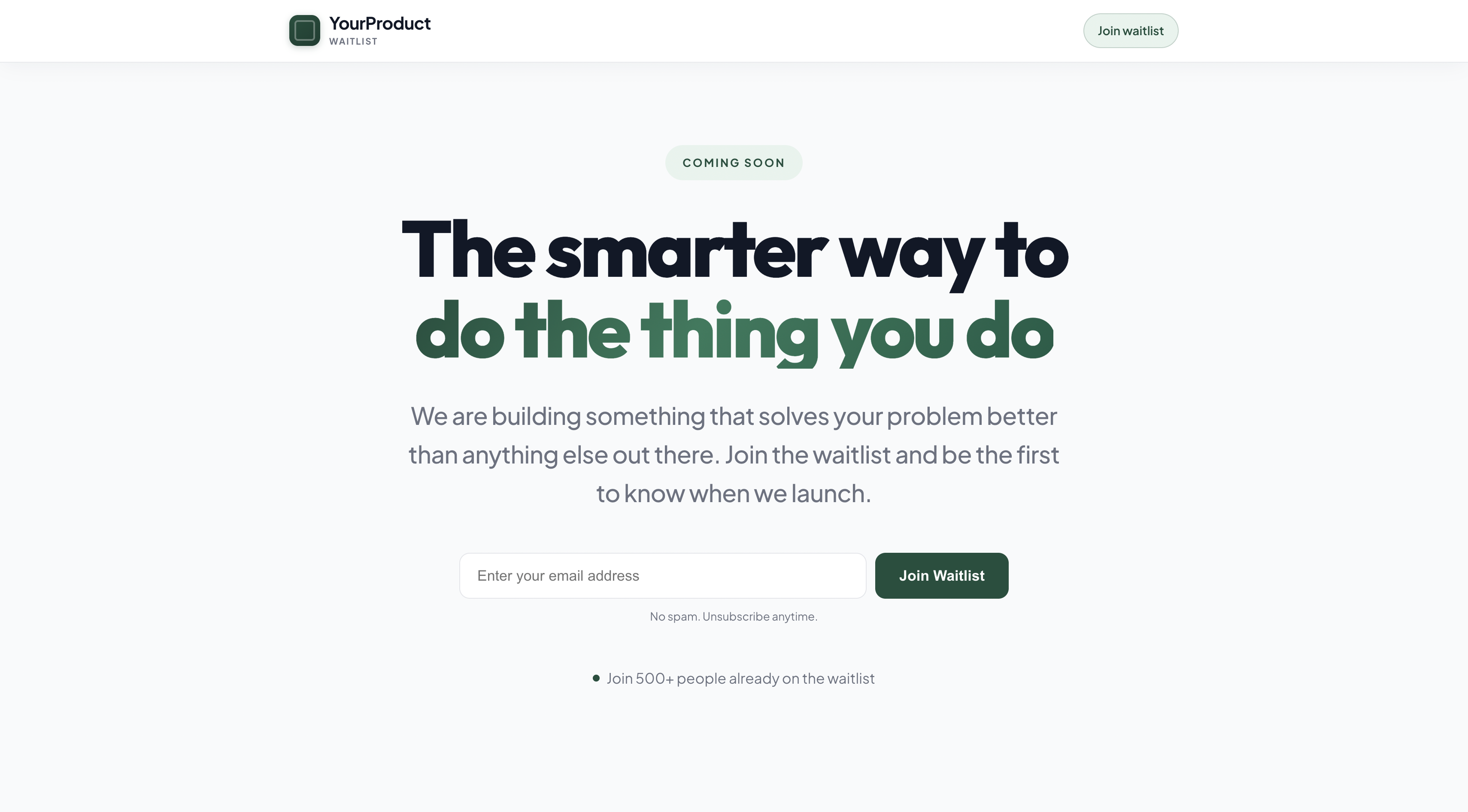
Why a Waitlist Page Matters Before You Launch
Most founders make the same mistake. They build for months, launch to the public, and discover nobody is waiting. The problem was not the product. It was the absence of a pre-launch audience.
A waitlist page does three things at once:
It validates demand. If people will not give you their email address, they will not give you their money either. A hundred signups before launch is proof that real humans care about what you are building.
It gives you a launch list. When you are ready to go live, you have a warm audience to email. That first wave of users does not come from cold outreach. It comes from people who already said yes.
It creates momentum. Showing "1,200 people on the waitlist" on your landing page is social proof that compounds. Every new visitor sees it and thinks, "maybe I should sign up too."
The good news: you do not need a fancy tool or a monthly subscription to build one. You need HTML, CSS, and a form backend.
What You Will Build
A clean, professional waitlist page with:
- A compelling hero section with your headline and value proposition
- A working email capture form
- A success message after submission
- Spam protection built in
- Email notification to your inbox on every signup
- A submission dashboard to track all your signups
Step 1: Create Your Formgrid Account
Head to https://formgrid.dev and sign up using Google or Email.
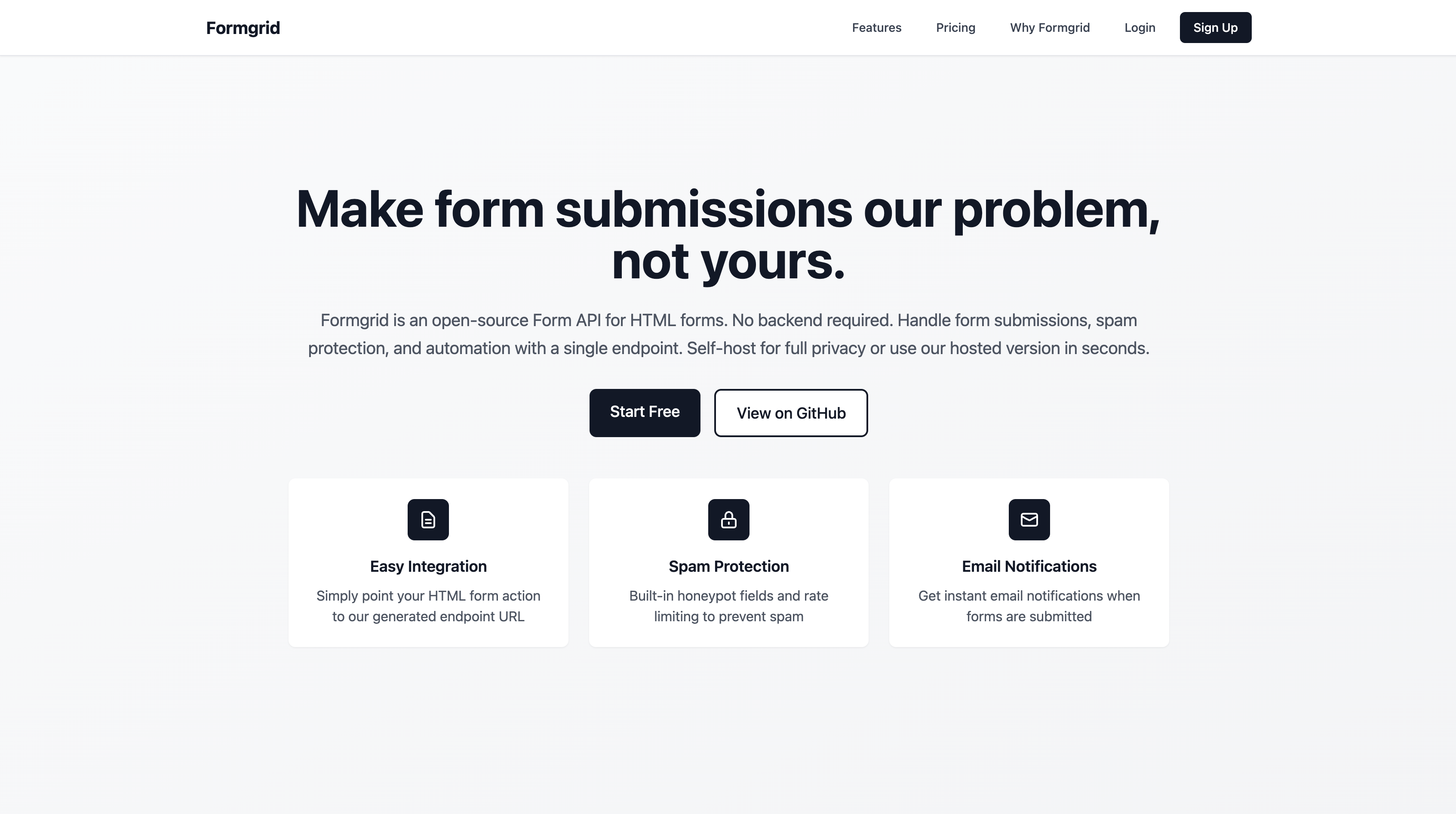
No credit card required. The free plan gives you 50 submissions per month, which is more than enough to validate your idea before you launch.
Step 2: Create a New Form
Once logged in, click New Form from your dashboard.
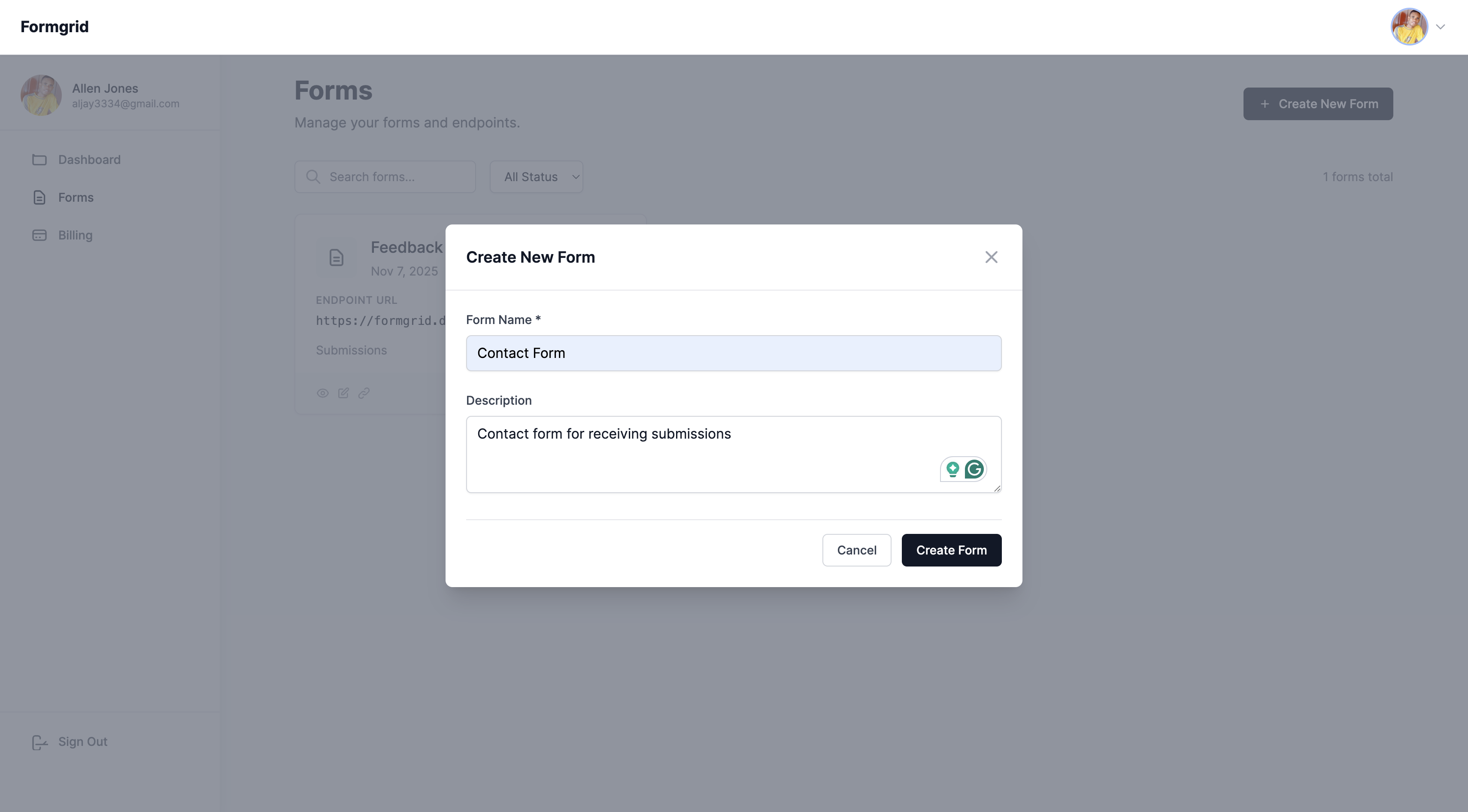
Name your form something descriptive, like:
- "Waitlist Signups"
- "Early Access"
- "Pre-Launch Leads"
Click Create Form.
Step 3: Copy Your Endpoint URL
Go to the Overview tab of your new form and copy your unique endpoint URL.
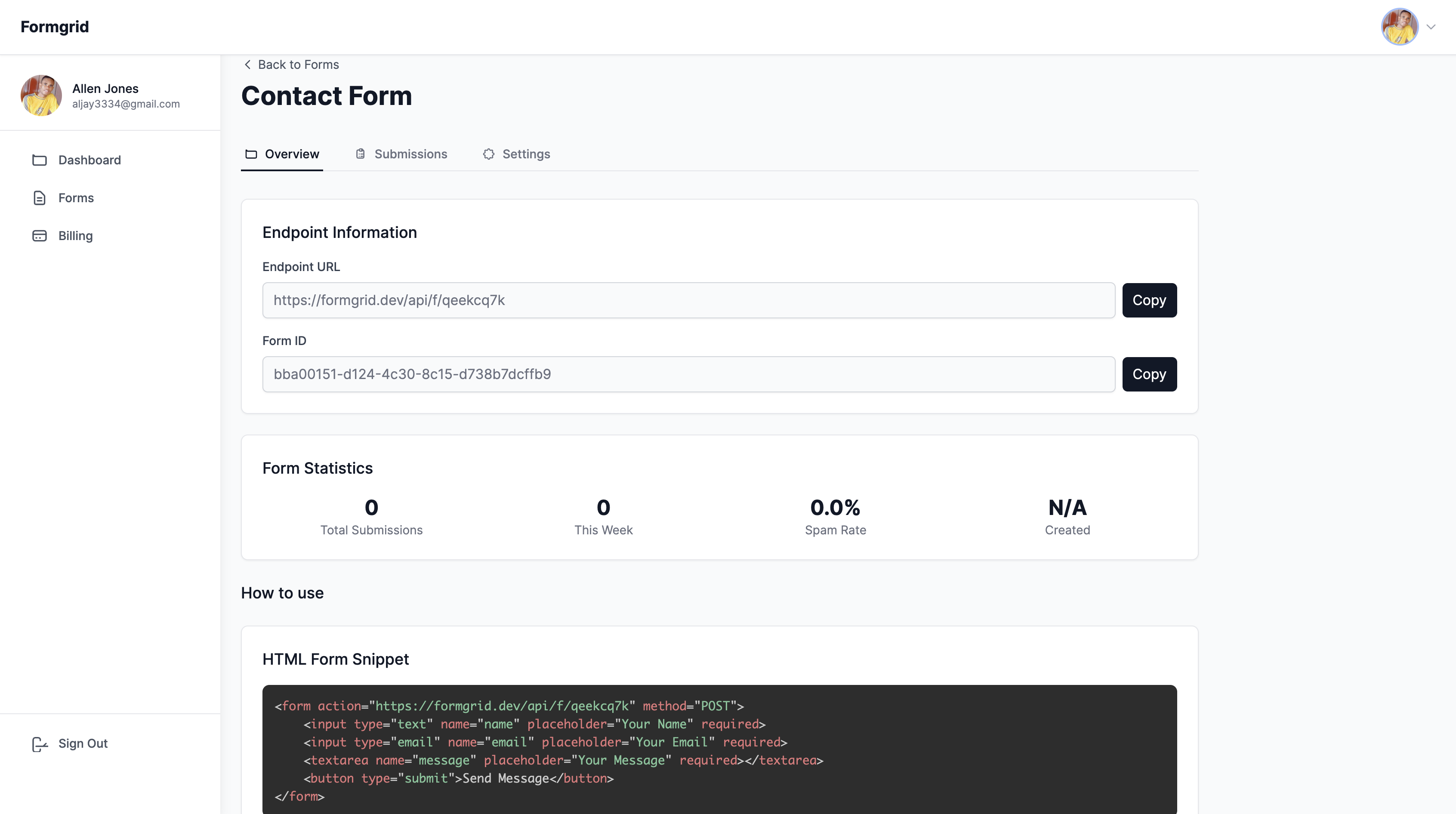
It looks like this: https://formgrid.dev/api/f/your-form-id
This is the URL your waitlist form will submit data to. Keep it handy for the next step.
Step 4: Build Your Waitlist Page
Create a new file called index.html and paste
this complete waitlist page. Replace
YOUR_FORMGRID_ENDPOINT_URL with the endpoint
you copied in Step 3, and update the headline,
description, and colours to match your product.
<!DOCTYPE html>
<html lang="en">
<head>
  <meta charset="UTF-8" />
  <meta name="viewport"
        content="width=device-width,
                 initial-scale=1.0" />
  <title>Join the Waitlist</title>
  <link rel="preconnect" href="https://fonts.googleapis.com" />
  <link rel="preconnect" href="https://fonts.gstatic.com" crossorigin />
  <link
    href="https://fonts.googleapis.com/css2?family=Outfit:wght@600;700;800&family=Plus+Jakarta+Sans:ital,wght@0,400;0,500;0,600;0,700;1,400&display=swap"
    rel="stylesheet"
  />
  <style>
    *, *::before, *::after {
      box-sizing: border-box;
      margin: 0;
      padding: 0;
    }

    :root {
      --brand: #1d4f3d;
      --brand-light: #e8f3ee;
      --text: #111827;
      --muted: #6b7280;
      --border: #e5e7eb;
      --bg: #f9fafb;
      --font-sans: "Plus Jakarta Sans", -apple-system, BlinkMacSystemFont,
        "Segoe UI", sans-serif;
      --font-display: "Outfit", "Plus Jakarta Sans", sans-serif;
    }

    body {
      font-family: var(--font-sans);
      background: var(--bg);
      color: var(--text);
      line-height: 1.6;
      min-height: 100vh;
      display: flex;
      flex-direction: column;
      -webkit-font-smoothing: antialiased;
      -moz-osx-font-smoothing: grayscale;
    }

    /* NAV */
    .site-nav {
      position: sticky;
      top: 0;
      z-index: 50;
      background: rgba(255, 255, 255, 0.92);
      backdrop-filter: blur(12px);
      -webkit-backdrop-filter: blur(12px);
      border-bottom: 1px solid rgba(229, 231, 235, 0.85);
      box-shadow: 0 1px 0 rgba(255, 255, 255, 0.8) inset,
        0 4px 24px -4px rgba(17, 24, 39, 0.06);
    }

    .site-nav-inner {
      max-width: min(1100px, 94vw);
      margin: 0 auto;
      padding: 1rem clamp(1.25rem, 4vw, 2rem);
      display: flex;
      align-items: center;
      justify-content: space-between;
      gap: 1rem;
    }

    .logo {
      font-family: var(--font-sans);
      display: inline-flex;
      align-items: center;
      gap: 0.65rem;
      font-size: 1.25rem;
      font-weight: 800;
      letter-spacing: -0.02em;
      color: var(--text);
      text-decoration: none;
      transition: opacity 0.2s ease;
    }

    .logo:hover {
      opacity: 0.85;
    }

    .logo-mark {
      width: 2.25rem;
      height: 2.25rem;
      border-radius: 10px;
      background: linear-gradient(
        145deg,
        var(--brand) 0%,
        #163d30 100%
      );
      box-shadow: 0 2px 8px rgba(29, 79, 61, 0.25);
      flex-shrink: 0;
      position: relative;
    }

    .logo-mark::after {
      content: "";
      position: absolute;
      inset: 6px;
      border-radius: 4px;
      border: 2px solid rgba(255, 255, 255, 0.35);
      opacity: 0.9;
    }

    .logo-text {
      display: flex;
      flex-direction: column;
      align-items: flex-start;
      gap: 0.1rem;
    }

    .logo-name {
      line-height: 1.15;
      color: var(--text);
    }

    .logo-kicker {
      font-size: 0.65rem;
      font-weight: 700;
      letter-spacing: 0.12em;
      text-transform: uppercase;
      color: var(--muted);
    }

    .nav-cta {
      font-size: 0.875rem;
      font-weight: 600;
      color: var(--brand);
      text-decoration: none;
      padding: 0.5rem 1rem;
      border-radius: 999px;
      border: 1px solid rgba(29, 79, 61, 0.2);
      background: var(--brand-light);
      transition: background 0.2s ease, border-color 0.2s ease;
      white-space: nowrap;
    }

    .nav-cta:hover {
      background: #dceee5;
      border-color: rgba(29, 79, 61, 0.35);
    }

    @media (max-width: 480px) {
      .logo-kicker {
        display: none;
      }

      .logo {
        font-size: 1.1rem;
      }

      .logo-mark {
        width: 2rem;
        height: 2rem;
      }

      .nav-cta {
        font-size: 0.8125rem;
        padding: 0.45rem 0.75rem;
      }
    }

    /* HERO — wide column, large type */
    .hero {
      flex: 1;
      display: flex;
      flex-direction: column;
      align-items: center;
      justify-content: center;
      text-align: center;
      padding: clamp(3rem, 8vw, 6rem) clamp(1.25rem, 4vw, 3rem);
      max-width: min(1100px, 94vw);
      margin: 0 auto;
      width: 100%;
    }

    .badge {
      display: inline-block;
      background: var(--brand-light);
      color: var(--brand);
      font-family: var(--font-sans);
      font-size: 0.8125rem;
      font-weight: 700;
      letter-spacing: 0.14em;
      text-transform: uppercase;
      padding: 10px 20px;
      border-radius: 999px;
      margin-bottom: clamp(1.25rem, 3.5vw, 2rem);
    }

    .hero h1 {
      font-family: var(--font-display);
      font-size: clamp(3.125rem, 9vw + 0.75rem, 5.75rem);
      font-weight: 800;
      letter-spacing: -0.035em;
      line-height: 1.02;
      color: var(--text);
      margin-bottom: clamp(1.25rem, 3vw, 2rem);
      width: 100%;
    }

    .hero h1 .hero-accent {
      display: inline-block;
      font-weight: 800;
      color: var(--brand);
    }

    @supports (-webkit-background-clip: text) or (background-clip: text) {
      .hero h1 .hero-accent {
        background: linear-gradient(
          120deg,
          var(--brand) 0%,
          #2d7a5c 45%,
          #1a5c46 100%
        );
        -webkit-background-clip: text;
        background-clip: text;
        color: transparent;
      }
    }

    .subtitle {
      font-family: var(--font-sans);
      font-size: clamp(1.35rem, 2.8vw, 1.75rem);
      font-weight: 500;
      line-height: 1.6;
      letter-spacing: -0.015em;
      color: var(--muted);
      max-width: min(48rem, 100%);
      margin: 0 auto clamp(2rem, 4vw, 3rem);
    }

    /* FORM */
    #waitlist-form {
      scroll-margin-top: 5.5rem;
    }

    .form-wrap {
      width: 100%;
      max-width: min(640px, 100%);
      margin: 0 auto;
    }

    .form-row {
      display: flex;
      gap: 10px;
    }

    .form-row input[type="email"] {
      flex: 1;
      padding: 16px 20px;
      font-size: 1.0625rem;
      border: 1px solid var(--border);
      border-radius: 12px;
      outline: none;
      background: #fff;
      transition: border-color 0.2s;
    }

    .form-row input[type="email"]:focus {
      border-color: var(--brand);
    }

    .form-row button {
      padding: 16px 28px;
      background: var(--brand);
      color: #fff;
      font-size: 1.0625rem;
      font-weight: 700;
      border: none;
      border-radius: 12px;
      cursor: pointer;
      white-space: nowrap;
      transition: opacity 0.2s;
    }

    .form-row button:hover {
      opacity: 0.9;
    }

    .form-row button:disabled {
      opacity: 0.6;
      cursor: not-allowed;
    }

    .form-hint {
      font-size: 0.82rem;
      color: var(--muted);
      margin-top: 10px;
      text-align: center;
    }

    /* SUCCESS STATE */
    .success {
      display: none;
      background: var(--brand-light);
      border: 1px solid #cde3d8;
      border-radius: 14px;
      padding: 20px 24px;
      text-align: center;
    }

    .success h3 {
      color: var(--brand);
      margin-bottom: 6px;
    }

    .success p {
      color: var(--muted);
      font-size: 0.95rem;
    }

    /* SOCIAL PROOF */
    .proof {
      margin-top: clamp(2rem, 5vw, 3rem);
      display: flex;
      align-items: center;
      justify-content: center;
      gap: 8px;
      font-size: clamp(0.95rem, 1.5vw, 1.05rem);
      color: var(--muted);
      max-width: min(52rem, 100%);
      margin-left: auto;
      margin-right: auto;
    }

    .proof-dot {
      width: 8px;
      height: 8px;
      background: var(--brand);
      border-radius: 50%;
    }

    /* FEATURES */
    .features {
      padding: 64px 24px;
      max-width: 960px;
      margin: 0 auto;
      width: 100%;
    }

    .features h2 {
      font-family: var(--font-display);
      text-align: center;
      font-size: clamp(1.5rem, 3vw, 1.85rem);
      font-weight: 800;
      letter-spacing: -0.03em;
      margin-bottom: 40px;
    }

    .features-grid {
      display: grid;
      grid-template-columns: repeat(
        auto-fit, minmax(240px, 1fr)
      );
      gap: 24px;
    }

    .feature-card {
      background: #fff;
      border: 1px solid var(--border);
      border-radius: 16px;
      padding: 24px;
    }

    .feature-icon {
      width: 40px;
      height: 40px;
      background: var(--brand-light);
      border-radius: 10px;
      display: flex;
      align-items: center;
      justify-content: center;
      margin-bottom: 16px;
    }

    .feature-icon svg {
      width: 20px;
      height: 20px;
      stroke: var(--brand);
      fill: none;
      stroke-width: 2;
      stroke-linecap: round;
      stroke-linejoin: round;
    }

    .feature-card h3 {
      font-size: 1rem;
      font-weight: 700;
      margin-bottom: 8px;
    }

    .feature-card p {
      font-size: 0.9rem;
      color: var(--muted);
    }

    /* FOOTER */
    footer {
      text-align: center;
      padding: 24px;
      font-size: 0.85rem;
      color: var(--muted);
      border-top: 1px solid var(--border);
    }

    @media (max-width: 560px) {
      .form-row {
        flex-direction: column;
      }
    }
  </style>
</head>
<body>

  <header class="site-nav" role="banner">
    <div class="site-nav-inner">
      <a href="#" class="logo" aria-label="YourProduct home">
        <span class="logo-mark" aria-hidden="true"></span>
        <span class="logo-text">
          <span class="logo-name">YourProduct</span>
          <span class="logo-kicker">Waitlist</span>
        </span>
      </a>
      <a href="#waitlist-form" class="nav-cta">Join waitlist</a>
    </div>
  </header>

  <section class="hero">

    <span class="badge">Coming Soon</span>

    <h1>
      The smarter way to<br />
      <span class="hero-accent">do the thing you do</span>
    </h1>

    <p class="subtitle">
      We are building something that solves
      your problem better than anything else
      out there. Join the waitlist and be
      the first to know when we launch.
    </p>

    <div class="form-wrap">

      <form id="waitlist-form">

        <input
          type="hidden"
          name="_subject"
          value="New Waitlist Signup"
        />

        <!-- Honeypot spam protection -->
        <input
          type="text"
          name="_honey"
          style="display:none"
          tabindex="-1"
          autocomplete="off"
        />

        <div class="form-row">
          <input
            type="email"
            name="email"
            placeholder="Enter your email address"
            required
          />
          <button type="submit" id="submit-btn">
            Join Waitlist
          </button>
        </div>

        <p class="form-hint">
          No spam. Unsubscribe anytime.
        </p>

      </form>

      <div class="success" id="success-msg">
        <h3>You are on the list!</h3>
        <p>
          We will email you the moment we launch.
          Thank you for your interest.
        </p>
      </div>

    </div>

    <div class="proof">
      <span class="proof-dot"></span>
      <span>Join 500+ people already on the waitlist</span>
    </div>

  </section>

  <section class="features">
    <h2>Why people are excited</h2>
    <div class="features-grid">

      <div class="feature-card">
        <div class="feature-icon">
          <svg viewBox="0 0 24 24">
            <polyline points="20 6 9 17 4 12"></polyline>
          </svg>
        </div>
        <h3>Benefit One</h3>
        <p>
          Describe the first key benefit of your
          product in one or two sentences.
          Be specific and outcome focused.
        </p>
      </div>

      <div class="feature-card">
        <div class="feature-icon">
          <svg viewBox="0 0 24 24">
            <circle cx="12" cy="12" r="10"></circle>
            <polyline points="12 6 12 12 16 14">
            </polyline>
          </svg>
        </div>
        <h3>Benefit Two</h3>
        <p>
          Describe the second key benefit.
          What problem does this solve?
          How does it save time or money?
        </p>
      </div>

      <div class="feature-card">
        <div class="feature-icon">
          <svg viewBox="0 0 24 24">
            <path d="M12 22s8-4 8-10V5l-8-3-8 3v7c0 6 8 10 8 10z">
            </path>
          </svg>
        </div>
        <h3>Benefit Three</h3>
        <p>
          Describe the third benefit.
          What makes your approach different
          from everything else out there?
        </p>
      </div>

    </div>
  </section>

  <footer>
    Built with HTML and
    <a href="https://formgrid.dev"
       style="color: var(--brand);">
      Formgrid
    </a>
  </footer>

  <script>
    const form = document.getElementById(
      'waitlist-form'
    );
    const btn = document.getElementById(
      'submit-btn'
    );
    const successMsg = document.getElementById(
      'success-msg'
    );

    form.addEventListener('submit', async (e) => {
      e.preventDefault();

      btn.disabled = true;
      btn.textContent = 'Joining...';

      const data = new FormData(form);

      try {
        const res = await fetch(
          'YOUR_FORMGRID_ENDPOINT_URL',
          { method: 'POST', body: data }
        );

        if (res.ok) {
          form.style.display = 'none';
          successMsg.style.display = 'block';
        } else {
          btn.disabled = false;
          btn.textContent = 'Join Waitlist';
          alert(
            'Something went wrong. Please try again.'
          );
        }
      } catch (err) {
        btn.disabled = false;
        btn.textContent = 'Join Waitlist';
        alert(
          'Network error. Please check your connection.'
        );
      }
    });
  </script>

</body>
</html>
Replace these three things before you deploy:
YourProduct with your actual product name
The headline and subtitle with your real value proposition
YOUR_FORMGRID_ENDPOINT_URL with the endpoint URL from Step 3
Step 5: Email Notifications Are Already Set Up
Good news: you do not need to configure anything. Formgrid automatically sends every new signup to the email address you used to create your account.
The moment someone joins your waitlist, you will receive an email like this:
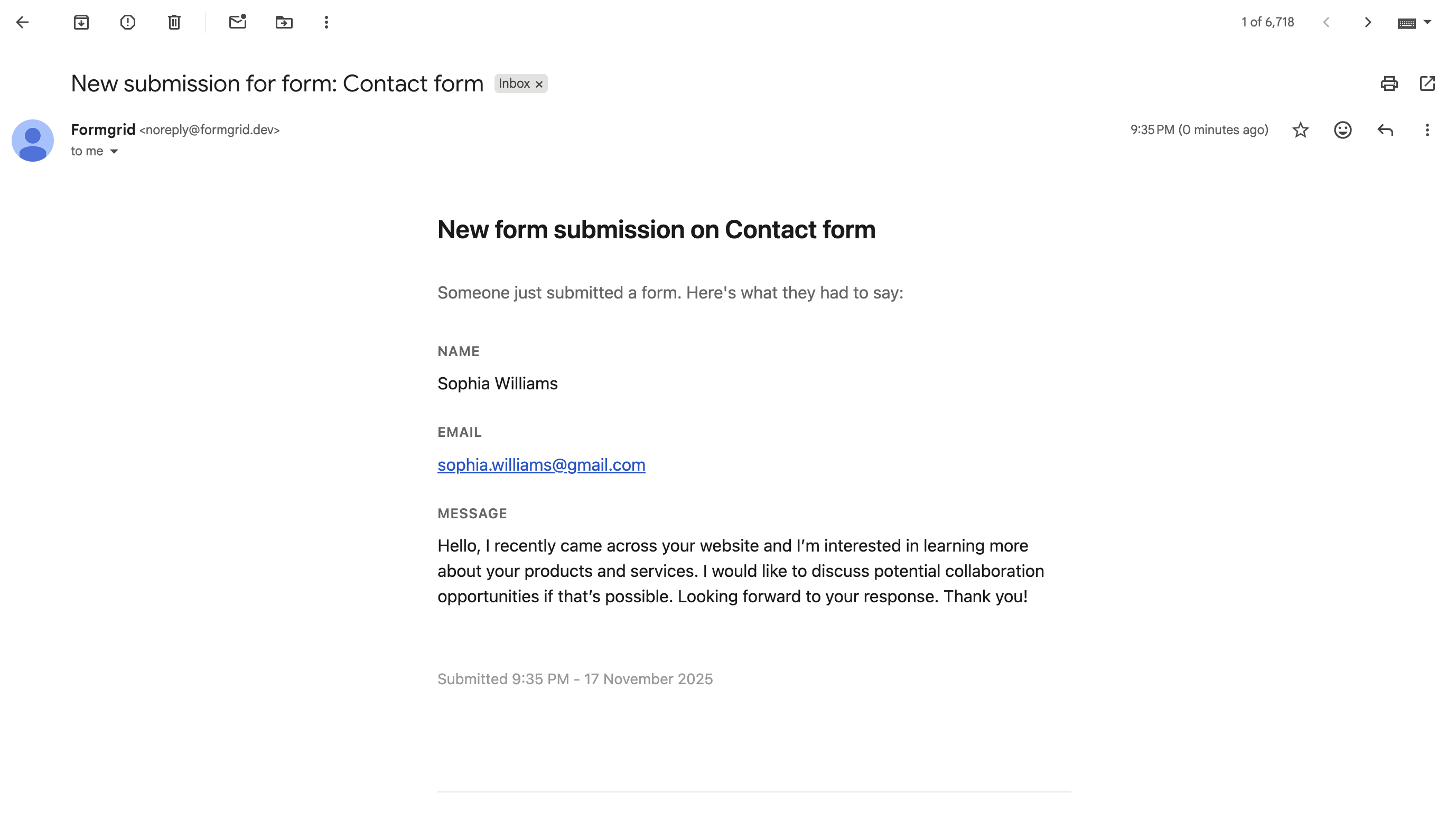
If you want signups sent to a different address, go to your form's Settings tab, find Email Notifications, and update it there.
Step 6: Deploy Your Waitlist Page for Free
You have several free options for hosting your waitlist page. All of them serve static HTML with no setup required.
GitHub Pages: Push your index.html to a
GitHub repo and enable Pages in the repository
settings. Your page goes live at
username.github.io/repo-name.
Netlify: Drag and drop your index.html file
onto netlify.com/drop
and it goes live instantly at a random Netlify URL.
Connect a custom domain in settings.
Cloudflare Pages: Connect your GitHub repo and Cloudflare deploys on every push. Fast, free, and global CDN included.
All three options are completely free for a static HTML page. Pick whichever you are most comfortable with.
Step 7: View and Manage Your Signups
Every signup is stored automatically in your Formgrid dashboard. Go to the Submissions tab to see everyone who has joined your waitlist.
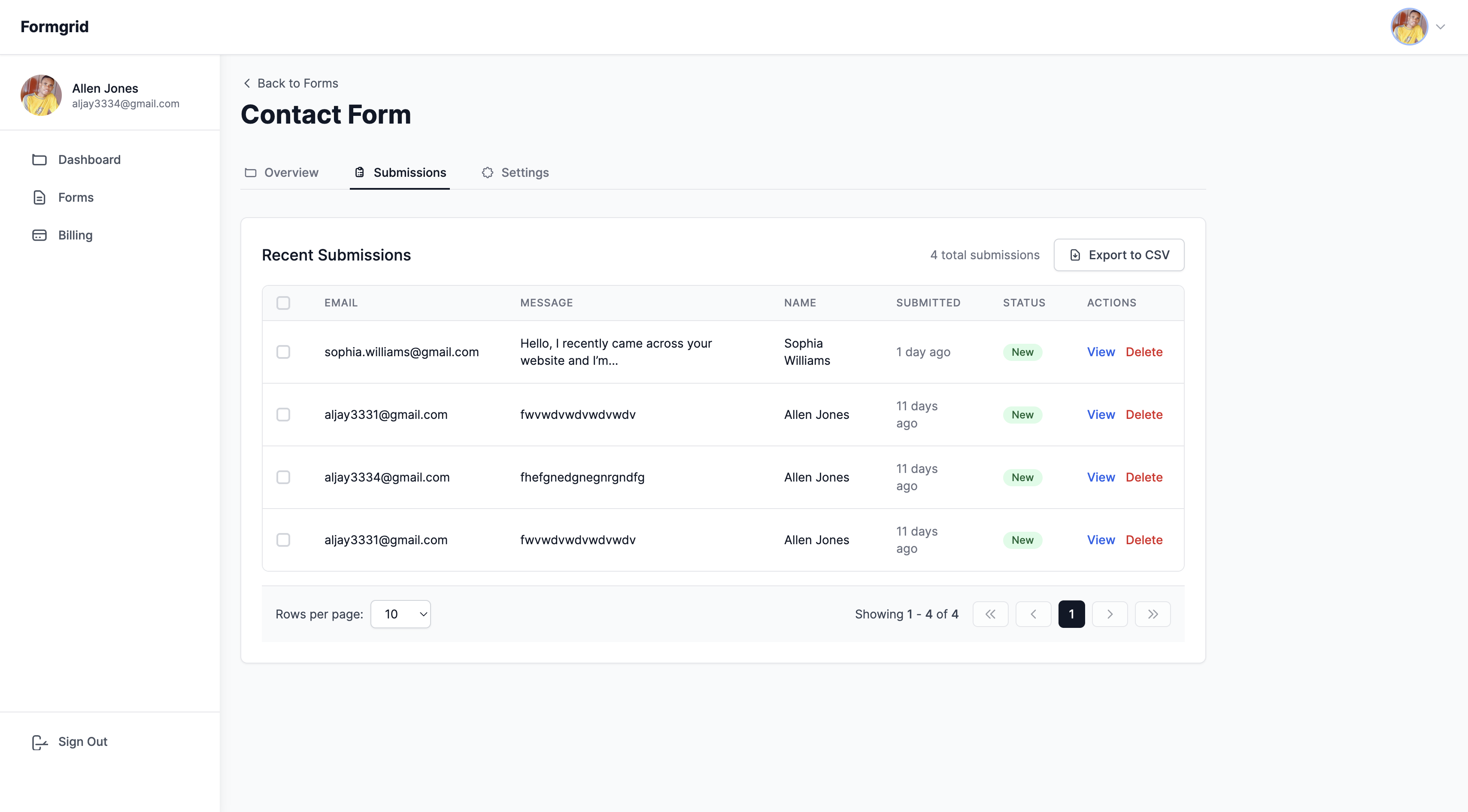
You can search, filter, and export all your signups as a CSV file at any time. When you are ready to launch, export the list, and import it into your email tool of choice to send your launch announcement.
What Makes a Waitlist Page Convert
Based on the research behind this guide, here are the elements that separate high-converting waitlist pages from ones that collect zero signups:
A specific headline. "The future of productivity." converts nobody. "The form backend for developers who hate maintaining servers" converts the right people. Be specific about who it is for and what it does.
One clear action. Your only CTA should be the email field. No navigation links, no secondary buttons, no distractions. One page. One goal.
Social proof near the form. "Join 500 people already on the waitlist" creates FOMO and builds trust. Even if you are starting from zero, update this number as you grow.
A reason to sign up now. "Early access" or "be first to know" gives people a reason to act today instead of coming back later and forgetting.
Keep the form short. Email only for first contact. You can ask for more information in a follow-up survey after signing up. Every extra field reduces conversion.
Customising the Page for Your Brand
The template above uses a green brand colour
defined as --brand: #1d4f3d in the CSS variables
at the top. To match your own brand, just change
that one value:
:root {
  --brand: #your-colour-here;
  --brand-light: #lighter-version-here;
}
Everything else on the page inherits those two values automatically. No need to hunt through the CSS changing colours one by one.
Final Thoughts
A waitlist page is not a nice-to-have. It is the difference between launching to silence and launching to a warm, engaged audience.
The page in this guide takes less than 30 minutes to set up. It costs nothing to host. And every signup goes straight to your inbox and your dashboard the moment it happens.
Stop waiting to start collecting. Build your waitlist today.
With Formgrid.dev you get:
✅ Working form with email capture in minutes
✅ Instant email notification on every signup
✅ Spam protection built in
✅ Submission dashboard to track all signups
✅ CSV export when you are ready to launch
✅ Free to start, no credit card required

Comments
Leave a comment