
You checked your analytics this week. People are visiting your website. Maybe 50 visits per day. Maybe more.
But your phone is not ringing. Your inbox is empty. Nobody is filling in your contact form.
This is one of the most common frustrations I hear from small business owners. And the answer is rarely what they expect.
Most business websites do not fail because they look bad. They fail because they do not help the visitor decide.
Here is what that actually means.
1. The Visitor Does Not Understand What You Do Fast Enough
Most business websites open with something like:
"We provide innovative solutions."
"Welcome to our company."
"Quality services you can trust."
The problem is that nobody visiting your website is trying to understand your brand. They are trying to solve a problem. They typed something into Google, clicked your link, and landed on your page. They have about 5 seconds to figure out whether you can help them.
If they cannot answer three questions in those 5 seconds, they leave:
What do you do?
Who is it for?
Why should I choose you?
Business owners in communities like Reddit's r/smallbusiness and r/Entrepreneur describe this constantly. Someone clicks a local business website and still cannot tell whether that business offers what they need. So they hit the back button and click the next result.
Your competitor gets the call. Not because they are better. Because their website was clearer.
2. The Website Does Not Answer the Visitor's Real Question
When someone lands on your website, they are not thinking about your company history or your mission statement.
They are thinking:
Can you solve my problem?
How much will this cost?
Can I trust you?
What do I do next?
Most business websites never directly answer any of those questions. The visitor is left guessing. And guessing leads to leaving.
A roofing company website that leads with a paragraph about being family-owned since 1987 is not answering the question a homeowner arrived with: "Can you fix my roof before it rains again, and how much will it cost?"
Answer the real question on your homepage. Everything else is secondary.
3. There Is No Clear Next Step
This is one of the most damaging problems on small business websites and one of the easiest to fix.
A surprising number of business websites do not clearly guide people toward taking action. You will see:
Multiple buttons that all say different things
A contact form buried at the bottom of the page
No clear booking or enquiry flow
Phone number in small text in the footer
So what happens? The visitor is interested. They like what they see. But they are not sure what to do next. So they do nothing.
They close the tab and forget about you.
The fix is simple: one clear call to action above the fold. Not five options. One.
"Get a free quote"
"Book a call"
"Send us your project details"
Pick one. Make it obvious. Put it where they can see it without scrolling.
4. The Website Feels Untrustworthy Even If Your Business Is Legitimate
Online, trust is fragile. Visitors make subconscious decisions about whether to trust you within seconds of landing on your page. They are looking for signals:
Real photos of your work
Customer reviews and testimonials
Names and faces behind the business
Past projects and case studies
Clear contact details including a phone number
When those signals are missing, something in the visitor's brain says: "I am not sure about this." And when people are unsure, they do not act.
Many business owners say their site looks fine. That is often the problem. Fine is not enough to convert. Fine means the visitor has no strong reason to trust you over the next result in Google.
5. The Website Is Built Like a Brochure, Not a Salesperson
This is the biggest issue of all.
Most small business websites are static, descriptive, and informational. They exist to tell you about the business. That is a brochure.
A good website behaves like a salesperson. It guides the visitor. It removes doubt. It answers objections before they are raised. It leads the visitor toward one specific decision.
Brochure: "Here is what we do."
Salesperson: "Here is your problem,
here is how we solve it,
here is what happens next,
here is why you should act today."
Most small business websites never make that shift. They describe. They do not sell.
6. Even When Someone Contacts You, the Lead Gets Lost
Here is the problem that nobody talks about.
Say you fix everything above. Your website is clear, trustworthy, and has a strong call to action. Someone fills in your contact form.
What happens next?
For most small businesses:
An email arrives in your inbox
It sits there among 50 other emails
You get busy
You reply two days later
By then, the homeowner already hired
the competitor who called back
within an hour
This is the lead follow-up problem. And it kills more business than a bad website ever could.
A study of service businesses found that leads contacted within 5 minutes of enquiring are 9 times more likely to convert than leads contacted after 30 minutes. Most small businesses are calling back the next day.
Your website generated the lead. Your follow-up system lost it.
The Real Reason Your Website Is Not Getting Customers
Most websites fail at one or more of these:
Not clear enough about what you do
Not convincing enough to build trust
Not guiding enough toward a next step
Not capturing leads properly
Not following up on leads fast enough
The result is always the same: people visit, but nobody contacts you. Or people contact you, and nothing comes of it.
How to Fix It
The structural problems, clarity, trust signals, and call to action require work on your website itself. But the lead capture and follow-up problem has a fast fix.
Formgrid adds a complete lead system to any website in under 30 minutes.
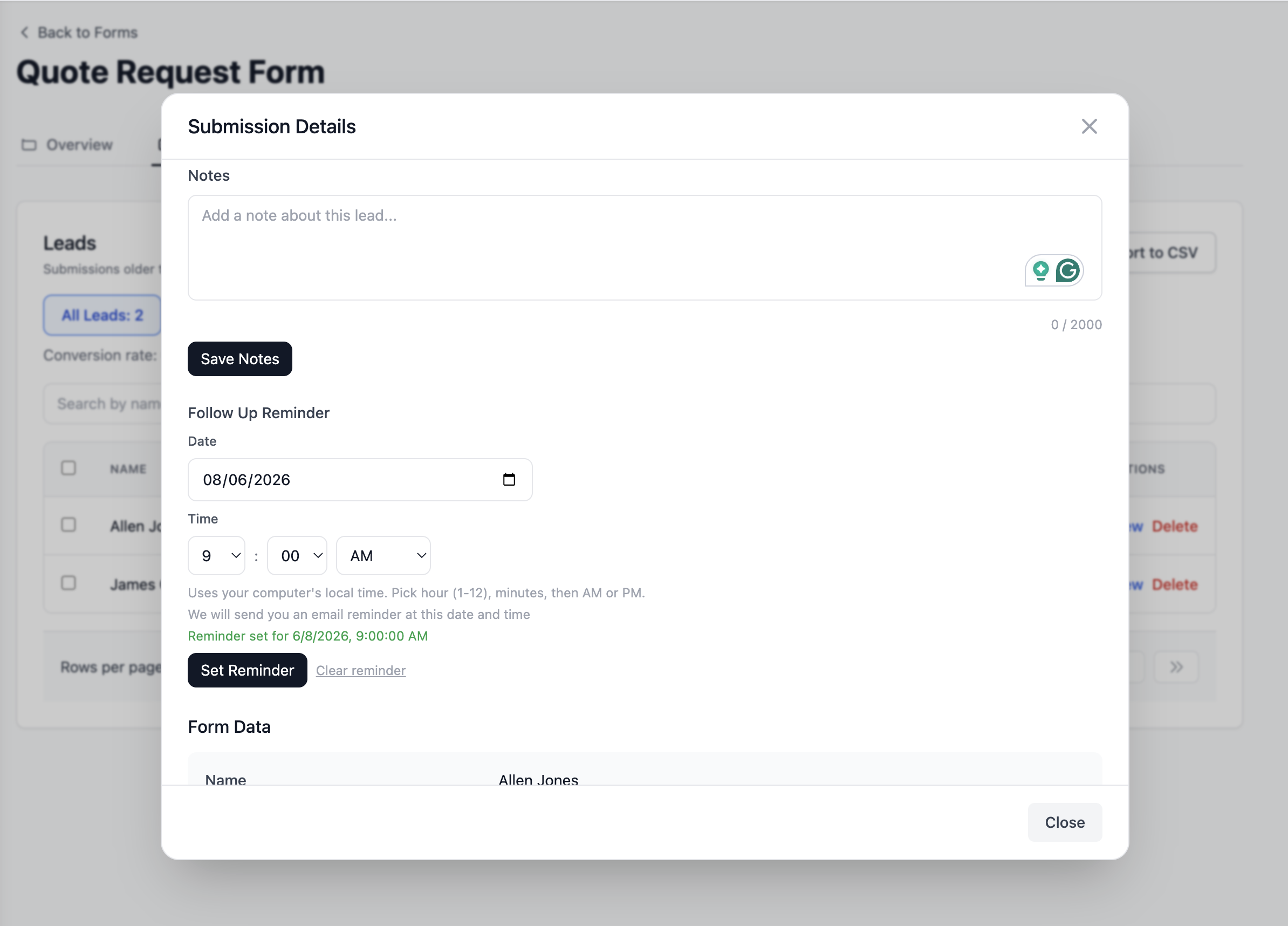
Every enquiry that comes through your contact form becomes a tracked lead automatically. Not just an email in your inbox. A lead with a status, a notes field, a follow-up reminder, and conversion tracking built in.
Here is what that looks like in practice:
A homeowner submits your quote request form
You get an instant email notification
with all their details

The enquiry appears in your
Formgrid dashboard as a New lead

A new row appears in your Google Sheet
Your office team sees it immediately

You call them back within the hour
You mark the lead as Contacted
You set a follow-up reminder
for 3 days later if they need time

3 days later, Formgrid emails you
a reminder with their details and your notes
You follow up
You close the job
That system is the difference between a website that generates enquiries and a website that generates revenue.


Two Ways to Get This Set Up
Set it up yourself in 30 minutes
Sign up free at formgrid.dev. Connect your existing contact form to a Formgrid endpoint by changing one line of HTML. Configure your Google Sheets sync from the Integrations tab. The free plan includes 25 submissions per month. Premium is $12 per month for 1,000 submissions.
👉 Try Formgrid free No credit card required.
Get it done for you in 3 to 5 days
If you would rather have everything configured for you including your quote request form, Google Sheets sync, UTM tracking, and lead pipeline, the done-for-you setup starts at $500.
The Summary
Your website is probably not getting customers for one of these reasons:
Visitors do not understand what you do
fast enough when they land on your page

The website does not answer their
real questions about price and trust

There is no clear next step
pushing them toward contact

The site feels untrustworthy
because trust signals are missing

The website describes your business
instead of guiding the visitor
toward a decision

Leads that do come in get lost
because there is no system
to capture and follow up on them
Fix the last one first. It is the fastest win and the one most business owners overlook entirely.
Have questions about setting up lead capture for your specific business? Email allen@formgrid.dev and I will help you get it working.

Comments
Leave a comment