
You have enquiries coming in.
People are contacting you about your services. Potential customers are filling in your form. Interested buyers are reaching out.
But somewhere between the first message and the closed deal, something is falling through the cracks.
Maybe you are managing leads in your inbox and losing track of who you replied to. Maybe you have a spreadsheet you update inconsistently. Maybe you bought a CRM subscription, spent two days setting it up, and stopped using it after a week because it was too complicated.
You do not need a CRM. You need something simpler. Something that fits the way a small business actually works.
This guide shows you how to manage leads without a CRM using a lightweight system that takes about 10 minutes to set up.
Why Most Small Businesses Do Not
Need a CRM
HubSpot, Salesforce, and Pipedrive are built for sales teams. They assume you have a dedicated sales person, a pipeline with six stages, lead scoring, deal tracking, activity logging, and someone whose full-time job is keeping the system updated.
Most small businesses have none of that. You have a contact form, an inbox, and a growing pile of enquiries you are trying to keep on top of while also running the actual business.
A full CRM does not help with that. It adds complexity you do not need on top of a problem you are already struggling with.
The real question is not which CRM to use. It is what is the minimum system that actually keeps leads from falling through the cracks.
The answer is three things: A pipeline with simple stages. A way to add notes to each lead. A follow-up reminder system.
That is it. If you have those three things, you can manage leads effectively without a CRM.
The Three Things That Actually Matter
1. A Simple Pipeline
Most leads move through three stages: New → Contacted → Converted
New means the lead has come in, and you have not reached out yet.
Contacted means you have been in touch and the conversation is ongoing.
Converted means they became a customer.
That is the entire pipeline. You do not need a stage for Qualified, Proposal Sent, Negotiation, Contract Review, and Closed Won. You need to know whether you have talked to this person yet and whether they became a customer.
At a glance, you can see: New: 8 people waiting for a response Contacted: 5 people in conversation Converted: 2 people who became customers
You know immediately where your attention needs to go. You know your conversion rate without counting anything manually. 2 of 15 leads converted (13%)
2. Notes on Every Lead
After every conversation, you need to write something down. Not in a separate notebook. Not in a Google Doc. Right there on the lead.Called Monday. Interested, but said the budget is tight until next quarter. Wants to revisit in July. Seemed genuinely keen. Worth following up.
That note is worth more than any CRM feature. When you follow up in July, you know exactly where the conversation left off. You sound prepared. You sound like someone worth doing business with.
Without the note, you are starting from scratch every time. You ask the same questions again. You sound like you do not remember them. You lose the deal to someone who does.
3. Follow-Up Reminders
Most leads do not convert on the first contact. They need a second email. A second call. A gentle nudge at the right moment.
The problem is that "follow up next month" is not a system. It is a hope.
A follow-up reminder turns that hope into a certainty. You set a date on the lead, and on that date, you receive an email with everything you need to make the follow-up count. Follow-up reminder: James Garside from Contact Form Lead: James Garside Email: james@gmail.com Current status: Contacted Notes: Called Monday. Interested but budget tight until next quarter. Revisit in July. View this lead: [link]
You open that email. You have the context. You send the follow-up. You close the deal.
How to Build This System in 10 Minutes
Formgrid is a form builder and form backend that has all three of those things built directly into every form. A lead pipeline. Notes on every lead. Follow up reminders with email alerts.
You do not need a separate CRM. You do not need a Zapier integration to connect your form tool to your lead tracker. Everything is in one place.
Here is how to set it up.
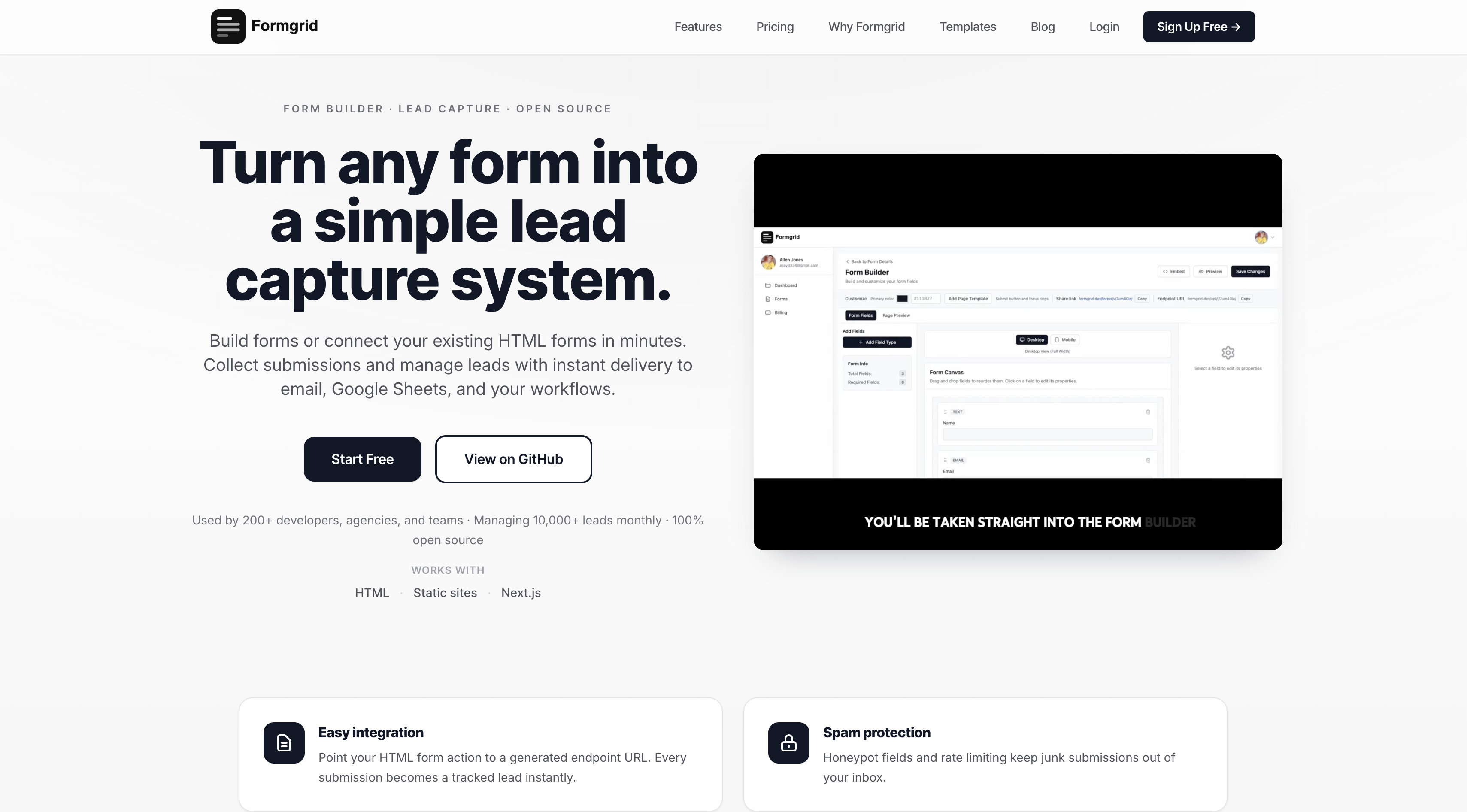
Step 1: Sign Up and Create Your Form
Go to formgrid.dev and sign up with Google or your email address. No credit card required.
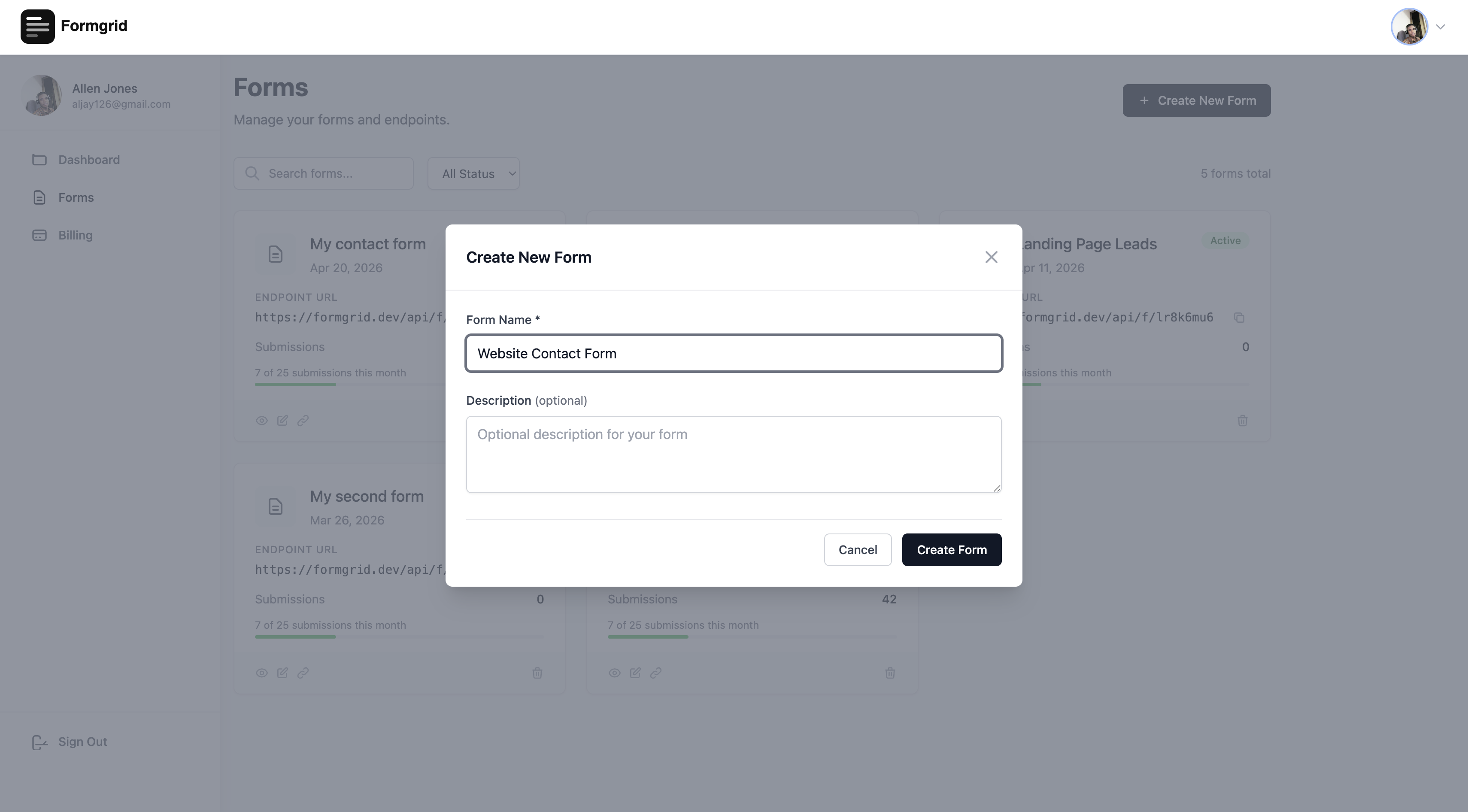
Once you are logged in, click New Form and give it a name that matches your use case: Website Contact Form Photography Booking Enquiries Cleaning Service Quote Requests Contractor Estimate Requests
Step 2: Connect Your Form
You have two options, depending on whether you already have a form on your website.
Option A: Use your existing HTML form
If you already have a contact form on your website, just replace the form action with your Formgrid endpoint URL. One change. Everything else stays exactly as it is.
<form
  action="https://formgrid.dev/api/f/your-form-id"
  method="POST"
>
  <input
    type="text"
    name="name"
    placeholder="Your Name"
    required
  />
  <input
    type="email"
    name="email"
    placeholder="Your Email"
    required
  />
  <textarea
    name="message"
    placeholder="Your Message"
  ></textarea>

  <input
    type="text"
    name="_honey"
    style="display:none"
  />

  <button type="submit">Send Message</button>
</form>
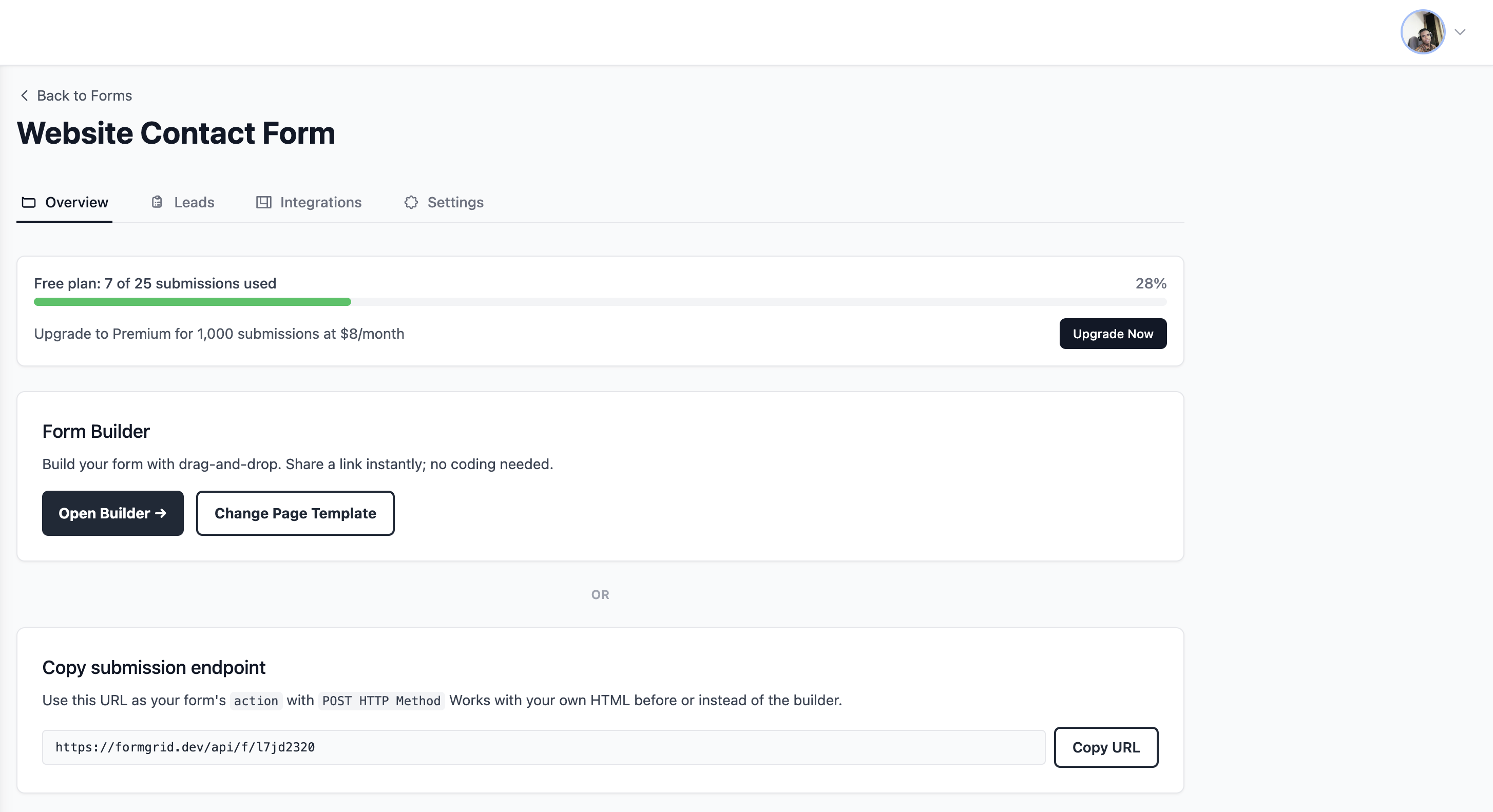
Copy your endpoint URL from the form details page in your Formgrid dashboard and paste it into the action attribute.
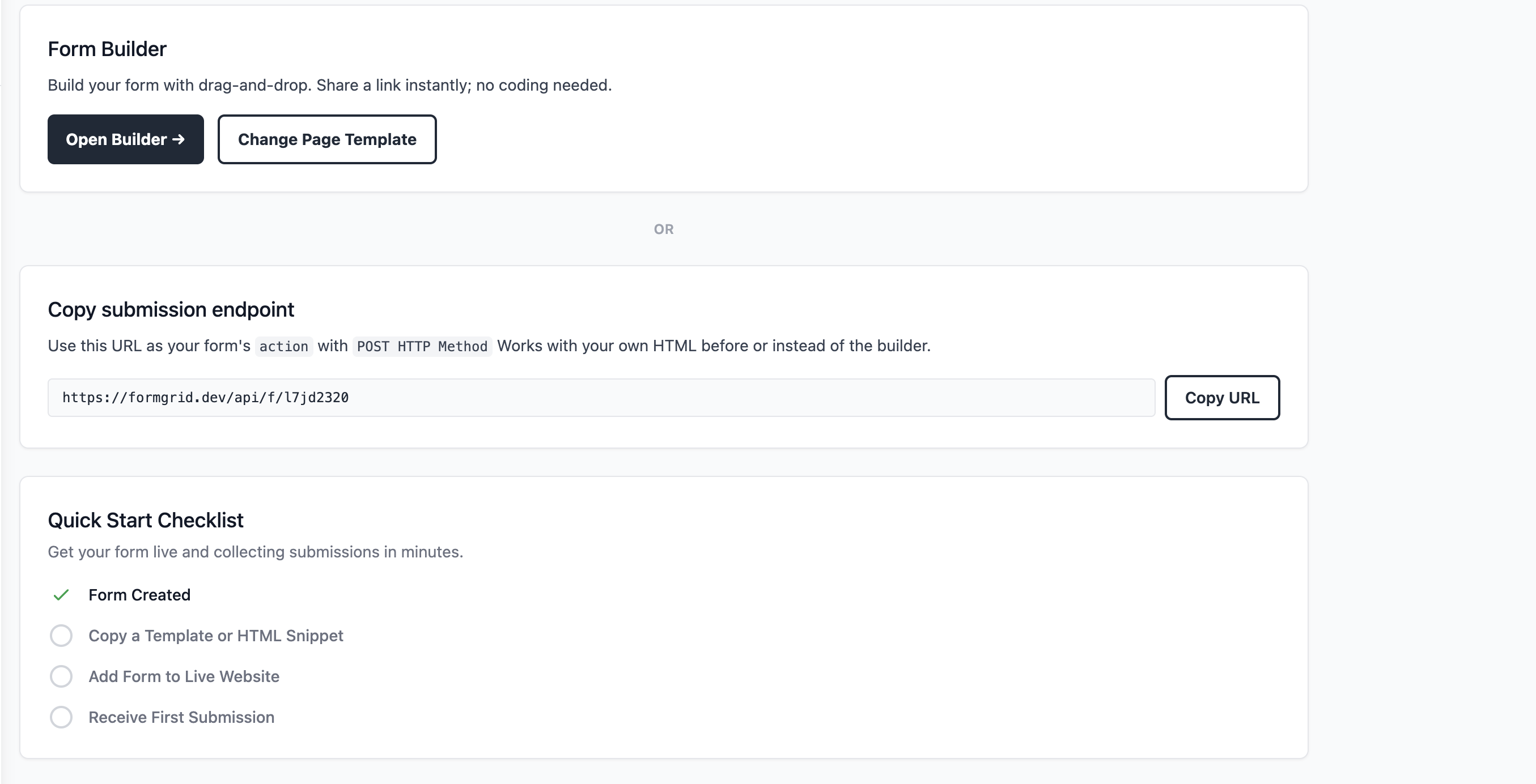
Option B: Use the drag and drop builder
If you do not have a website or you want a standalone shareable form link, click Open Builder on your form details page.
Build your form with drag and drop fields. When you are done, click Save and copy your shareable link. Send it via WhatsApp, email, or embed it on any page.
Step 3: Watch Enquiries Become
Tracked Leads
The moment someone fills in your form, two things happen.
You receive an instant email notification: New Lead: Website Contact Form Name: James Grside Email: james@email.com Phone: (555) 234-5678 Message: Hi, I am interested in your cleaning service for a commercial property in the city center. Can you send me a quote? Submitted: 2 minutes ago
No more digging through your inbox to find out who contacted you and when. Every lead arrives formatted and ready to act on.
The submission appears in your Leads tab:
Go to your form in the Formgrid dashboard and click the Leads tab. Every submission appears there as a tracked lead with its current status, the time it came in, and the submitter's details.
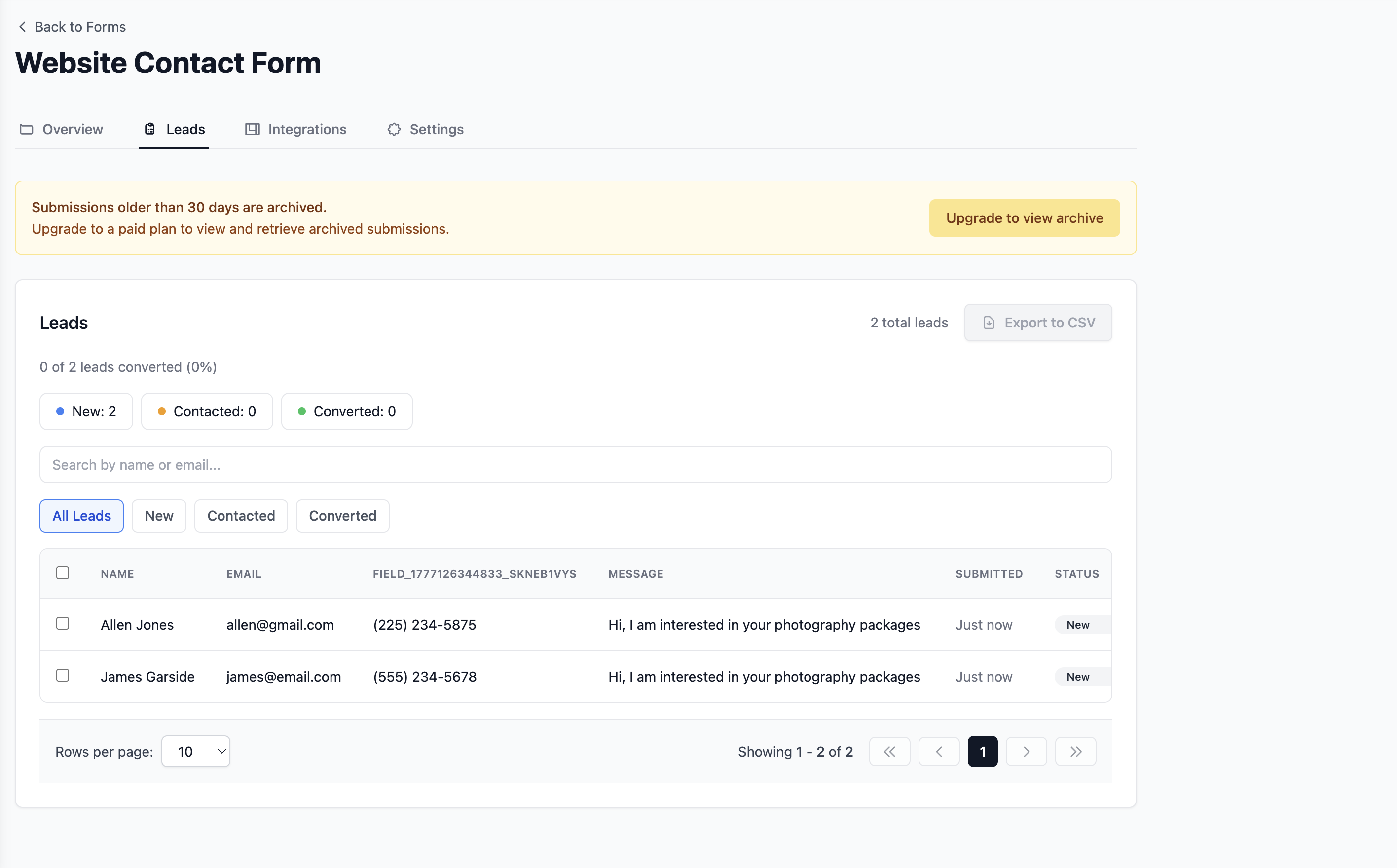
At the top of the leads tab, you will see your pipeline summary: New: 8 Contacted: 5 Converted: 2
And your conversion rate: 2 of 15 leads converted (13%)
That is your entire lead pipeline at a glance without a single spreadsheet or CRM.
Step 4: Move Leads Through the Pipeline
When you reply to a lead, open it in your dashboard and change its status from New to Contacted.
When they become a customer, change it to Converted.
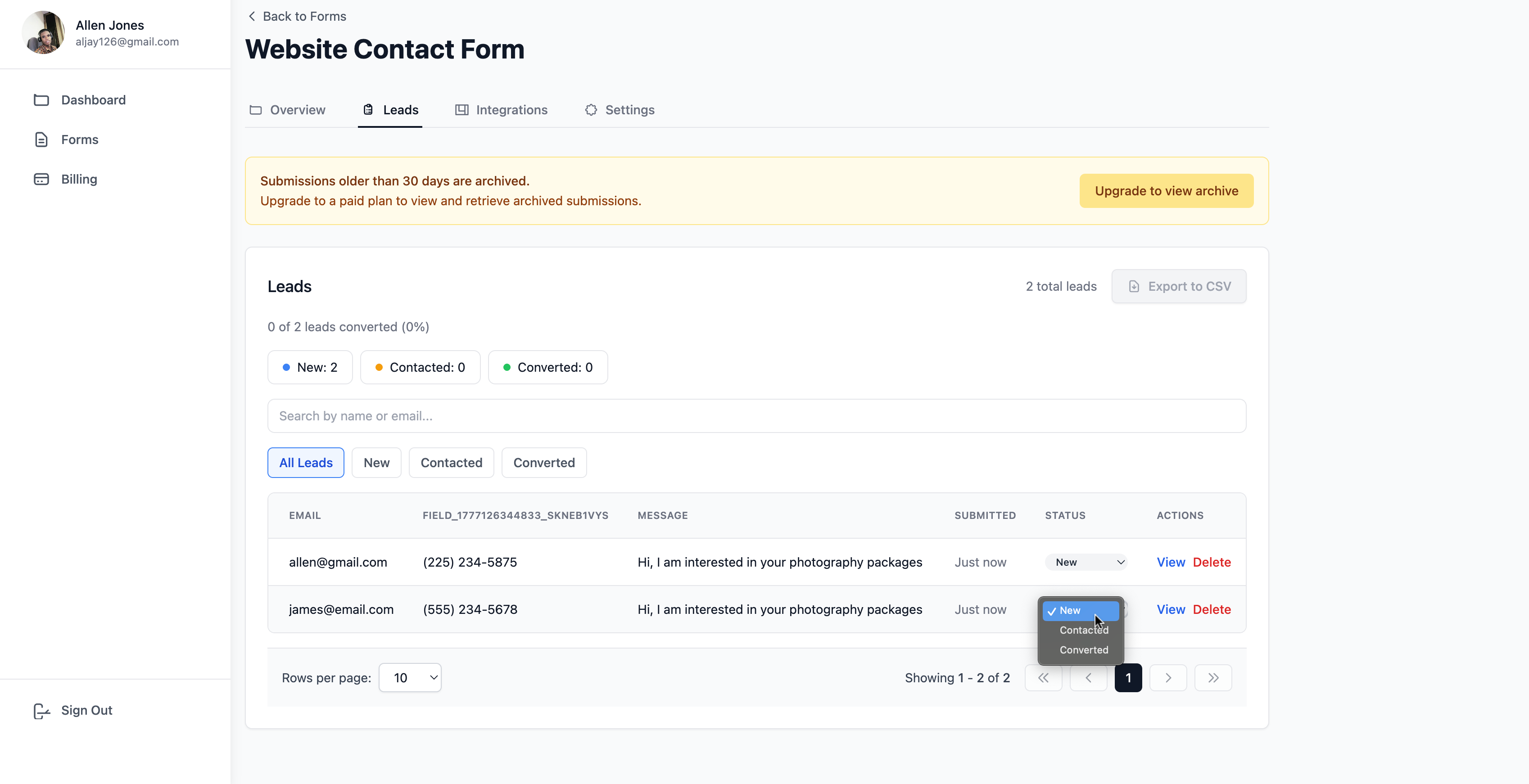
You can also update multiple leads at once using bulk actions. Select the leads you replied to this morning and mark them all as Contacted in one click.
The pipeline updates instantly. Your conversion rate updates automatically. You always know where things stand.
Step 5: Add Notes After Every
Conversation
When you have a call or exchange emails with a lead, open their record in the dashboard and add a note.
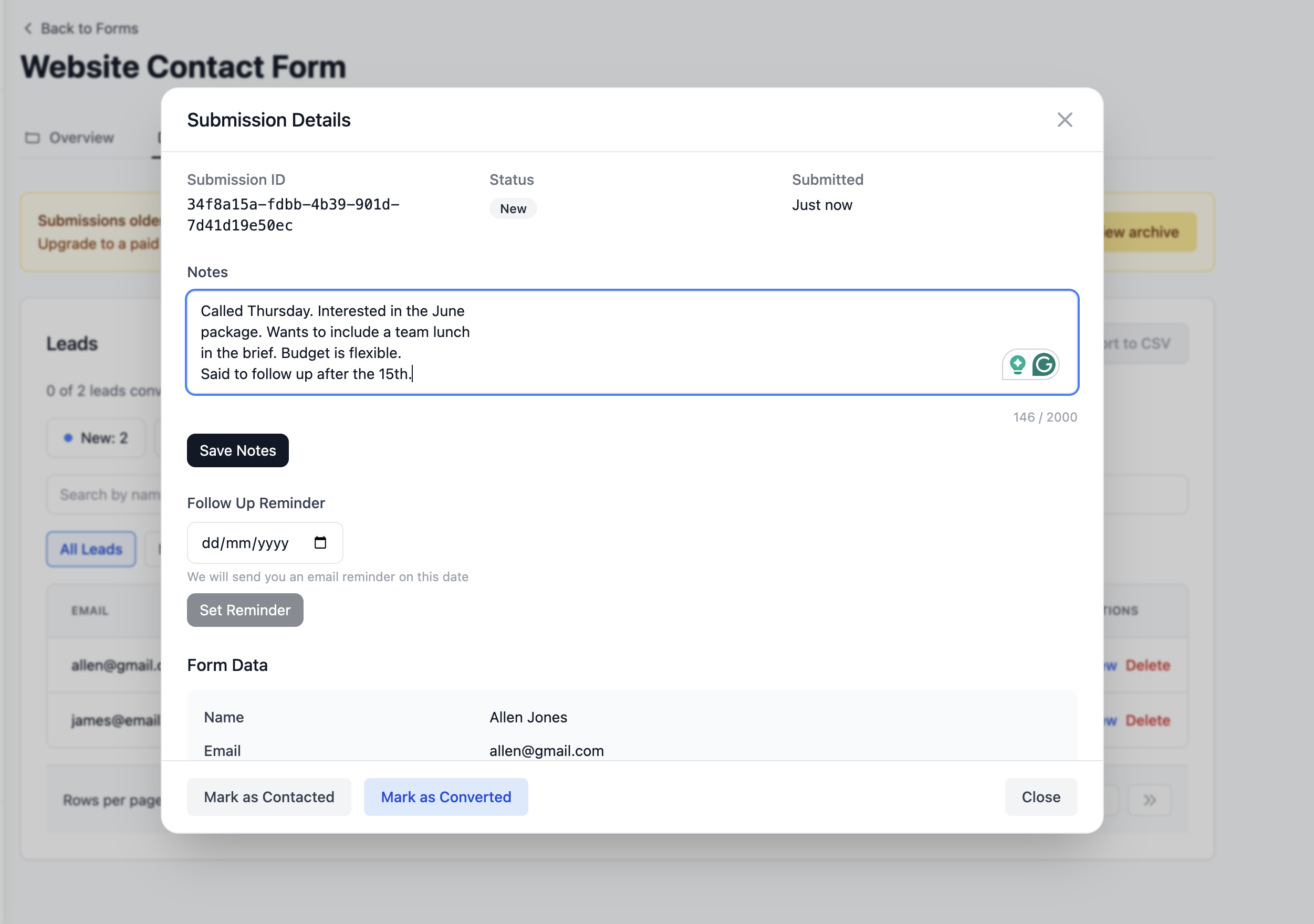
There is a notes field on every lead that accepts up to 2000 characters. Write whatever you need to remember: Called Tuesday. Interested in the monthly cleaning package for their office.Wants a quote for 3 visits per week. The said budget is around $800 per month. Partner needs to approve. Follow up after the 20th.
The next time you open that lead, your note is right there. You always know where the conversation stands before you pick up the phone.
Step 6: Set Follow-Up Reminders
If a lead asks you to follow up in two weeks, set a reminder directly on the lead.
Click the Follow Up Reminder section on the lead detail page, pick a date, and click Set Reminder.
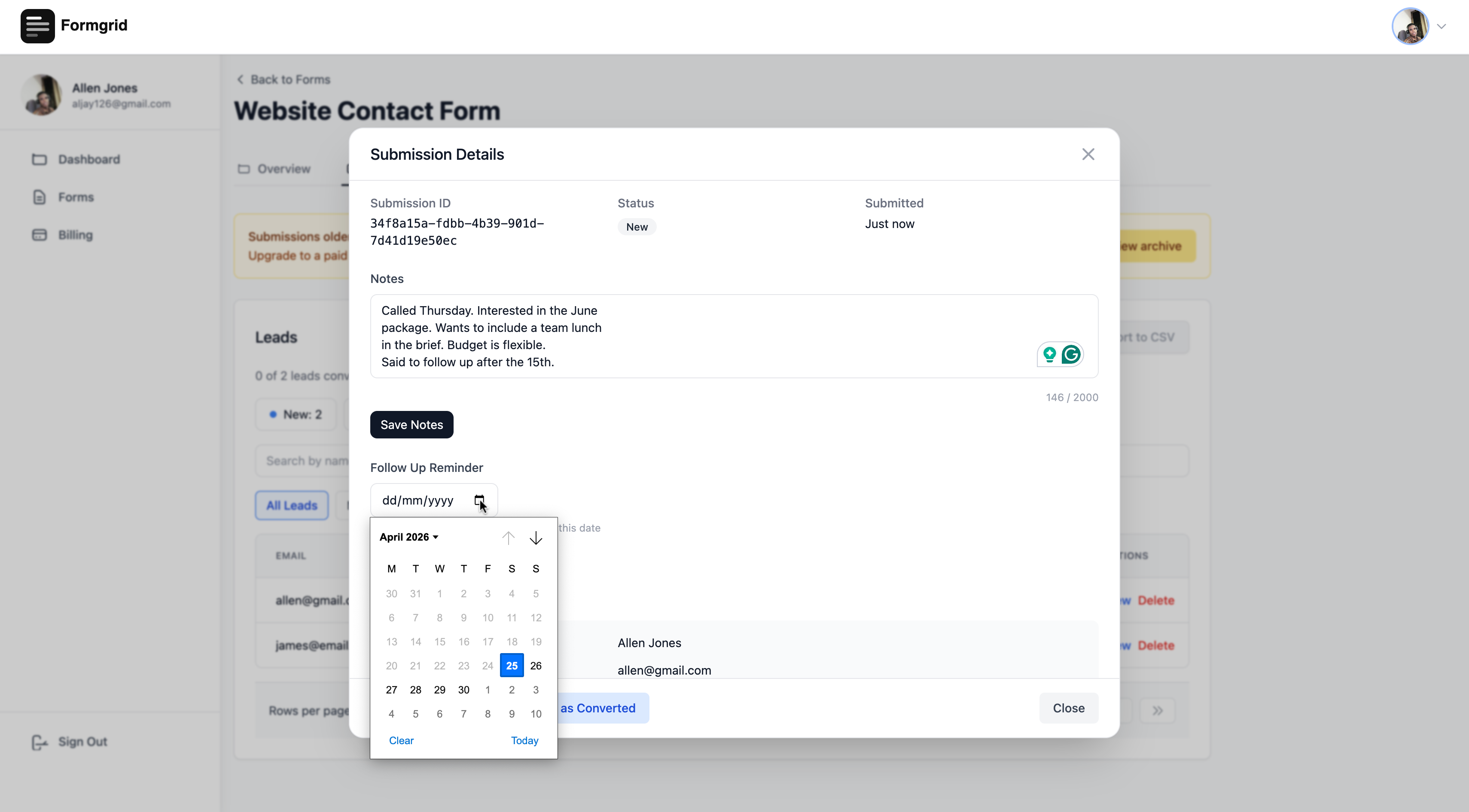
On that date, Formgrid sends you an email with the lead details and your notes so you have everything you need before you follow up.
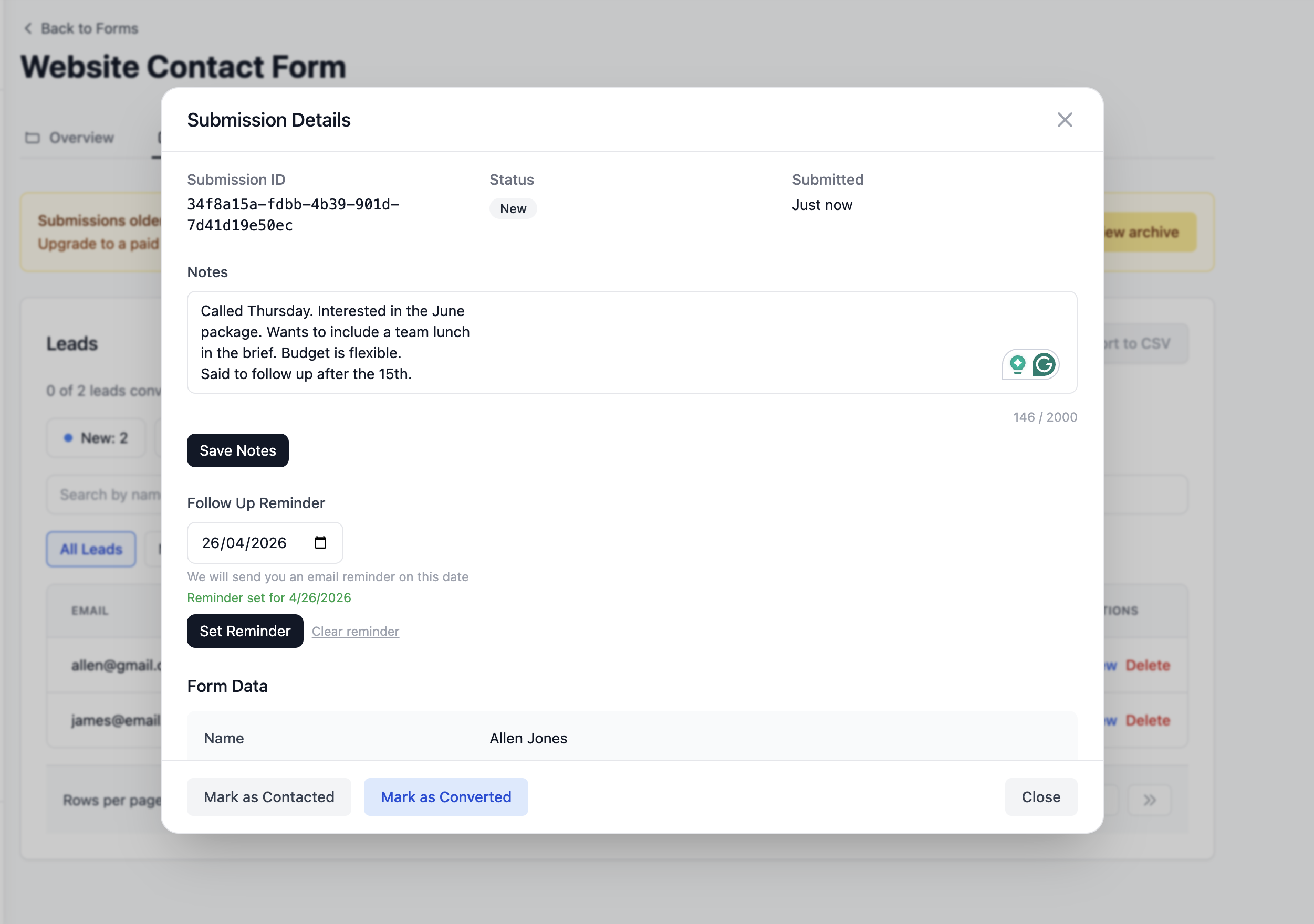
You set the reminder once. Formgrid handles the rest.
No calendar invite. No sticky note. No, hoping you remember. Just an email at the right moment with everything you need to close the deal.
Step 7: Track Your Conversion Rate
The leads tab shows your conversion rate at all times.
As you move leads through the pipeline from New to Contacted to Converted, the rate updates automatically: 2 of 15 leads converted (13%)
That number tells you things you cannot see from an inbox.
If your conversion rate drops, you know something changed. Maybe leads are coming in from a new source that is lower quality. Maybe you are taking too long to reply. Maybe your pricing conversation needs work.
If your conversion rate is climbing, you know your process is working. Keep doing what you are doing.
Without that number, you are guessing.
A Real Example: How a Cleaning
Business Manages 30 Enquiries a Month
Mark runs a commercial cleaning company. He was getting 25 to 30 enquiries per month through his website contact form and managing them entirely in his inbox.
Some got replies the same day. Some got buried under supplier emails and invoices. Some he followed up on. Mostly, he did not.
He had no idea what his conversion rate was. He had no idea which enquiries were still warm. He had no system for follow-ups beyond hoping he remembered.
He connected his existing contact form to Formgrid by replacing the form action URL. That took about five minutes.
Now every enquiry lands in his Leads tab as a New lead. He has a simple rule: every new lead gets a reply within 4 hours and gets marked Contacted the moment he sends it.
After every call, he adds a note. When someone asks him to follow up, he sets a reminder. When they sign a contract, he marks them Converted.
After six weeks, his conversion rate is sitting at 28%. Before, he had no idea what it was.
He also realised he had been losing enquiries from commercial properties because he was taking 3 to 4 days to reply. The leads tab showed him exactly how many New leads were sitting untouched for more than 24 hours. He fixed his reply time, and his conversion rate jumped immediately.
None of that came from a CRM. It came from a pipeline, a notes field, and a follow-up reminder.
What This System Costs
Formgrid is free to start.
The free plan gives you 25 submissions per month, which is enough to test the whole system and run a low-volume form.
When your enquiry volume grows, upgrade to Premium at $12 per month for 1,000 submissions per month.
The Business plan at $29 per month adds auto-responder emails so every person who fills in your form automatically receives a confirmation email from you the moment they submit. That one feature alone stops the "did my message come through" follow up emails that waste your time. Free: $0/month 25 submissions Premium: $12/month 1,000 submissions Business: $29/month 15,000 submissions plus auto-responder emails and more
No contracts. Cancel any time.
How This Compares to Other Options
Your inbox
Your inbox is not a lead management system. It is a communication tool. Using it to track leads means your leads are mixed in with everything else, with no pipeline, no notes, no reminders, and no conversion rate.
It works for 5 enquiries a month. It does not work for 30.
A Google Sheet
A spreadsheet works if you are disciplined about updating it every time something happens. Most people are not. The moment you get busy, the spreadsheet falls behind, and you are back to managing things in your head.
The advantage of tracking leads inside your form tool is that the leads are already there. The moment someone submits your form, their details are in the system. You just need to update the status and add a note.
A full CRM
HubSpot, Salesforce, and Pipedrive are genuinely powerful. They are also built for sales teams with complex pipelines and dedicated people to run them.
For a small business owner with 10 to 50 enquiries per month, they are overkill. The setup takes days. The learning curve takes weeks. The cost starts at $50 per month and climbs as you add features.
Formgrid gives you 20 percent of CRM features that handle 80 percent of your actual needs. A pipeline. Notes. Follow-up reminders. A conversion rate. All built into your form tool, so you do not have to manage a separate system.
Who This Works Best For
This system works particularly well for:
Service businesses taking enquiries for cleaning, landscaping, plumbing, electrical, photography, design, and similar trades. You have a high volume of inbound enquiries, and each one needs a follow-up conversation before converting.
Event organizers are collecting registrations and managing attendee communications. Every registration is a lead you need to confirm, follow up with, and track to attendance.
Freelancers and consultants handling project enquiries. You need to know which potential clients you have spoken to, what they need, and when to follow up.
Small retail and hospitality businesses taking custom orders, reservations, or booking enquiries. You need a simple way to track what stage each enquiry is at without a full CRM.
If you are getting more than 10 enquiries per month and managing them in your inbox, this system will make an immediate difference.
Getting Started Today
You do not need a CRM. You need a pipeline, notes, and follow-up reminders. Those three things are all built into Formgrid, and they take about 10 minutes to set up.
If you already have an HTML contact form on your website, connect it to Formgrid by replacing the form action URL. Five minutes.
If you are starting from scratch, use the Formgrid form builder to get a shareable form link live in under 5 minutes.
Either way, every enquiry that comes in from that point forward is a tracked lead with a status, a notes field, and a follow-up reminder waiting to be set.
No credit card required. Free plan available. Upgrade when your volume grows, and your process needs it.
Have questions about setting up lead management for your specific business? Email allen@formgrid.dev, and I will help you get it working.

Comments
Leave a comment