Free online form builder

Free Online Form Builder with Built-in Lead Pipeline

Create multi-step forms, conversational forms, and traditional forms in minutes. Choose a Notion-style template or build from scratch.

Every submission becomes a tracked lead with email notifications, Google Sheets sync, follow-up reminders, and file uploads built in.

No credit card required. MIT licensed and self hostable. Used by 300+ businesses and teams worldwide.

Formgrid drag and drop form builder editing a Notion-style quote request form
Open Source HTML Form Backend No-code Builder Self-hostable Used by businesses worldwide

Two ways to start

Start with a template or build from scratch

Formgrid is a drag and drop form builder for people who want polished forms fast, and for teams that still need a reliable HTML form endpoint.

Option 1

Start with a template

Pick a Notion-style document form or a Typeform-style multi-step flow. Quote requests, event registration, photography booking, and law firm intake are ready to customize.

  • Notion-style layouts
  • Quote Request, Event Registration, Photography Booking
  • Law Firm Client Intake and more
Browse Templates

Option 2

Build from scratch

Open the no code editor, add fields, and publish. Create conversational multi-step forms, traditional forms, and branded shareable links without writing backend code.

  • Drag-and-drop editor
  • Conversational and multi-step forms
  • Brand colors, logo, and custom domains
Create Blank Form
Published Request a quote form with heading, hero image, and contact details fields

Notion-style layouts

Publish forms that look like polished documents

Combine headings, paragraphs, images, dividers, and fields into a clean document-style layout. Start from a quote request template or design your own, then share a branded link.

View Quote Request Template

Conversational forms

Multi-step forms that feel like a conversation

Ask one question at a time, add statement screens for headings and paragraphs, and send a shareable link. Every completed response lands in your lead pipeline automatically.

Try the builder free
Formgrid multi-step conversational form submitting and appearing as a lead

Builder features

Everything you need in a modern form builder

Drag-and-drop editor

Add fields, reorder sections, and publish without writing markup.

Multi-step forms

One question per screen with progress, intro, and thank you pages.

Conversational forms

Typeform-style flows that keep respondents focused and engaged.

Notion-style layouts

Document-mode forms with clean typography and multi-page breaks.

File uploads

Collect documents and images with the rest of each submission.

Branding

Match colors, logo, and presentation to your brand.

Custom domains

Publish forms on your own domain on eligible plans.

HTML form endpoints

Keep your existing HTML and point the action URL at Formgrid. See the form backend guide.

Flexible layouts

Centered, split, background image, and document modes for different brands.

What Happens After Submit

Most form builders stop at the inbox. Formgrid does not.

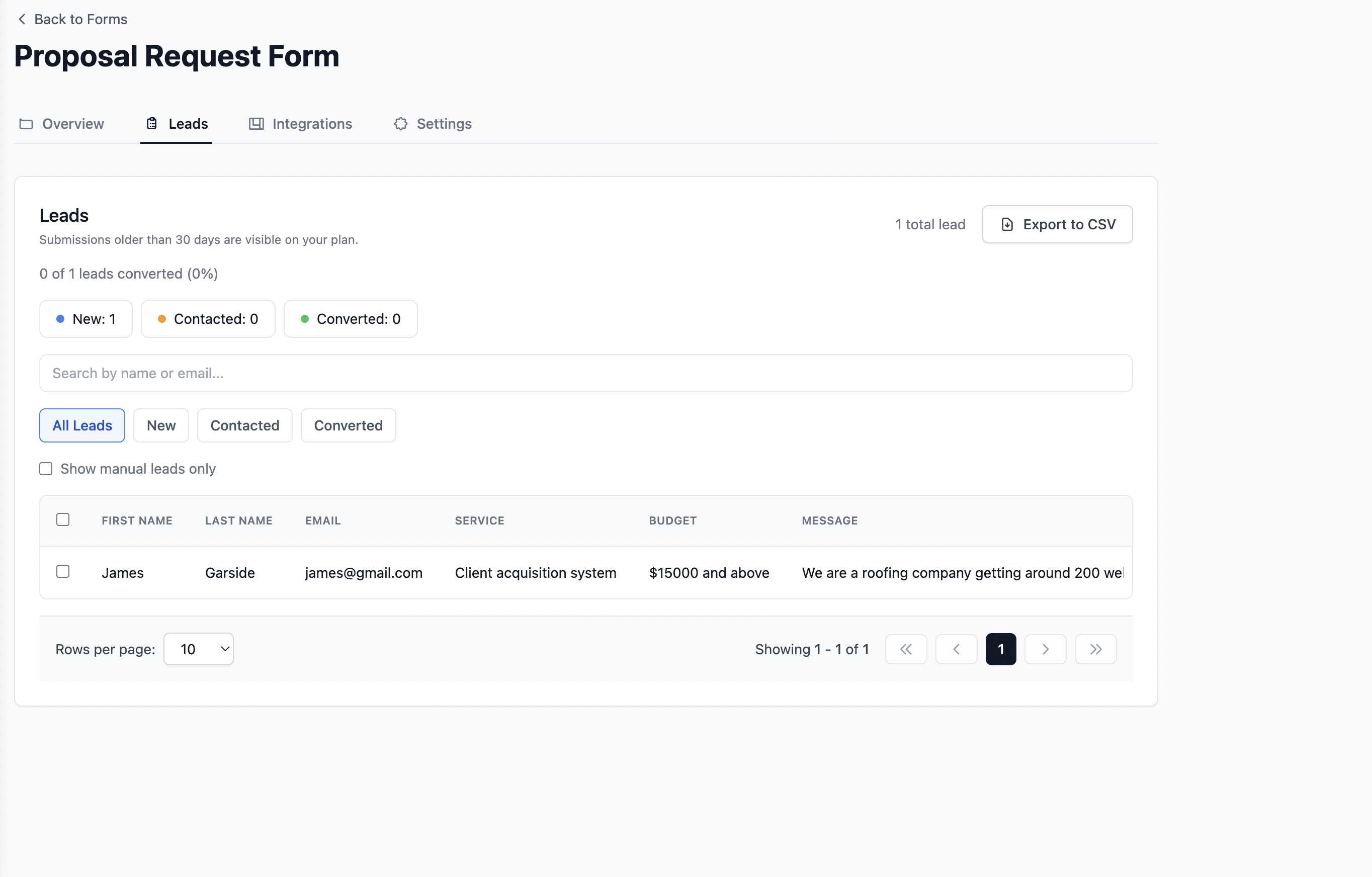
Every submission becomes a tracked lead with email notifications, Google Sheets sync, follow up reminders, and UTM tracking built in. Collect responses and manage what happens next.

Lead pipeline

Every submission becomes a tracked lead

New, Contacted, and Converted stages in one dashboard. See active enquiries and conversion rate without counting manually or paying for a separate CRM add-on.

Formgrid lead pipeline showing New Contacted Converted stages
Lead status and pipeline view in the Formgrid dashboard

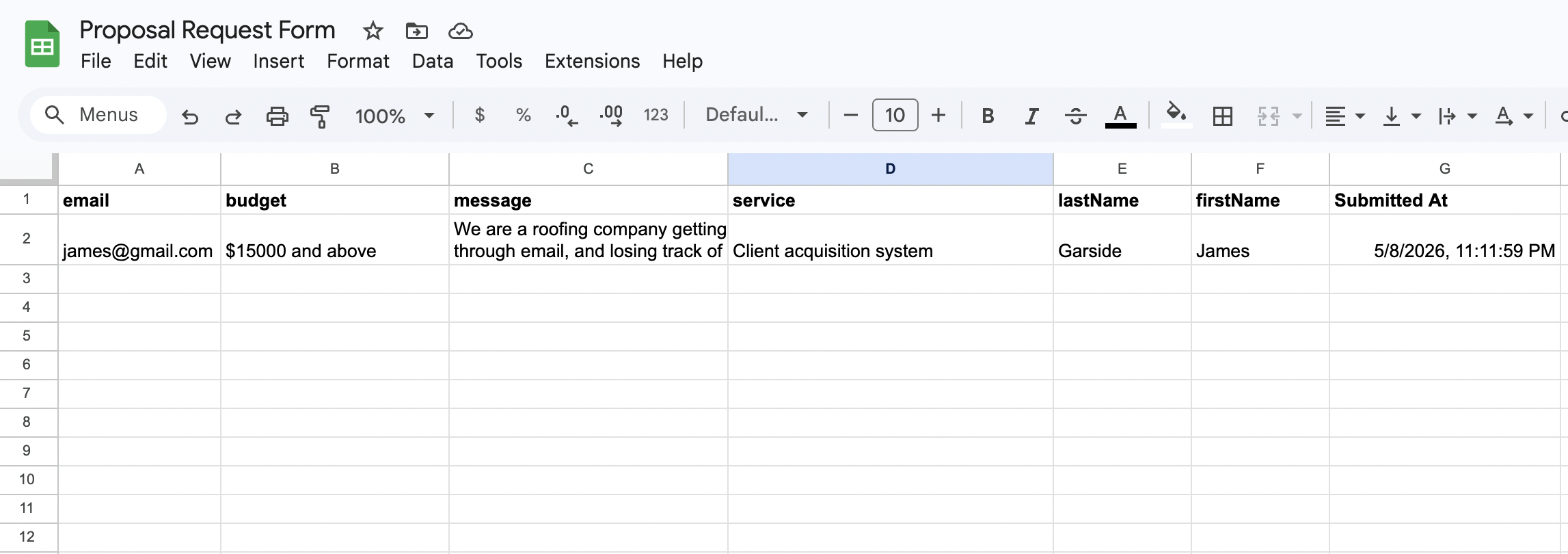
Google Sheets sync

Every submission in a shared sheet automatically

Each form post appears as a new row in Google Sheets within seconds. Your whole team sees new leads in real time. No Zapier integration required.

Form submissions syncing to Google Sheets automatically

Email notifications

Instant inbox alerts that look professional

Every submission triggers a clean, formatted email with the full enquiry details. No raw data dumps or provider-branded notification templates.

Instant email notification for a new form submission

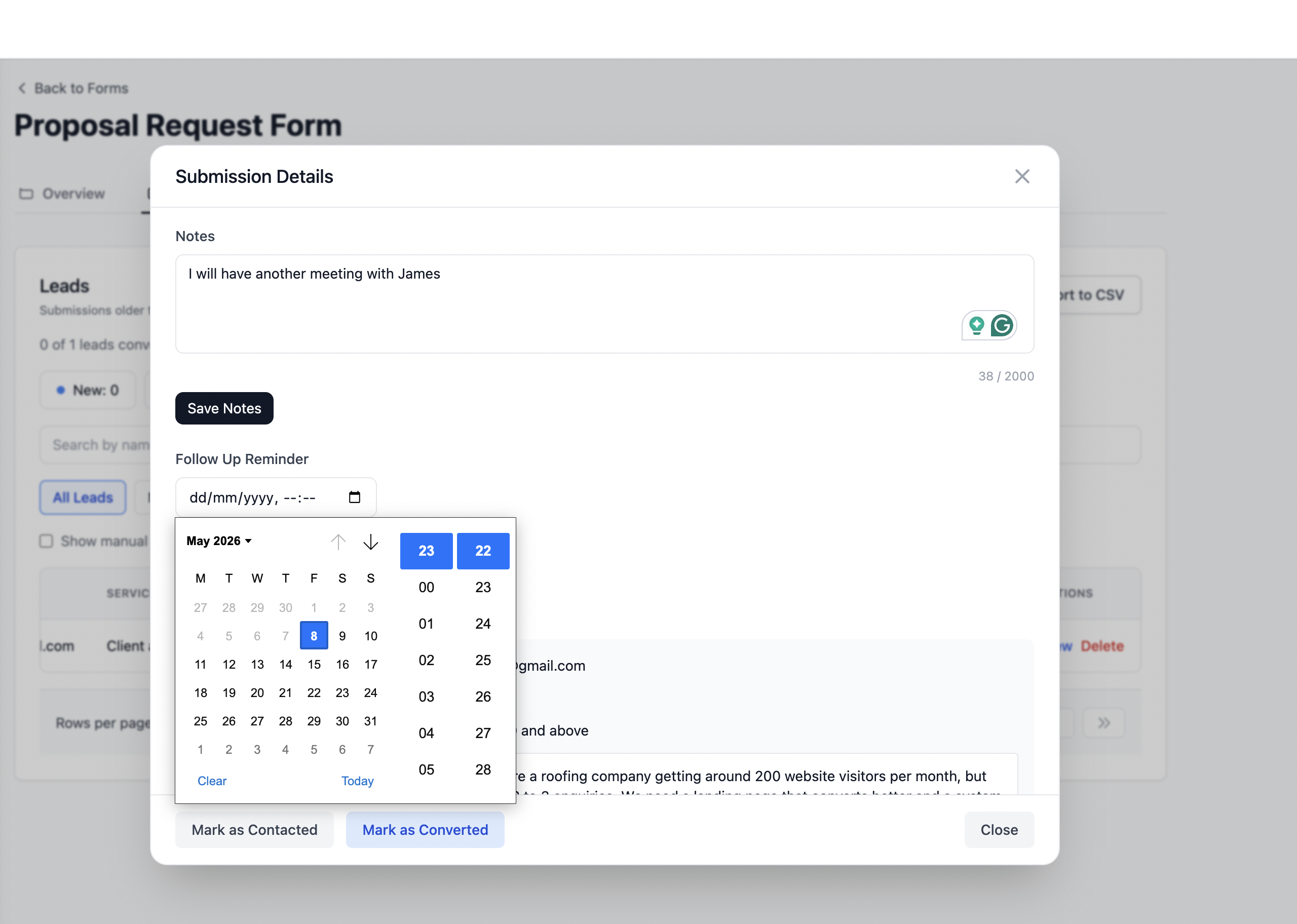
Follow up reminders

Warm leads never go cold

Set a follow up date on any lead and get an email reminder with the lead details and your notes on that date. Built in, not a paid upgrade.

Formgrid follow up reminder email with lead details

UTM Source Tracking

Know exactly which channel sent each submission. Google, Instagram, referrals, and paid ads are captured automatically on every form post.

CSV Export

Download submissions whenever you need a spreadsheet backup, audit trail, or offline analysis. Export is built into the dashboard.

Form Templates

Free Form Templates for Every Business

Choose a no code template to customize and share in minutes, or download an HTML template and deploy it anywhere.

Built for no-code teams and developers

Prefer to keep your own HTML? Formgrid works as a form backend too. Point your form action at an endpoint and keep your layout. Works with React, Astro, Next.js, static HTML, Jekyll, Hugo, Eleventy, Squarespace, and Webflow.

Read the full form backend overview for static sites.

Formgrid vs other form builders

High-level comparison for people searching for the best form builder. Verify current pricing and features on each vendor’s site before you buy.

Feature Formgrid Typeform Tally Jotform Google Forms
Builder Yes Yes Yes Yes Yes
HTML form backend Yes Limited Limited Limited
Lead pipeline Yes Add-ons
Google Sheets Built in Integrations Yes Integrations Native
Email notifications Yes Yes Yes Yes Yes
Self-hostable Yes (Docker)
Open source Yes (MIT)
File uploads Yes Yes Yes Yes Yes
Conversational forms Yes Yes Limited Yes
Typical paid entry (indicative) From $12/mo Higher tier pricing Free + paid Free + paid Free

Also compare Formgrid as a Jotform alternative or Formspree alternative.

Form builder use cases

Launch the right form for your workflow, then manage leads in one place.

Customer stories

Form builder FAQ

Answers for people searching for a free online form builder, drag and drop form builder, or no code form builder.

An online form builder lets you create forms in a browser with drag and drop or templates, then publish a shareable link or embed without writing backend code. Formgrid is a free online form builder with multi-step forms, Notion-style layouts, and a built-in lead pipeline.
Yes. Formgrid is a no code form builder. Start from a template or a blank form, add fields in the editor, customize branding, and publish. Developers can still use HTML endpoints when they prefer to keep their own markup.
Yes. Publish a Formgrid form and share the link, or use Formgrid as an HTML form backend by pointing your existing form action at a Formgrid endpoint. That works on Squarespace, Webflow, Astro, and static HTML.
Yes. Formgrid supports file upload fields so respondents can attach documents or images with their submission. Uploads appear with the lead in your dashboard.
Yes. Every submission can trigger a clean email notification with the full enquiry details so you never miss a lead.
Yes. Formgrid syncs submissions to Google Sheets automatically on Premium. Each form post appears as a new row within seconds. No Zapier required.
Yes. Formgrid includes Typeform-style multi-step conversational forms with one question per screen, statement screens, intro and thank you pages, plus Notion-style multi-page document layouts.
Yes. Custom domains are available on eligible plans. Formgrid is also open source under the MIT license and self hostable with Docker when you need full control of your data.

Build your first form in minutes

Start from a professional template or create your own from scratch. No credit card required.

Your form builder, lead pipeline, and form backend in one place.

Whether you are sharing a form link on WhatsApp, pointing your HTML form to a Formgrid endpoint, or tracking leads through a built-in pipeline, get it done in 2 minutes.

Start Free. No Credit Card Required