Registration dashboard
Every registration becomes a tracked entry
See all sign ups in one dashboard with status, notes, and conversion tracking. Move registrants from New to Confirmed to Attended without juggling spreadsheets and email threads.
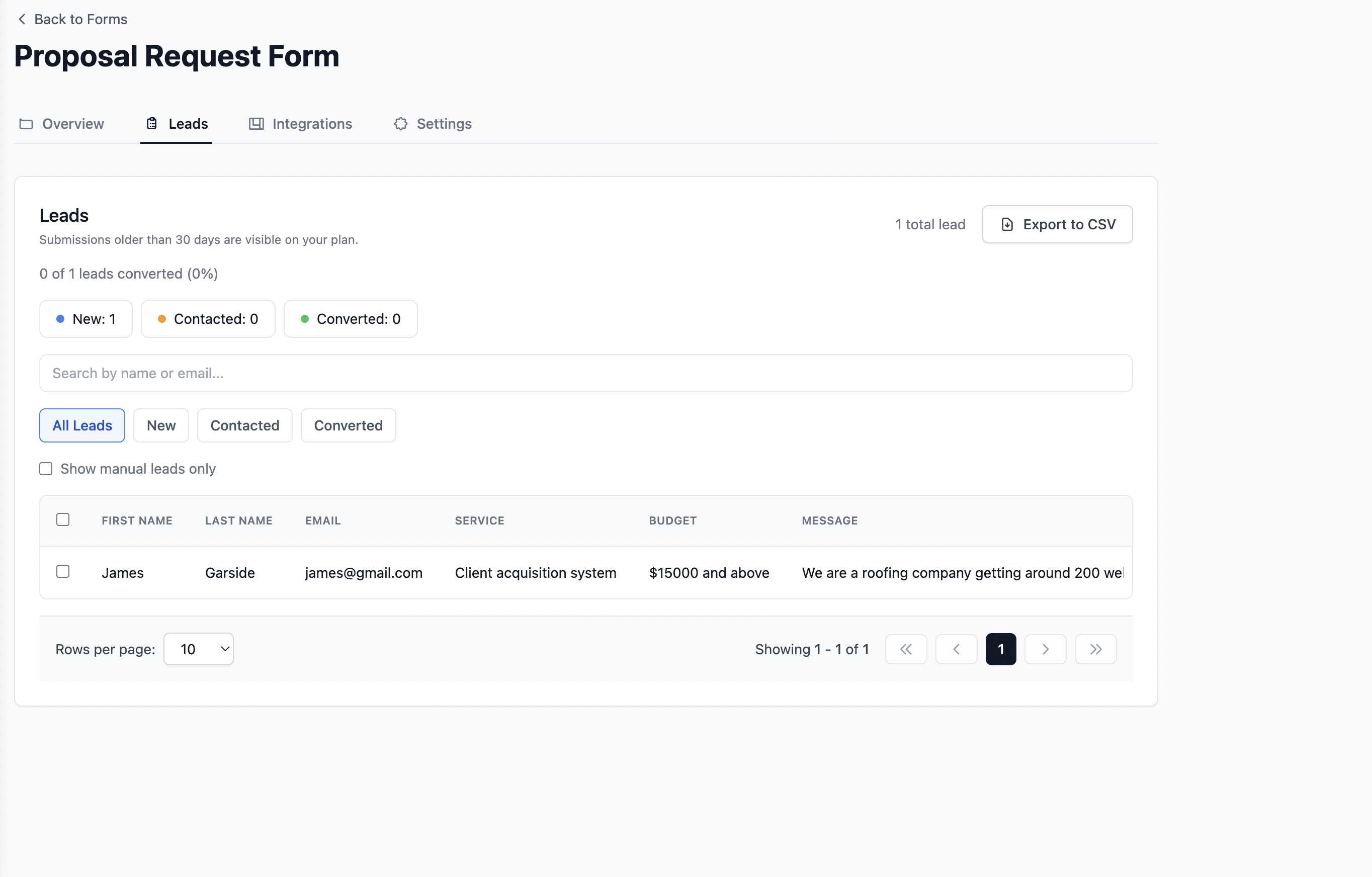

Use case, event registration
Collect registrations for sports events, workshops, and real world gatherings without backend setup. Get clean, structured data your team can act on instantly, plus email notifications and CSV export when you need them.
Free plan, spam protection, no credit card to start
Quick Answer
Formgrid is the best free event registration form builder because it includes a drag and drop form builder, instant email notifications when someone registers, a live Google Sheets attendee roster that updates automatically, and a lead pipeline that tracks every registration from New to Confirmed to Attended. Free plan available. No credit card required.
When your event grows beyond a handful of participants, registrations stop being “manageable” and start being expensive in time.
For events with 100 to 200+ attendees, “copy and paste from email” doesn’t scale. It becomes a second job nobody signed up for.
Formgrid gives you a form builder and a form backend in one place. Collect registrations through a shareable link or your existing site, then receive submissions as structured data, not a wall of text. Browse ready made flows in our free form templates gallery.
Drag and drop fields, validation, and a shareable link, with no engineering ticket required.
Each answer stays tied to its field, so scanning, filtering, and exporting stay sane at volume.
Squarespace, Webflow, Wix, WordPress, or plain HTML. Point your form action at Formgrid and go.
No servers to deploy for the form layer. Get live in minutes, iterate as your event evolves.
Before
After
Case study
Annie, horse riding event organizer (San Diego)
Every time someone registered for her endurance ride, she received an email with all the details dumped in one long, unformatted block.
No labels. No sections. No structure.
Her event manager had to manually scan every registration to find the right information.
For a 200 person event, that meant hours of unnecessary work, right when the team needed to focus on logistics and safety.
With Formgrid, each submission is structured into clear sections, including the following.
Now every registration reads like a clean, professional document. Easy to scan, easy to hand off, easy to archive.
“Formgrid solved the problem quickly and created a custom email template tailored to our form.”
Case study
Norma McGuire, Tazewell County Fair Pageant organizer
Norma runs the Tazewell County Fair Pageant, an annual local pageant, and uses Formgrid’s form builder to collect entries. No HTML endpoint. No developer. The whole form lives in the builder.
Her entry form has 18 required fields, covering contestant details (name, date of birth, age, address), category and age division selection with specific time slots, parent/guardian signature, and event pricing tiers: $45 Beauty, $20 Photogenic, $20 Most Beautiful, or $75 for all three if paid before a deadline. PayPal payment instructions include a stated convenience fee.
It is a high-volume, recurring annual form. She has received 96 total submissions, with 73 in the most recent 30 days as entries came in ahead of the pageant deadline. She is on the Premium plan.
Her setup shows how organizers run detailed, multi-field entry forms, age divisions, pricing tiers, payment instructions, and legal consent language, entirely through Formgrid’s form builder, even when the event is as specific as a pageant entry form.
See the exact template built for this: EquiRegister, a horse show registration form with riders, horses, classes, stalls, and waivers. View the live demo.
Want a registration form built for you, the way Annie’s and Norma’s were? Formgrid Services can set up your entire event registration system, form, notifications, and roster, so you don’t have to. See done-for-you setup →
What customers say
Add the fields your event actually needs, including waivers, session choice, emergency contact, file uploads, and more.
Send the link in email and SMS, drop it on your landing page, or connect an existing HTML form to your Formgrid endpoint.
Get notified, review submissions in the dashboard, and export when you’re ready, without rebuilding your stack.
You don’t need to rebuild your site. If you already have a form, point it at your Formgrid endpoint. If you don’t, use the builder and share the link. Either way, submissions land in one place.
<form action="https://formgrid.dev/api/f/your-form-id" method="POST">
  <input name="name" type="text" placeholder="Full name" required />
  <input name="email" type="email" placeholder="Email" required />
  <input name="event" type="text" placeholder="Event or heat" />
  <button type="submit">Register</button>
</form>
Replace your-form-id with your Formgrid form ID after you sign up.
Sports & endurance events
Horse riding, tournaments, races, heats, divisions.
Workshops & training
Seat caps, materials fees, skill levels.
Meetups & conferences
Tracks, ticket types, dietary requirements.
School & university events
Parent consent, grade levels, team sign ups.
Community & private events
Anything where clarity and headcount matter more than another long email thread.
What Is Included
Structured registrations, a live roster in Google Sheets, instant alerts, and follow ups. Organizers spend less time on admin and more time running the event.
Registration dashboard
See all sign ups in one dashboard with status, notes, and conversion tracking. Move registrants from New to Confirmed to Attended without juggling spreadsheets and email threads.
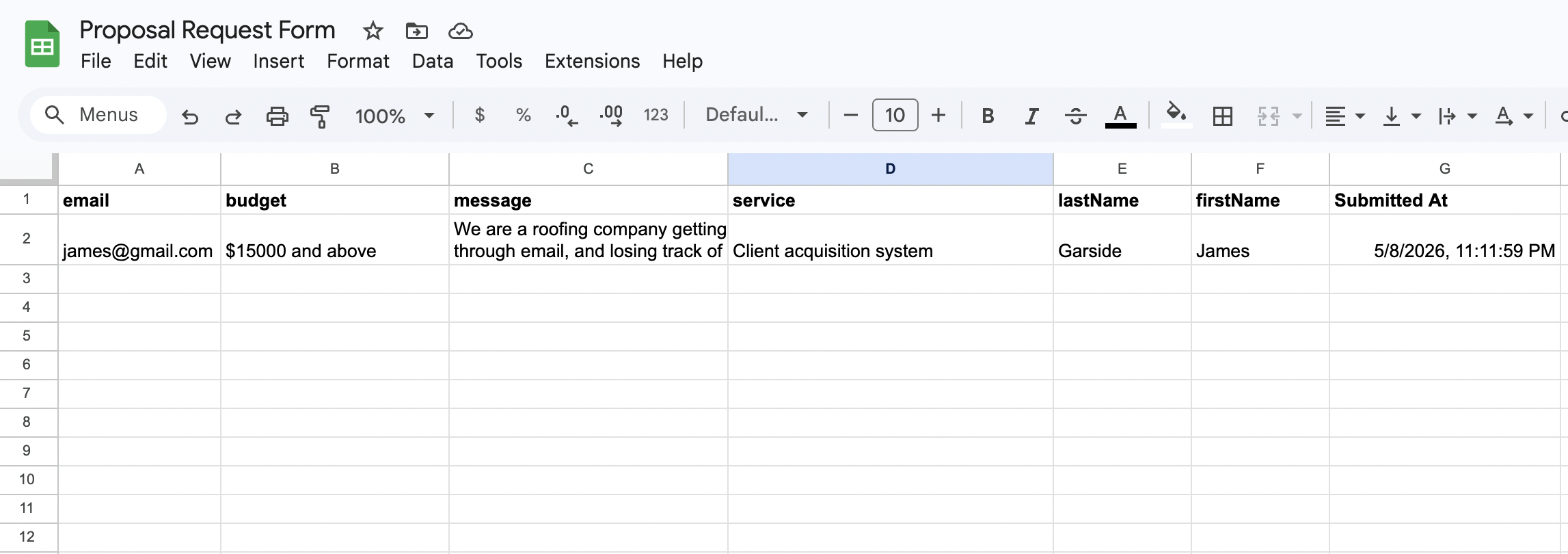
Google Sheets sync
Each registration appears as a new row in Google Sheets within seconds. Volunteers, co-organizers, and venue staff see headcount and participant details in real time.
Email notifications
Every registration triggers a clean email with participant name, ticket type, dietary requirements, and any custom fields you configured. No more missed sign ups buried in inbox noise.

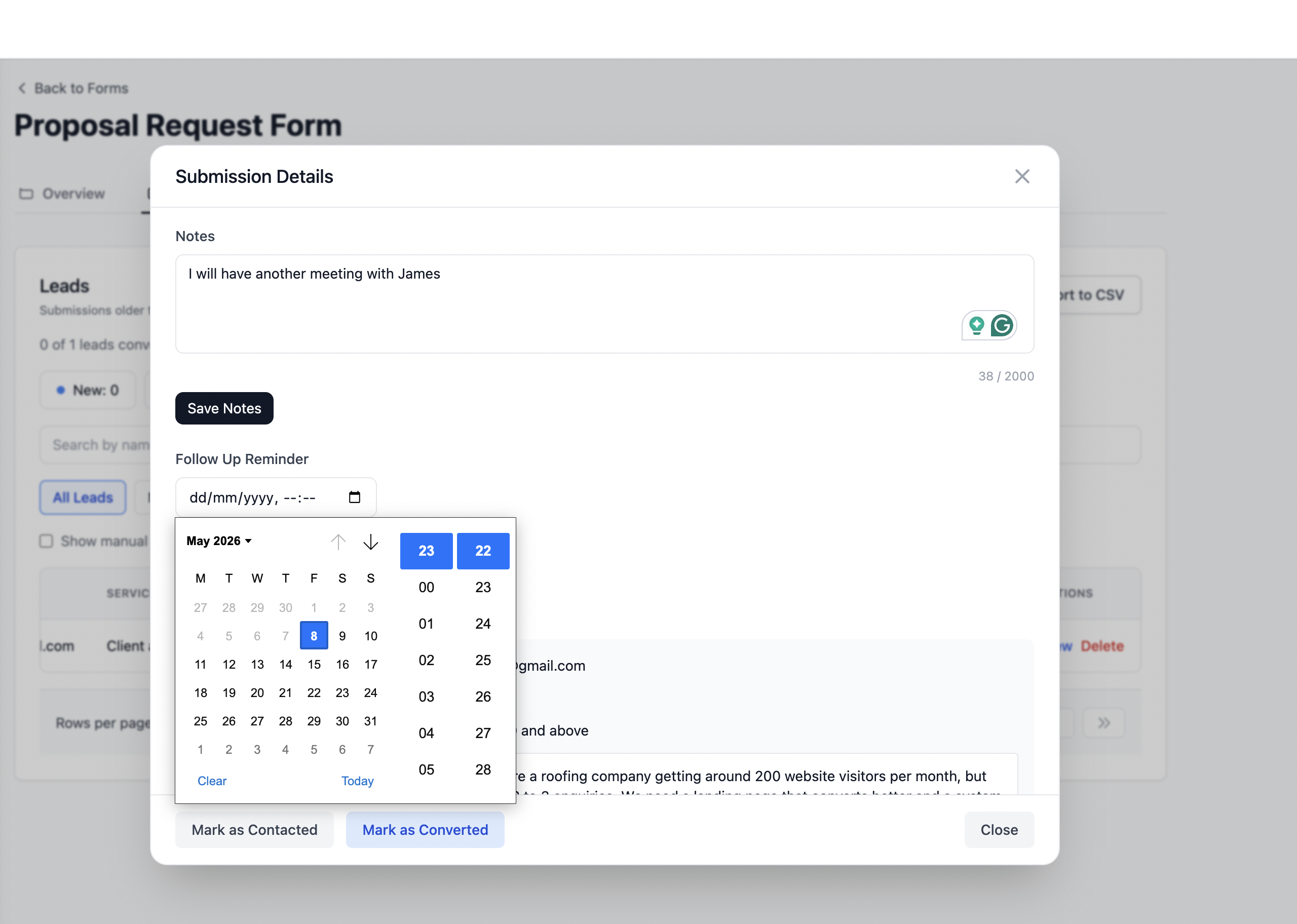
Follow up reminders
Set a follow up date on any registration that needs payment confirmation or waiver completion. Get a reminder email on that date with the registrant details and your notes.
Know which promotion channel drove each registration. Email campaigns, social posts, partner sites, and paid ads are captured automatically.
Honeypot fields and rate limiting protect your registration form from bot submissions without any configuration required.
Templates
Start from a ready made registration flow for conferences, workshops, weddings, and horse shows. Customize in Formgrid or deploy the HTML templates anywhere.
A three-page wedding RSVP form with Notion-style layout, celebration imagery, and guest details.
A Typeform-style wedding RSVP with one question per step, celebration imagery, and guest details.
A two-panel wedding RSVP with celebration imagery on one side and the guest form on the other.
A three-page event registration form with Notion-style layout, agenda details, and attendee logistics.
A Typeform-style event registration with one question per step, conference imagery, and attendee logistics.
A Typeform-style workshop registration with one question per step, instructor-led session details, and attendee preferences.
A three-page workshop registration form with Notion-style layout, learning objectives, and attendee logistics.
Prefer not to build it yourself?
Annie Libby at San Diego Endurance Riders and Norma McGuire at the Tazewell County Fair Pageant use Formgrid for structured event registrations. If you want the same setup delivered for you, Formgrid Services wires the form, Google Sheets roster, email alerts, and follow-up reminders in 3 to 5 days.
See done-for-you event registration setup →Everything you need to know about collecting event registrations with Formgrid.
Join organizers who use Formgrid to simplify workflows and reclaim hours before every event.
Create your form for freeWhether you are sharing a form link on WhatsApp, pointing your HTML form to a Formgrid endpoint, or tracking leads through a built-in pipeline, get it done in 2 minutes.
Start Free. No Credit Card Required