
Still Losing Track of Web3Forms Submissions?
Get a dashboard, permanent submission storage, and a lead pipeline, without paying Web3Forms' $18/month Pro price. Works with your existing HTML form or a no-code builder.
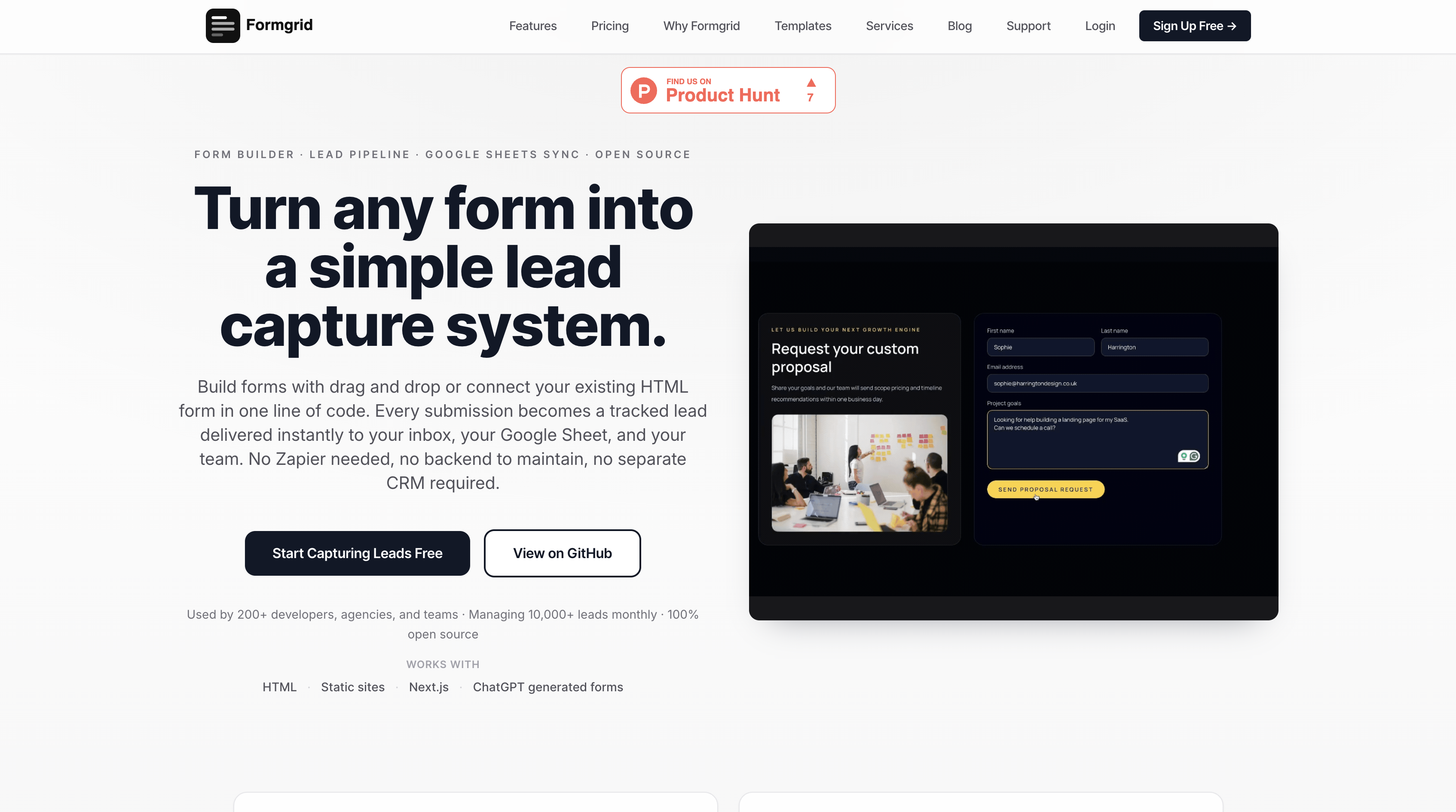
Web3Forms is a popular starting point for adding a contact form to a static site. The free plan is genuinely generous: 250 submissions per month, unlimited forms, no account required, just an access key in your inbox, and you are up and running.
But if you have been using Web3Forms for a while, you have probably noticed where it starts to fall short.
Submissions older than 30 days disappear on the free plan. There is no dashboard on the free tier to browse and manage your submissions. There is no form builder if you need a shareable link without writing HTML. There is no lead pipeline to track what happens after someone submits. And when you look at the Pro plan at $18 per month, Google Sheets, webhooks, and autoresponders are all locked behind that paywall.
In this article, I will walk through the best Web3Forms alternatives in 2026, covering price, features, and which one is right for your use case.
Short Version
If pure free volume is what matters most to you, Web3Forms genuinely wins that comparison at 250 free submissions a month and nothing else here beats it.
If you want a dashboard, permanent submission storage, and a way to track what happens after someone fills out your form, use Formgrid. It costs less than Web3Forms' Pro plan and includes more.
If you are already deep into a tutorial that uses Formspree, there is no strong reason to switch just for switching's sake. It is mature and well documented.
Why Developers Look for Web3Forms Alternatives
Here are the most common reasons people switch:
Submissions disappear after 30 days on the free plan. If you do not log in and export in time, your data is gone. There is no indefinite submission history unless you upgrade.
No submission dashboard on the free plan. Web3Forms sends submissions to your email. That is the entire free experience. If an email gets lost in spam, the submission is gone for good, with no dashboard to fall back on.
No form builder. Web3Forms is a form backend only. If you need a shareable form link without writing HTML, you have to look elsewhere.
No lead management. Web3Forms receives submissions and emails them to you. There is no way to track which leads you have followed up on, which have converted, or which need a reminder.
Google Sheets costs $18 per month. The free plan has no integrations at all. Google Sheets, Notion, Slack, and webhooks are all on the Pro plan.
No self-hosting. If you care about data ownership or GDPR compliance, Web3Forms gives you no option to run it yourself.
No open source option. You are locked in with no transparency and no customisation.
If any of those hit home, keep reading.
Web3Forms Pricing
Before comparing alternatives, here is what Web3Forms actually charges:
| Plan | Price | Submissions | Google Sheets | File Uploads | Webhooks |
|---|---|---|---|---|---|
| Personal | Free | 250/month | No | No | No |
| Pro | $18/month | 10,000/month | Yes | Yes | Yes |
| Agency | $47/month | 20,000/month | Yes | Yes | Yes |
The jump from free to Pro is steep. You go from $0 to $18 per month the moment you need any integration, file uploads, or autoresponders.
Ready to skip that jump entirely? See Formgrid's pricing.
The Best Web3Forms Alternatives in 2026
1. Formgrid: Form Backend, Form Builder, and Lead Pipeline in One Place
Best for: developers who want a form backend, non-technical users who need a shareable form link, and small businesses who want to manage leads without a full CRM.
What makes it different
Web3Forms is a form backend that stops at the inbox. Formgrid does not stop there.
Every submission becomes a tracked lead automatically. You can mark it New, Contacted, or Converted, add a note, and set a follow-up reminder that emails you on the day you need to act.
On top of that, Formgrid includes a drag-and-drop form builder, multi-step conversational forms, free captcha on all plans, and Google Sheets sync at $12 per month instead of Web3Forms' $18 per month.
How Zena uses it
Zena runs a cleaning company and was on Web3Forms before switching. Her issue was not the emails themselves; it was what happened after. A lead would come in, she would reply, and a week later she had no record of whether that person ever booked. She moved her booking enquiry form to Formgrid's multi-step builder and embedded it directly on her site. Now every enquiry is a lead with a status, so she can see at a glance who booked, who she is still waiting to hear back from, and who she needs to follow up with before they go quiet.
Two ways to use it
Option A: Point your existing HTML form at a Formgrid endpoint
<form action="https://formgrid.dev/api/f/your-form-id" method="POST">
  <input type="text" name="name" placeholder="Your Name" required />
  <input type="email" name="email" placeholder="Your Email" required />
  <textarea name="message" placeholder="Your Message"></textarea>
  <button type="submit">Send Message</button>
</form>
Your form stays exactly as it is. Formgrid handles receiving submissions, sending email notifications, and storing every lead in your dashboard permanently. No 30-day deletion, no expiry.
Option B: Use the drag and drop form builder
No HTML required. Build your form, get a shareable link, and send it via WhatsApp, email, or embed it on any website. Every submission lands as a tracked lead in your dashboard instantly.
Formgrid also includes a multi-step conversational form builder. One question at a time, clean design, works on any device. No Typeform subscription needed.

The full setup, screenshots included, is further down this post.
Switch from Web3Forms in 5 minutes. No credit card required.
The lead management dashboard
Every form submission becomes a lead you can track through a simple pipeline: New, Contacted, Converted.
Here is what the full flow looks like from form submission to tracked lead:
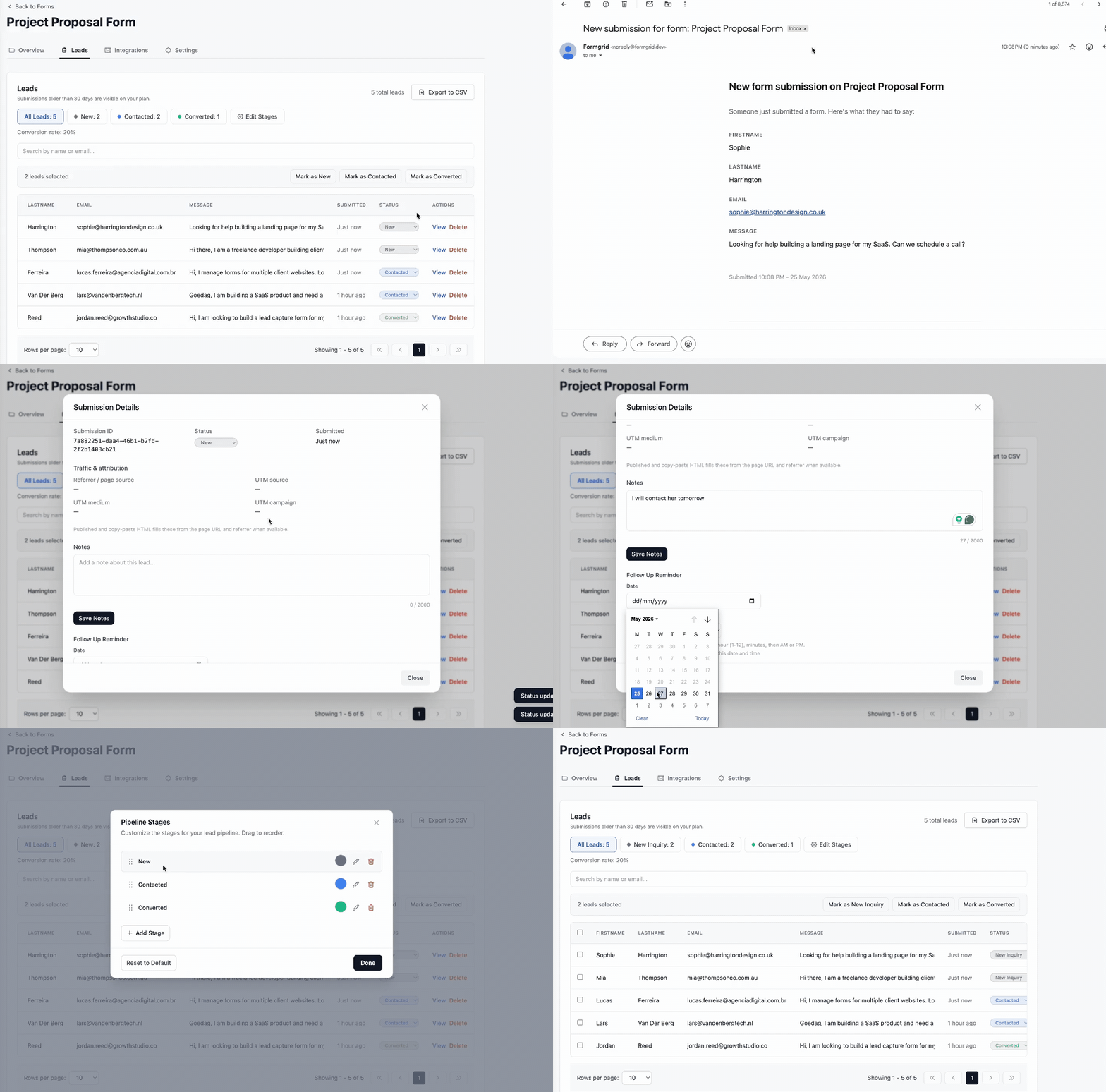
On each lead, you can:
- Add a private note about the conversation
- Set a follow-up date and get an email reminder on that day
- See where the lead came from (UTM source, medium, campaign)
- Export all leads as CSV at any time
The leads tab shows your conversion rate at the top, so you always know how your form is performing.
This is the feature Web3Forms does not have at any price point. There is no lead pipeline, no follow-up reminders, and no conversion tracking on any Web3Forms plan. Once the email lands in your inbox, you are on your own.
See what a tracked lead looks like, try Formgrid free. No credit card required.
Google Sheets sync
Every submission can automatically appear as a new row in your Google Sheet. No Zapier needed, no API setup. Connect your sheet once and every submission syncs instantly.
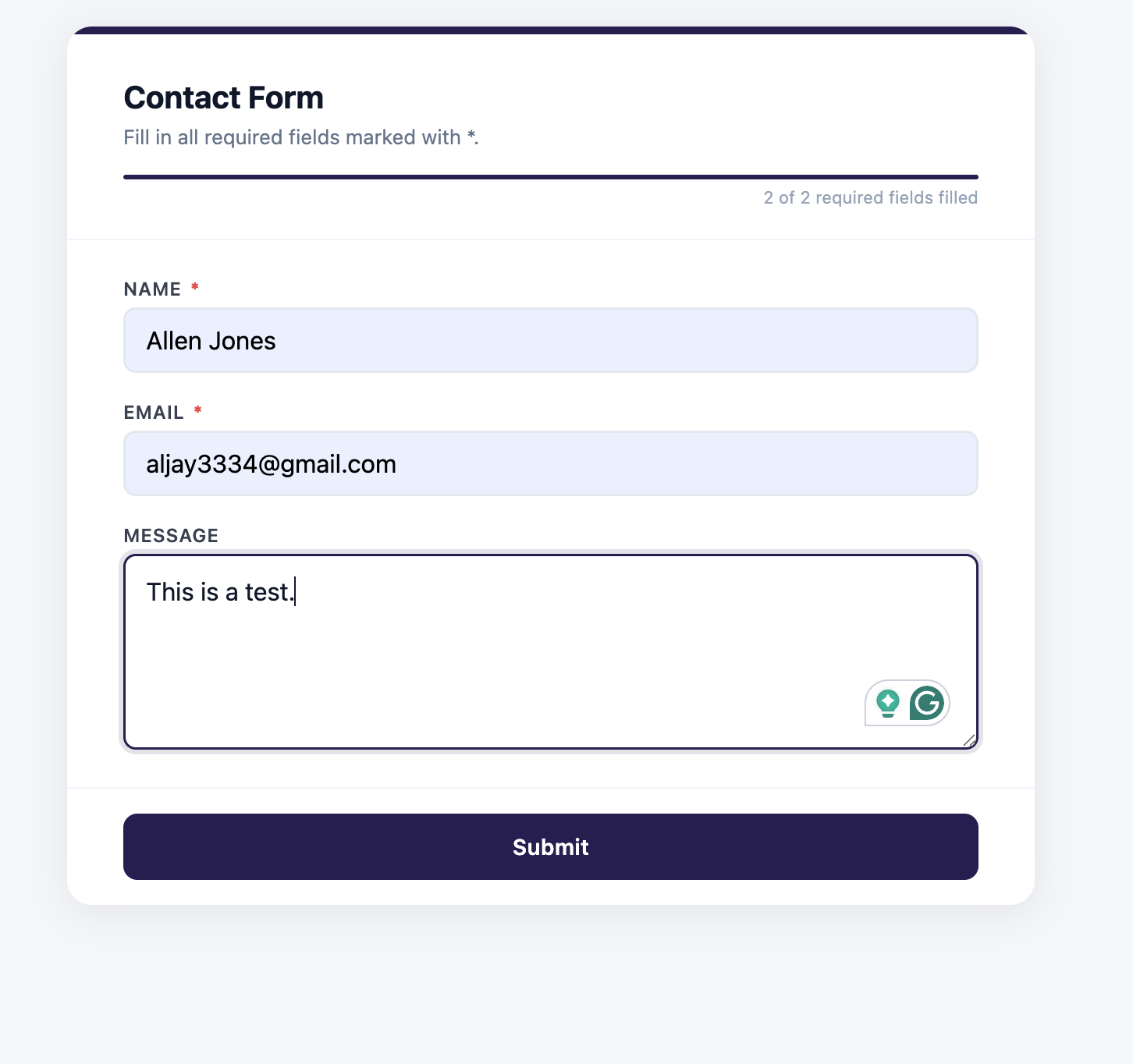
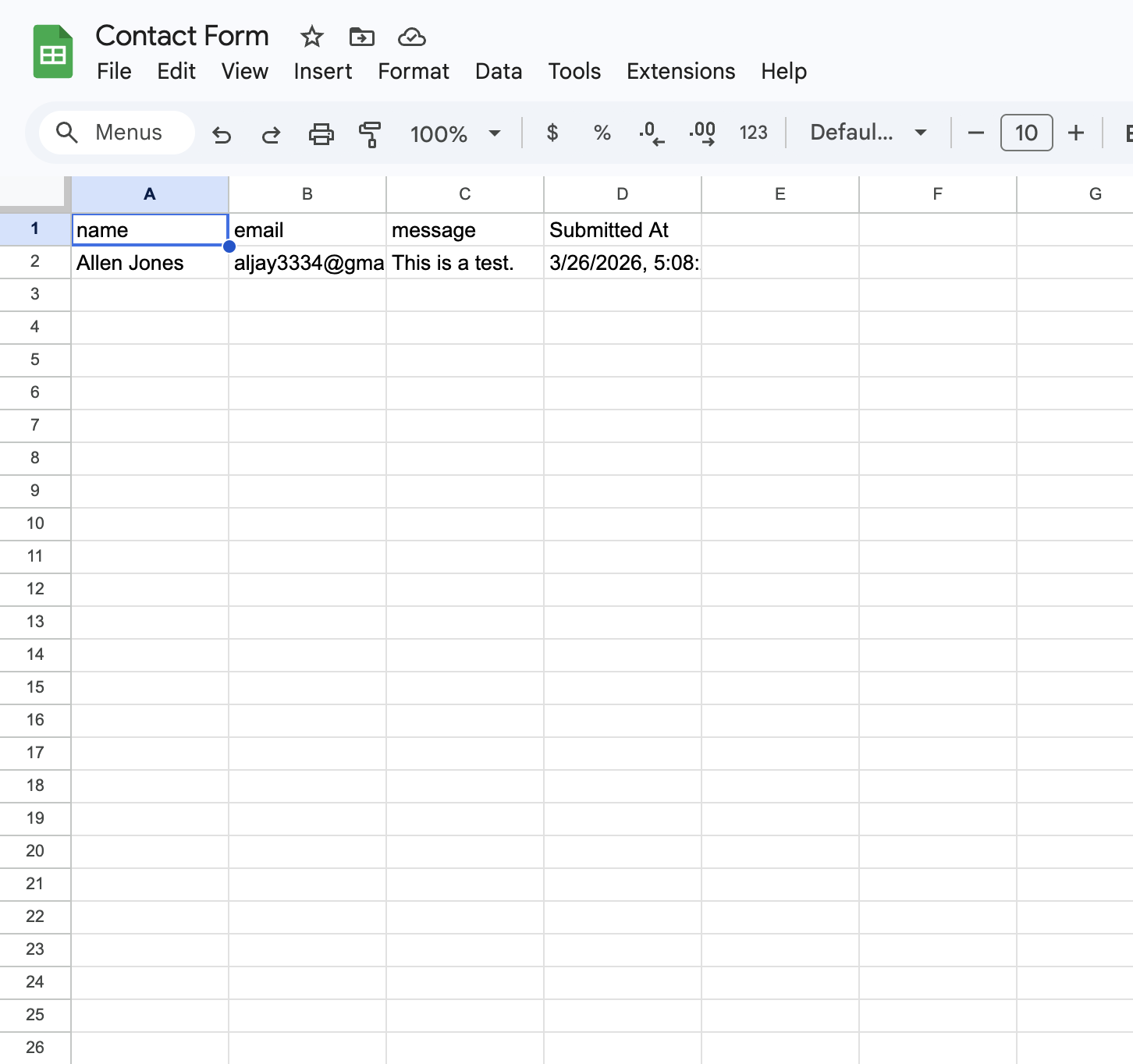
Web3Forms charges $18 per month for Google Sheets. Formgrid includes it on the Premium plan at $12 per month.
Free captcha and bot protection
Formgrid includes built-in bot protection on all plans, including free. No backend code needed, no separate account required.
For form builder forms, Cloudflare Turnstile runs invisibly in the background. Real visitors see nothing. Bots are blocked silently before they ever reach your inbox.
For HTML endpoint forms, you can enable hCaptcha protection from your form settings. Copy one snippet, paste it before your submit button, and Formgrid handles verification on the server side automatically.
Web3Forms offering hCaptcha on its free plan is a genuine strength, one of the few places it beats most competitors. Formgrid matches this with hCaptcha for HTML forms and adds Cloudflare Turnstile for form builder forms at no extra cost.
Key features
- Drag and drop form builder with shareable link
- Multi-step conversational forms built in
- HTML form endpoint that works with any static site
- Permanent submission storage, no 30-day deletion
- Built-in lead pipeline: New, Contacted, Converted
- Notes and follow-up reminders on every lead
- Conversion rate tracking
- Free captcha and bot protection on all plans
- Instant email notifications
- File uploads up to 1GB
- CSV export
- Google Sheets sync at $12/month, no Zapier needed
- Webhooks and Zapier on Business plan
- Self-hostable with Docker
- 100% open source under MIT license
- GDPR friendly with no tracking and no data selling
Pricing
| Plan | Price | Submissions | Google Sheets | File Uploads | Webhooks |
|---|---|---|---|---|---|
| Free | $0/month | 50/month | No | No | No |
| Premium | $12/month | 1,000/month | Yes | Yes | No |
| Business | $29/month | 15,000/month | Yes, unlimited | Yes | Yes |
The honest comparison: Web3Forms free plan gives you 250 submissions per month versus Formgrid's 50. That is a real advantage for Web3Forms at the free tier, and it is worth being upfront about. But Web3Forms has no lead pipeline at any price, no form builder, no permanent submission storage on the free plan, and charges $18 per month for Google Sheets. At $18 per month with Web3Forms Pro, you get Google Sheets, file uploads, and webhooks. At $12 per month with Formgrid, you get all of that plus a form builder, a full lead pipeline, follow-up reminders, and permanent storage. Once you are past the free tier and comparing paid plans, it is not a close call.
Turn your submissions into tracked leads. No credit card required.
2. Formspree: Most Established Form Backend
Best for: developers who want a well-documented, mature form backend with a large community and extensive framework guides.
Formspree has been around since 2012. It is the most referenced form backend in tutorials, documentation, and Stack Overflow answers, and the documentation covers every major framework and static site generator.
Key features
- HTML form endpoint
- Email notifications
- File uploads on paid plan
- Webhooks on paid plan
- Extensive documentation and large community
Pricing: free plan with 50 submissions per month, paid plans start at $15 per month.
Tradeoff: no form builder, no lead management, no follow-up reminders, no self-hosting. Captcha costs extra, Google Sheets costs $90 per month, and the free plan is less generous than Web3Forms at 50 submissions versus 250.
3. Getform: Clean Dashboard and Developer-Friendly
Best for: developers who want a clean submission dashboard and a simple Formspree or Web3Forms replacement.
Getform covers the basics well. It stores submissions, sends email notifications, and supports file uploads. The dashboard is clean, and submission history does not expire the way Web3Forms free submissions do.
Key features
- HTML form endpoint
- Email notifications
- File uploads
- Webhooks on paid plan
- Zapier integration
- Clean submission dashboard
Pricing: free tier available, paid plans start at $19 per month.
Tradeoff: no form builder, no lead management, no self-hosting, no open source option.
4. Basin: Minimal and No-Frills
Best for: developers who want the simplest possible form backend with no distractions.
Basin is intentionally minimal. Point your form at their endpoint, receive emails, and you are done. No dashboard overload, no feature creep, and webhooks are included even on the free plan.
Key features
- HTML form endpoint
- Email notifications
- Spam protection
- Simple dashboard
- Permanent submission storage
Pricing: free tier available, paid plans start at $8 per month, the cheapest paid option on this list.
Tradeoff: no form builder, no lead management, no self-hosting, no CAPTCHA on the free plan.
5. Netlify Forms: Great If You Are Already on Netlify
Best for: developers whose sites are deployed on Netlify.
Netlify Forms is built directly into the Netlify platform. If you are already deploying on Netlify, it is the easiest possible option. Just add the Netlify attribute to your form tag, and you are done; no external service needed.
<form
  name="contact"
  method="POST"
  data-netlify="true"
>
Key features
- Zero setup if you are on Netlify
- Spam filtering
- Email notifications
- Dashboard in Netlify
- 100 free submissions per month
Tradeoff: only works if your site is on Netlify. No lead management, no form builder. If you host anywhere else, this is not an option.
6. Formspark: Lightweight and Fast
Best for: developers who want a minimal Web3Forms-style backend with slightly better submission storage and no expiry on paid plans.
Formspark is a lightweight form backend with a clean API. Simple to set up, reliable delivery, and a submission dashboard that keeps your data permanently on paid plans.
Key features
- HTML form endpoint
- Email notifications
- Spam protection
- Submission dashboard
- Webhooks on paid plans
Pricing: 250 free submissions, then pay per submission or a flat monthly plan.
Tradeoff: no form builder, no lead management, no self-hosting, no open source. Pricing is slightly harder to predict than flat monthly alternatives.
Side by Side Comparison
| Feature | Web3Forms | Formgrid | Formspree | Getform | Basin |
|---|---|---|---|---|---|
| Form builder | No | Yes | No | No | No |
| Multi-step forms | No | Yes | No | No | No |
| HTML endpoint | Yes | Yes | Yes | Yes | Yes |
| Shareable form link | No | Yes | No | No | No |
| Lead pipeline | No | Yes | No | No | No |
| Follow up reminders | No | Yes | No | No | No |
| Conversion tracking | No | Yes | No | No | No |
| Permanent storage on free plan | No, 30 days | Yes | No, 30 days | Yes | Yes |
| Built in captcha | Yes, hCaptcha | Yes, free | Paid add-on | No | No |
| Google Sheets | $18/mo | $12/mo | $90/mo | No | No |
| Webhooks | $18/mo | Business plan | Paid | Paid | Free |
| Self-hostable | No | Yes | No | No | No |
| Open source | No | Yes | No | No | No |
| Submission dashboard | Paid only | Yes | Yes | Yes | Yes |
| Free submissions | 250/mo, most generous here | 50/mo | 50/mo | Limited | Limited |
| Starting paid price | $18/mo | $12/mo | $15/mo | $19/mo | $8/mo, cheapest here |
| GDPR friendly | Yes | Yes | Partial | Partial | Partial |
Step by Step: Setting Up Formgrid to Replace Web3Forms
Let's replace Web3Forms with Formgrid right now. This takes under five minutes.
Step 1: Create Your Formgrid Account
Head to https://formgrid.dev and sign up using Google or email.
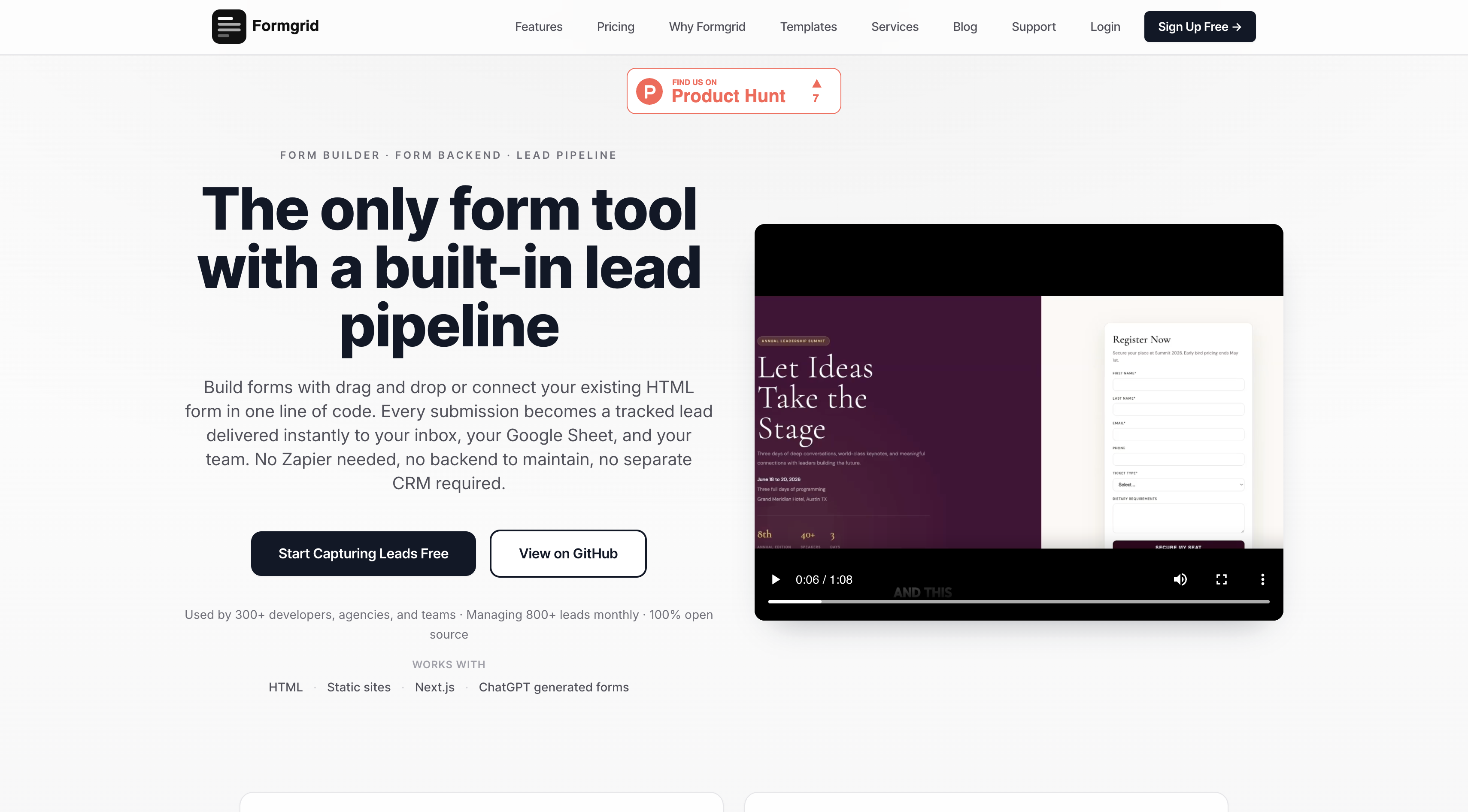
The free plan requires no credit card. You get unlimited forms and 50 submissions per month immediately.
Step 2: Create a New Form
Once logged in, you will land on your dashboard. Click New Form.
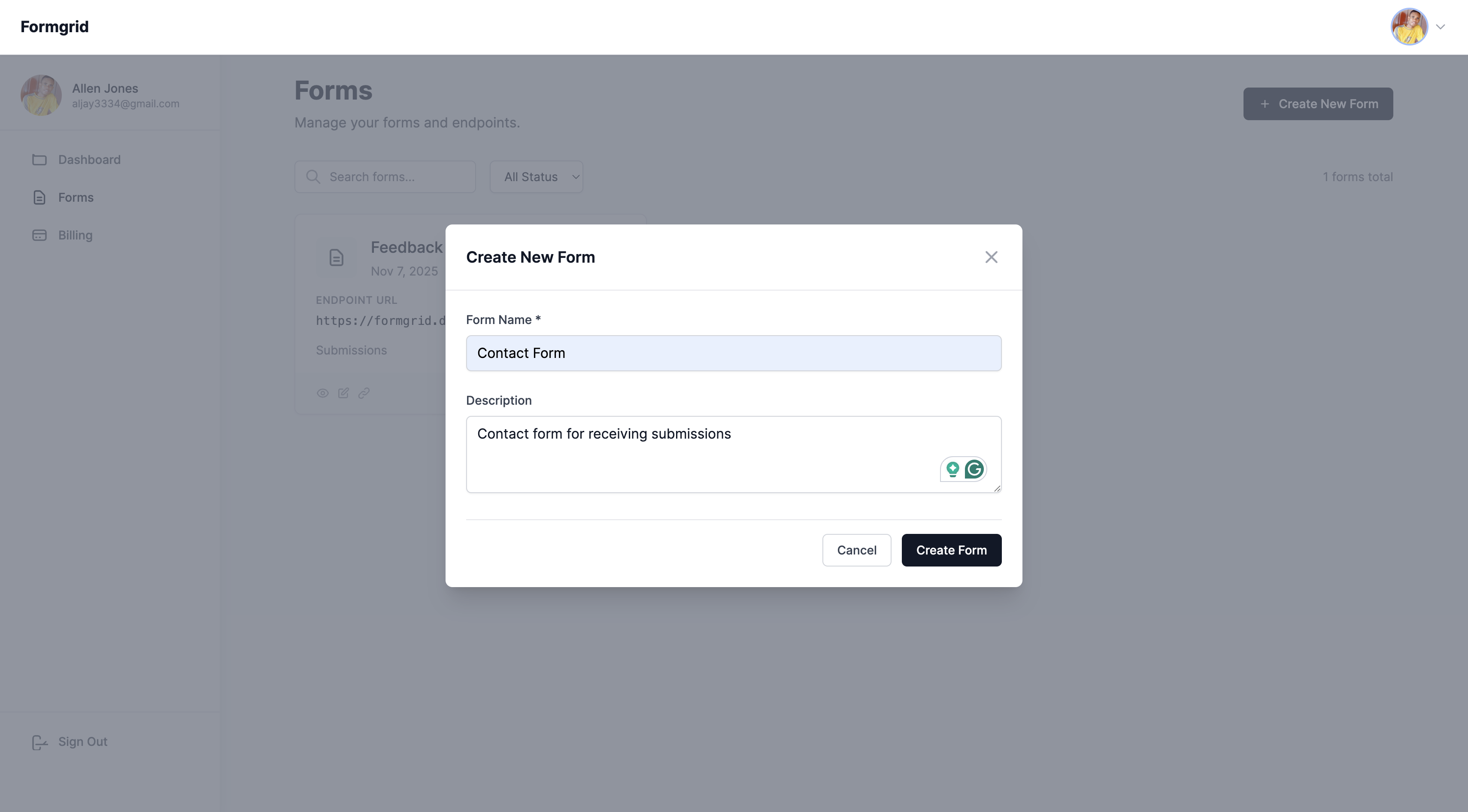
Give your form a name. Something descriptive works well: Contact Form, Booking Enquiry, Landing Page Leads.
Click Create Form.
Do not have an account yet? Create one here.
Step 3: Copy Your Endpoint URL
After creating your form, you will be taken to the form's overview page. Click the Overview tab and copy your unique endpoint URL.
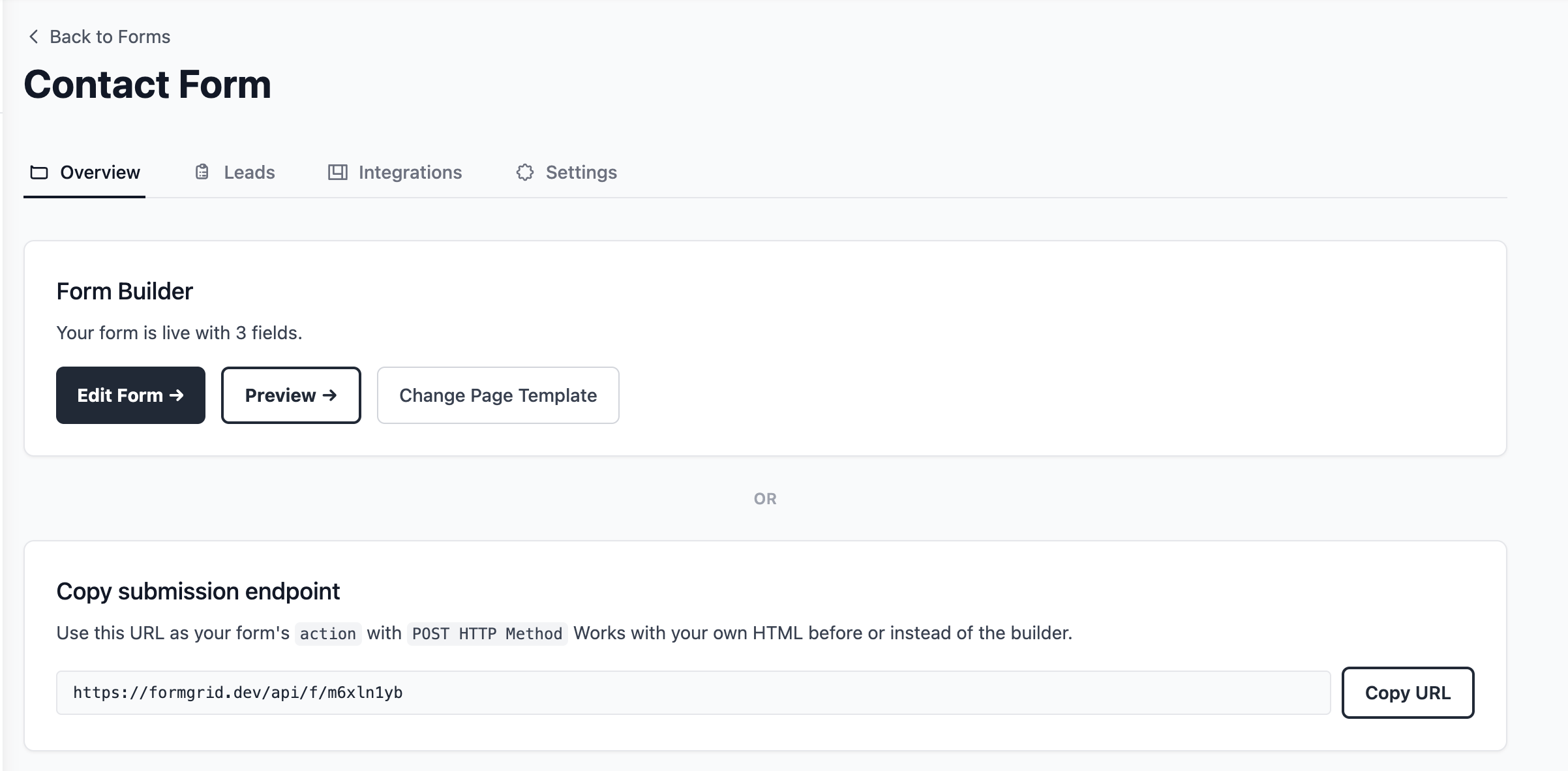
It will look something like this:
https://formgrid.dev/api/f/dcffghhnjjThis is the URL your HTML form will submit to. It's the same URL you'd use in place of your existing Web3Forms access key.
Step 4: Add the Form to Your HTML
If you already have a Web3Forms form, this step is genuinely all that changes. Copy your endpoint, replace the action URL, and you are done; no rewrite of your frontend required.
Here is a complete, copy-paste-ready contact form. Replace YOUR_ENDPOINT_URL with the URL you just copied:
<form action="YOUR_ENDPOINT_URL" method="POST">

  <label for="name">Your Name</label>
  <input
    type="text"
    id="name"
    name="name"
    placeholder="John Doe"
    required
  />

  <label for="email">Email Address</label>
  <input
    type="email"
    id="email"
    name="email"
    placeholder="john@example.com"
    required
  />

  <label for="message">Your Message</label>
  <textarea
    id="message"
    name="message"
    rows="5"
    placeholder="How can I help you?"
    required
  ></textarea>

  <!-- Honeypot: keeps bots out, invisible to real users -->
  <input
    type="text"
    name="_honey"
    style="display:none"
  />

  <!-- Optional: redirect after submission -->
  <input
    type="hidden"
    name="_redirect"
    value="https://yoursite.com/thank-you"
  />

  <button type="submit">Send Message</button>

</form>
That is your entire form. No server, no PHP, no backend code.
Replace Web3Forms now. No credit card required, and you will have this exact form live in under two minutes.
Step 5: Notifications Are Already Set Up, and Every Submission Becomes a Lead
You do not have to configure anything here. Formgrid automatically uses the email address you signed up with as your default notification email. The moment someone submits your form, the alert goes straight to your inbox.
If you would like submissions sent to a different address, for example a client's email or a team inbox, go to your form's Settings tab, find Email Notifications, and update it there.
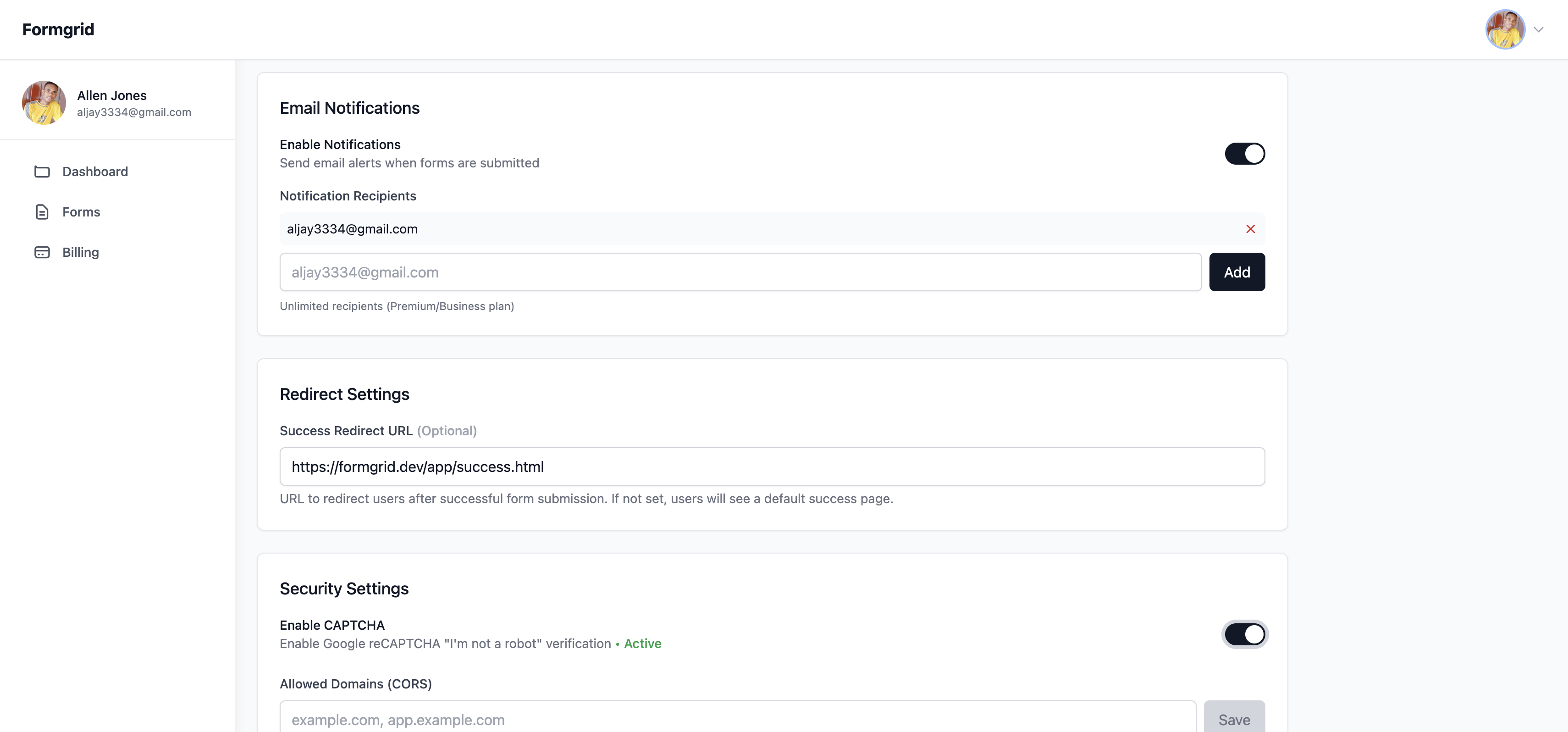
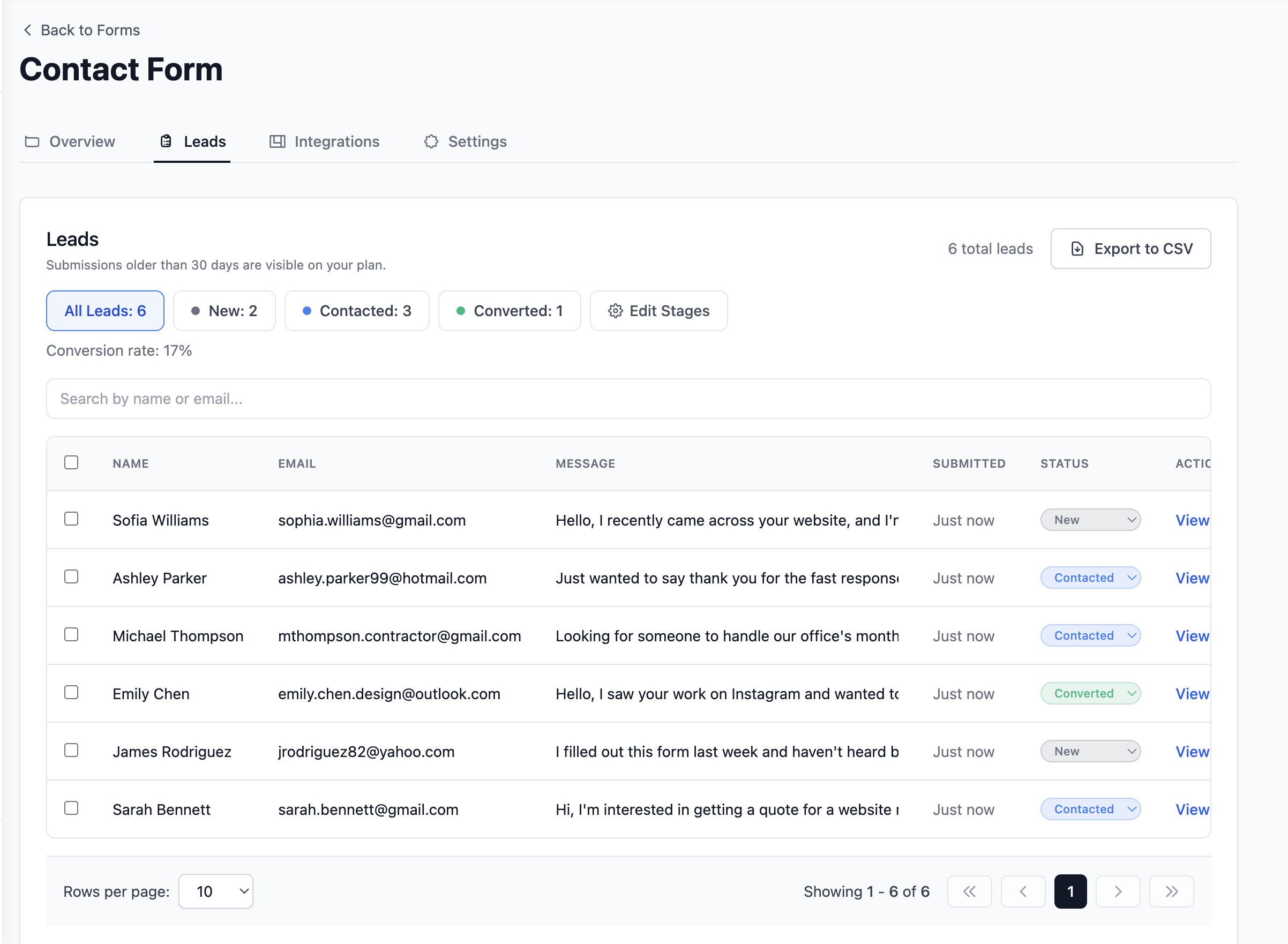
From this point on, every submission also lands in your dashboard as a lead you can move through New, Contacted, and Converted, not just a one-off email you have to remember to act on, and unlike Web3Forms' free plan, nothing disappears after 30 days.
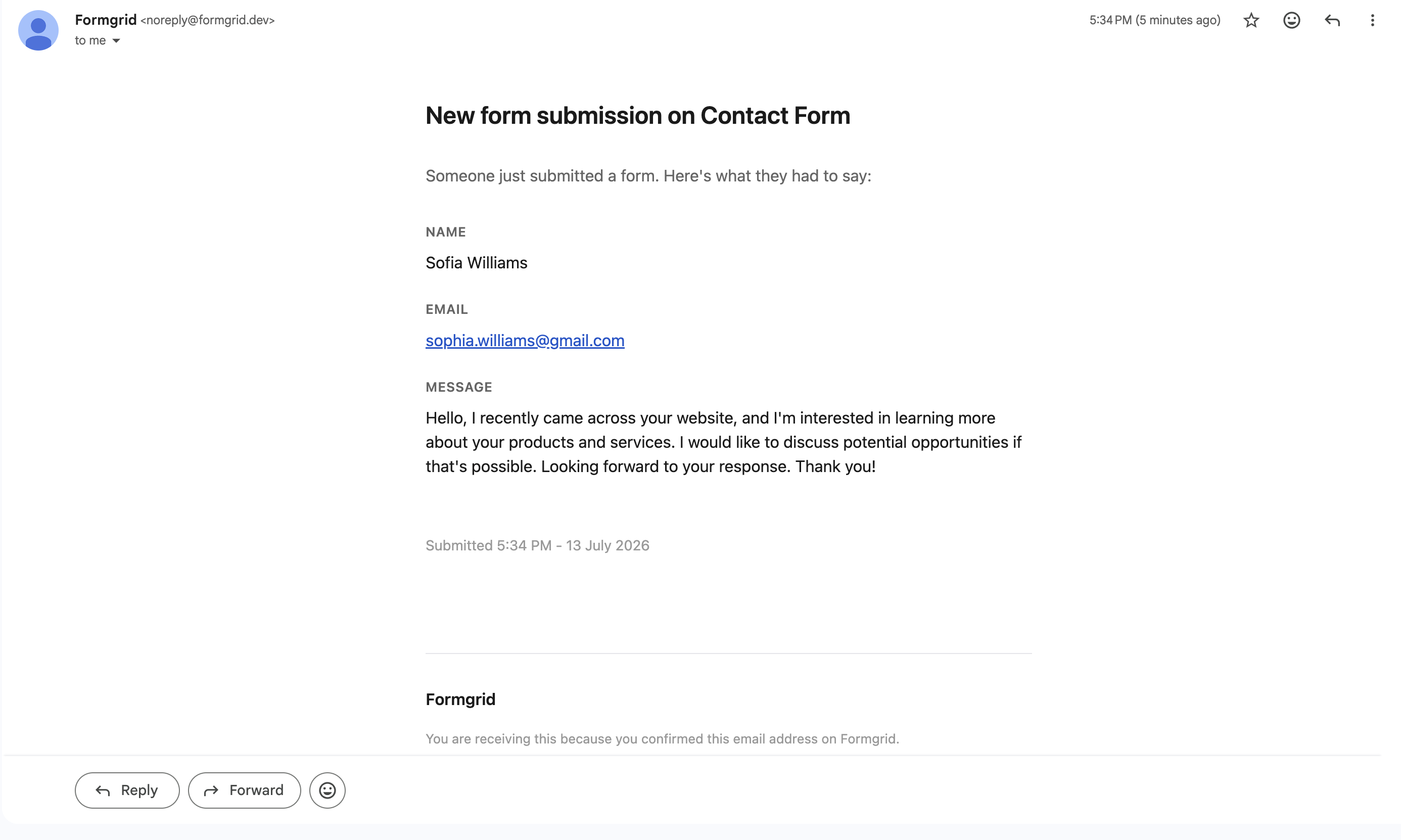
You will see the submitter's name, their email address, their message, and the timestamp, both in the email and in the dashboard. So even if a notification email slips into spam, nothing is lost.
Step 6: Test Your Form
Fill out your own form and submit it. Within seconds, you should see a confirmation email in your inbox and the submission logged in your Formgrid dashboard as a new lead.
If you do not receive the email, check your spam folder and make sure you saved the correct notification email in settings.
Optional: Using JavaScript for a Better UX
If you want to submit the form without a full page reload, here is a clean fetch-based approach:
const form = document.getElementById('contact-form');

form.addEventListener('submit', async (e) => {
  e.preventDefault();

  const formData = new FormData(form);

  try {
    const response = await fetch('YOUR_ENDPOINT_URL', {
      method: 'POST',
      body: formData,
    });

    if (response.ok) {
      form.innerHTML = '<p>Thanks! Your message was sent.</p>';
    } else {
      form.innerHTML = '<p>Something went wrong. Please try again.</p>';
    }
  } catch (error) {
    form.innerHTML = '<p>Network error. Please try again.</p>';
  }
});
Add id="contact-form" to your form element, and this script handles the rest. No page redirect, clean user experience.
Which One Should You Use?
Use Formgrid if you want a form backend and a form builder in one tool, you want to know what happened to a submission after it arrived, you want Google Sheets without paying $18 a month for it, you need multi-step forms without a Typeform subscription, or you want permanent submission storage and open source self-hosting.
Use Web3Forms if you want the most generous free plan available at 250 submissions a month, you need a simple contact form that sends emails and nothing more, and you are fine with submissions expiring after 30 days.
Use Formspree if you want the most mature, well-documented form backend with the largest community, or you are following a tutorial that already uses it.
Use Getform if you want a clean submission dashboard and a slightly better developer experience than Web3Forms, without needing a form builder.
Use Basin if you want webhooks on a free plan and the most minimal, affordable paid option.
Use Netlify Forms if your site is already on Netlify, and you want zero additional setup.
The Honest Assessment of Web3Forms
Web3Forms is good at one thing: getting a contact form working fast at zero cost. Its 250 free submissions a month are genuinely the most generous free tier among HTML form backends. If you are building a portfolio, a personal project, or a low-traffic site that just needs to forward a few emails a month, Web3Forms does that job well.
But the moment you need a dashboard, permanent storage, integrations, a form builder, or anything resembling lead management, Web3Forms either does not have it or charges $18 a month for it.
Final Thoughts
Web3Forms earns its place for developers who need a simple form backend and nothing more.
But once you are looking at the Pro plan or comparing paid tiers, Formgrid gives you more for less: a form builder, a lead pipeline no other tool on this list has, permanent submission storage, and the option to self-host if you ever want full control of your data.
Create your first tracked form. No credit card required.
Full disclosure: I built Formgrid. I wrote this comparison as honestly as I could. If anything looks inaccurate, let me know in the comments.

Comments
Leave a comment