
You set up Contact Form 7 on your WordPress site. Someone fills out your contact form. You never received the email.
Or worse: you receive it two days later, buried in your spam folder.
You are not alone. This is one of the most searched WordPress problems in 2026, and it affects thousands of website owners who have no idea why their contact form emails keep disappearing.
This guide explains exactly why it happens and gives you two ways to fix it permanently.
Why WordPress Contact Form Emails
Go to Spam
WordPress forms do send emails. Contact Form 7, WPForms, Gravity Forms, and Ninja Forms all send email notifications when someone submits your form.
The problem is not the form plugin. The problem is how WordPress sends emails.
By default WordPress uses a PHP function called mail() to send all emails including your form notifications. This function sends emails directly from your web server without any authentication
or encryption.
Email providers like Gmail, Outlook, and Yahoo has strict spam filters that check whether the server sending an email is authorized to send it. When an email arrives from a random web server with no authentication, those filters mark it as spam or reject it entirely.
Your form is working perfectly. Your hosting server is sending the email. But it never reaches your inbox because Gmail sees it as suspicious.
The Five Most Common Reasons Your
WordPress Form Emails Are Not Arriving
Reason 1: Your host blocks or throttles PHP mail
Many shared hosting providers block or severely limit PHP mail to prevent their servers from being used for spam. Bluehost, SiteGround, and other popular hosts have increasingly aggressive restrictions on PHP mail.
If you recently changed hosting providers and your contact form emails suddenly stopped working, this is almost certainly the reason.
Reason 2: Your domain has no SPF or DKIM records
SPF and DKIM are email authentication records that tell email providers your server is authorized to send emails from your domain. Without them, your emails look suspicious to spam filters.
Most WordPress PHP mail setups send emails without proper SPF and DKIM authentication, which is why they land in spam.
Reason 3: Contact Form 7 default settings use WordPress admin email
CF7 by default sends notification emails from your WordPress admin email address using your server's PHP mail. If your server's IP address has been flagged for spam by any email provider, your notifications will be blocked or filtered.
Reason 4: Your notification email address is different from your domain
If your WordPress site is yoursite.com but your notification email is
yourname@gmail.com the email is
traveling from a server at yoursite.com to Gmail. Gmail is increasingly suspicious of emails that originate from web servers
rather than dedicated email infrastructure.
Reason 5: No submission backup exists
This is not a deliverability problem, but it makes everything worse. When WordPress's PHP mail fails, your submission is lost permanently. There is no dashboard. No submission history. No way to recover what someone sent you. If the email fails, you never know it happened.
Fix 1: Use an SMTP Plugin
The fastest fix for most WordPress users is to replace PHP mail with a proper SMTP connection using a dedicated email service.
SMTP (Simple Mail Transfer Protocol) sends your emails through a proper authenticated email server instead of your web host's PHP mail function. Email providers trust SMTP emails from known services significantly more than PHP mail.
Step 1: Install WP Mail SMTP
WP Mail SMTP is the most popular WordPress SMTP plugin with over 3 million active installs. Install it from WordPress plugin directory.
Step 2: Choose an SMTP provider
WP Mail SMTP works with several free and paid SMTP providers:
Gmail SMTP (free) If you have a Google Workspace account, you can use Gmail's SMTP server. Free for basic usage. Best for small sites with low form volume.
Brevo (formerly Sendinblue) (free tier) 300 emails per day free. Good deliverability. Easy to set up.
Mailgun (free tier) 100 emails per day free. Excellent deliverability. Requires domain verification.
Step 3: Configure WP Mail SMTP
Go to WP Mail SMTP settings in your WordPress dashboard. Enter your SMTP credentials from whichever provider you chose. Send a test email to confirm it is working.
Once configured, all WordPress emails, including your contact form notifications, will be sent through your SMTP provider instead of PHP mail. Deliverability improves immediately.
Fix 2: Use Formgrid as Your
Form Backend
If you want more than just reliable email delivery, a submission dashboard, Google Sheets sync, file uploads, and spam protection, consider replacing your WordPress form plugin with Formgrid.
Formgrid is a form backend and form builder that handles your submissions independently of WordPress. It uses Resend for email delivery, which means your notifications go through proper, authenticated email infrastructure with excellent deliverability.
Here is how to use Formgrid with your WordPress site:
Option A: HTML Form in WordPress
Custom HTML Block
This is the most reliable approach. Instead of using a form plugin, you write a simple HTML form in a WordPress Custom HTML block and point it at your Formgrid endpoint.
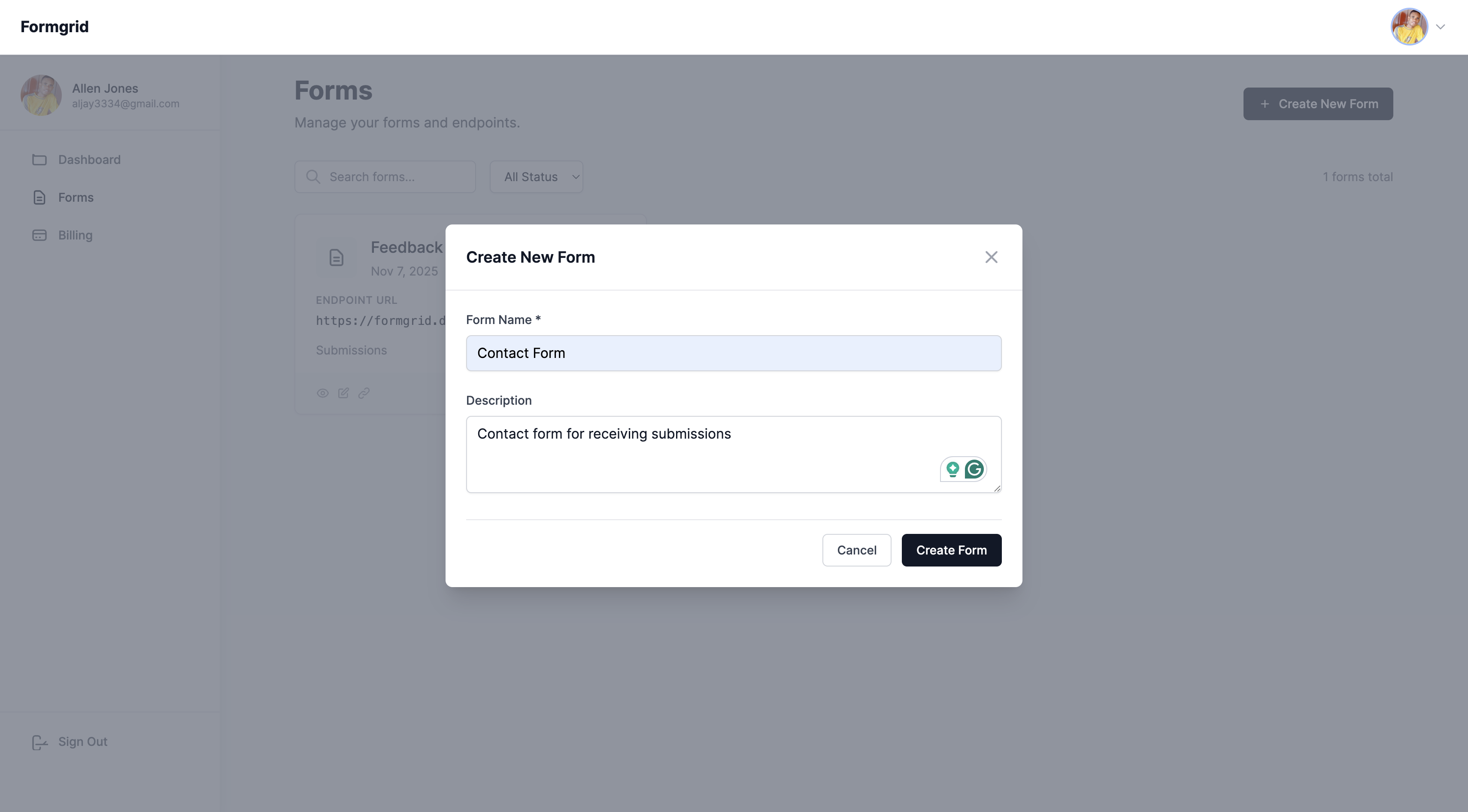
Step 1: Sign up at formgrid.dev and create a new form.
Step 2: Copy your Formgrid endpoint URL from the form overview tab. It looks like:
https://formgrid.dev/api/f/your-form-id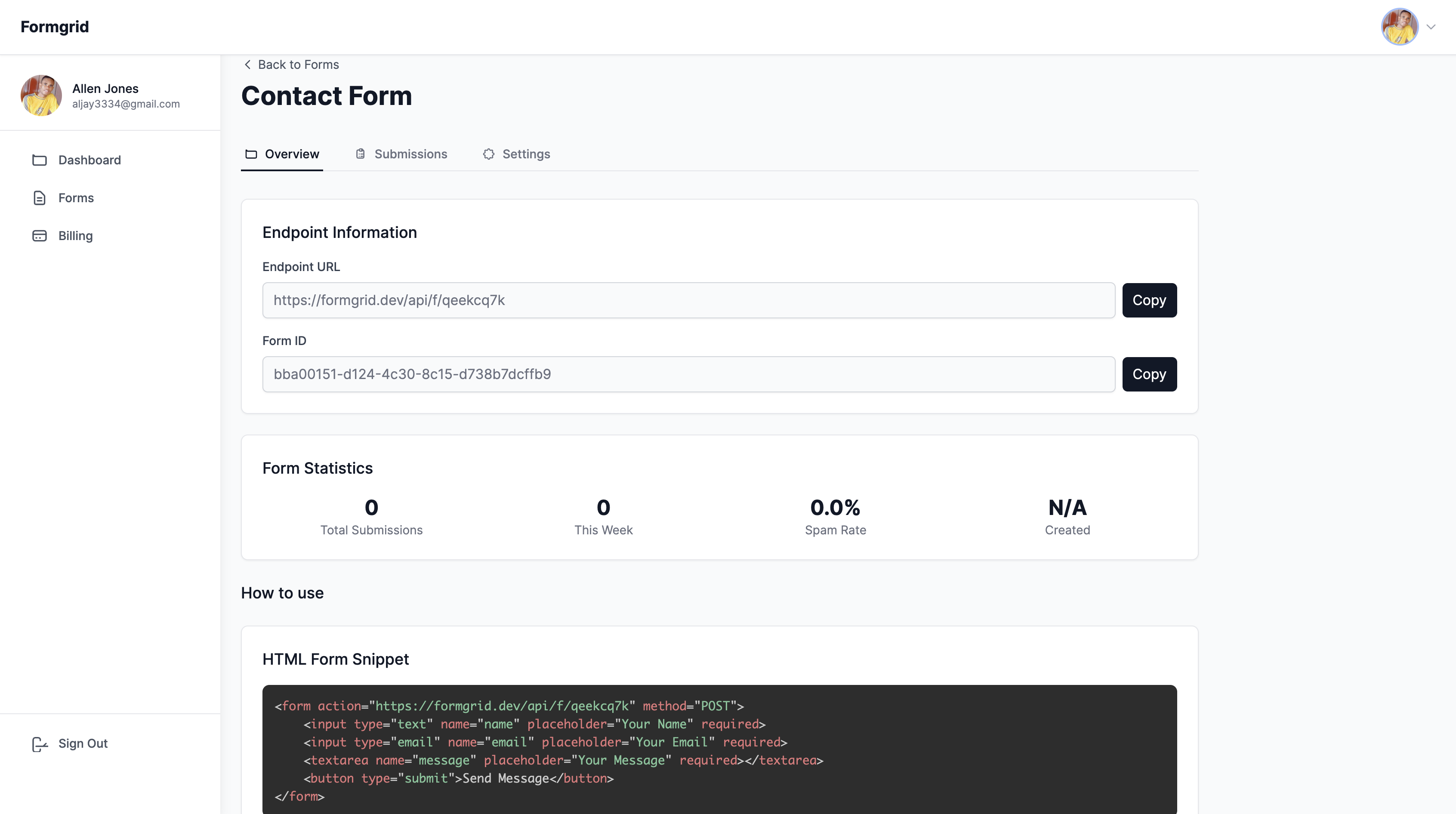
Step 3: In your WordPress page editor, add a Custom HTML block and paste this code:
<form action="https://formgrid.dev/api/f/your-form-id"
      method="POST">

  <div>
    <label for="name">Your Name</label>
    <input type="text"
           id="name"
           name="name"
           required />
  </div>

  <div>
    <label for="email">Email Address</label>
    <input type="email"
           id="email"
           name="email"
           required />
  </div>

  <div>
    <label for="message">Message</label>
    <textarea id="message"
              name="message"
              rows="5"
              required></textarea>
  </div>

  <!-- Honeypot spam protection -->
  <input type="text"
         name="_honey"
         style="display:none" />

  <button type="submit">Send Message</button>

</form>
Replace your-form-id with your actual
Formgrid endpoint slug.
Step 4: Publish your page and submit a test entry. Your notification email will arrive instantly through Resend with reliable, authenticated delivery.
Option B: Embed the Formgrid
Form Builder
If you do not want to write any HTML, you can build your form using Formgrid's drag-and-drop form builder and embed it in WordPress using an iframe.
Step 1: Build your form in the Formgrid form builder. Drag and drop your fields, customize labels, and click Save.

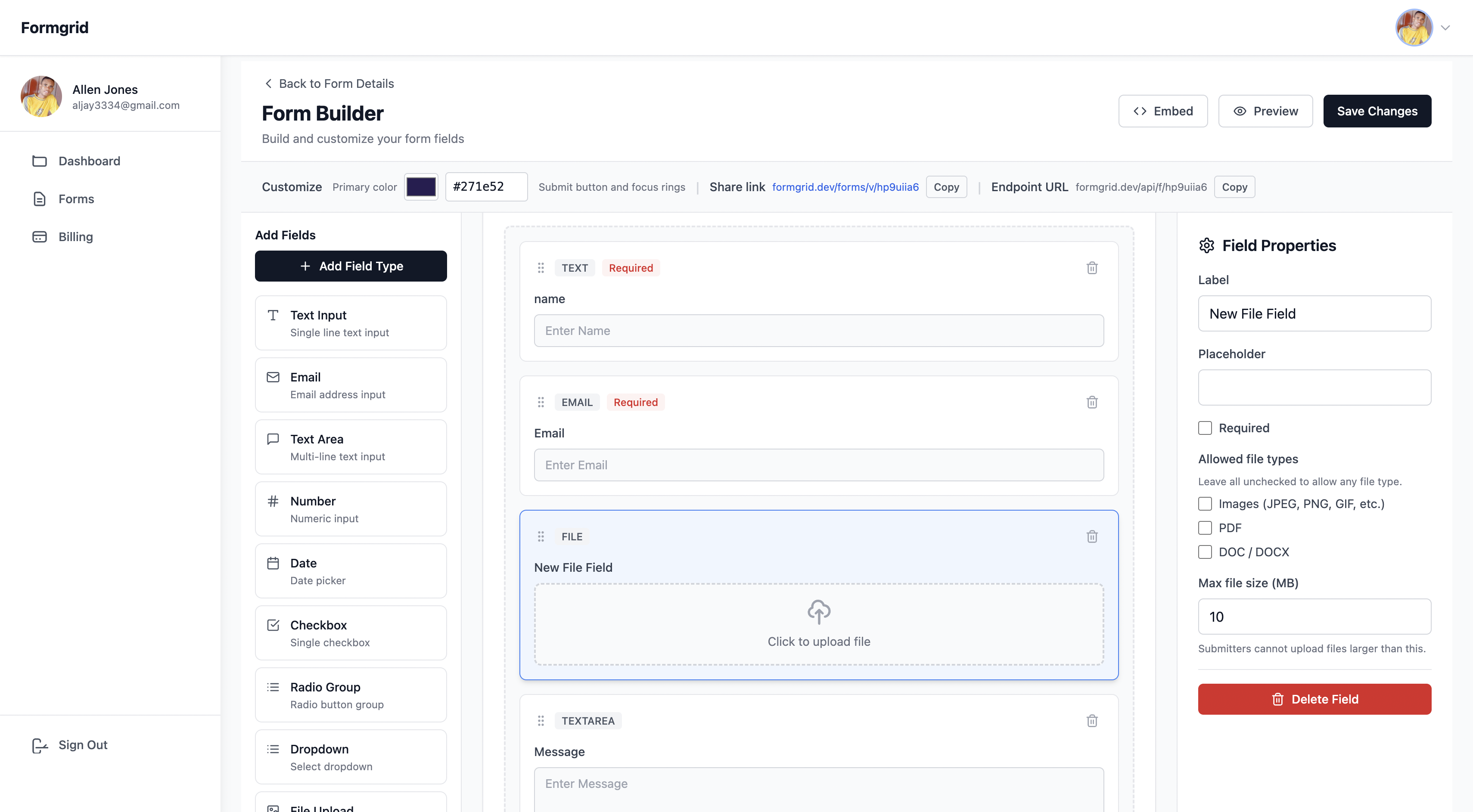
Step 2: Copy your shareable form link from the Overview tab.
Step 3: In your WordPress page editor add a Custom HTML block and paste this embed code:
<iframe
  src="https://share.formgrid.dev/f/your-form-id"
  width="100%"
  height="600"
  frameborder="0"
  style="border: none;">
</iframe>
Your form is now embedded in your WordPress page and all submissions go directly to Formgrid.
Why Formgrid Solves More Than
Just Deliverability
The SMTP plugin approach fixes your email deliverability. Formgrid fixes deliverability and gives you several things WordPress form plugins cannot:
A submission dashboard Every submission is saved in your Formgrid dashboard regardless of whether the email was delivered. You never lose a submission again.
CSV export Download all your submissions as a spreadsheet anytime. No plugin needed. No data loss.
File uploads Accept resumes, images, and documents up to 1GB per file on the Premium plan.
Google Sheets sync On all plans, with higher limits on Premium ($12/month) and unlimited sync on Business ($29/month), every submission can appear automatically in a Google Sheet in real time. No Zapier. No plugins. No Google API setup.
Spam protection Built-in honeypot and rate limiting catch bots before they reach your inbox. Advanced CAPTCHA on the Premium plan.
Custom email templates On the Business plan, you can design exactly how your notification emails look with full HTML control.
Which Fix Should You Use?
You want the simplest fix with minimal setup, and you are happy with your current form plugin:
→ Use WP Mail SMTP with a free
  SMTP provider

You want reliable emails AND a submission dashboard AND Google
Sheets sync AND spam protection:
→ Use Formgrid as your form backend

You are a non-technical user who
does not want to touch any code:
→ Use Formgrid's form builder
  embedded via iframe
The Honest Limitation of Formgrid
for WordPress
Formgrid is not a WordPress plugin. You cannot install it from the WordPress plugin directory. It requires either adding a custom HTML form to your page or embedding the form builder via iframe.
For users who are comfortable with WordPress Custom HTML blocks, this is a one-time 5-minute setup. For users who want a fully integrated WordPress plugin experience, WP Mail SMTP is the simpler choice.
Both fixes solve the core problem. Choose the one that matches your technical comfort level.
Frequently Asked Questions
Will this fix Contact Form 7 emails going to spam?
If you use WP Mail SMTP with a proper SMTP provider, yes. CF7 will send through your SMTP connection instead of PHP mail and deliverability improves immediately.
If you switch to Formgrid, your CF7 plugin becomes optional. You can use a simple HTML form instead and bypass CF7 entirely.
Do I need to pay for an SMTP provider?
Most SMTP providers have generous free tiers. Brevo gives you 300 emails per day free. Mailgun gives you 100 emails per day free. For most small business contact forms, these free tiers are more than enough.
Does Formgrid work with any WordPress theme?
Yes. Formgrid uses a standard HTML form or an iframe embed. Both work with any WordPress theme, including Astra, Divi, Elementor, GeneratePress, and Kadence.
What happens if I miss a submission?
With a standard WordPress form plugin and PHP mail, a failed email means a lost submission. With Formgrid, every submission is saved to your dashboard regardless of email delivery. You can always log in and see every submission ever received.
Formgrid Plans and Pricing
Free plan ($0/month): 25 submissions per month, email notifications, submission dashboard, and spam protection (honeypot and rate limiting).
Premium plan ($12/month): 1,000 submissions per month, Google Sheets sync (up to 500 rows per month), file uploads up to 1GB per file, CSV export, advanced CAPTCHA, and remove Formgrid branding.
Business plan ($29/month): 15,000 submissions per month, unlimited Google Sheets sync, custom HTML email templates, auto-responder emails, webhooks, and priority support.
No contracts. Cancel at any time.
Final Thoughts
WordPress contact form emails going to spam is a PHP mail problem not a form plugin problem. The fix is straightforward:
Replace PHP mail with a proper SMTP connection using WP Mail SMTP and a free SMTP provider. Your emails will reach inboxes reliably from today.
Or switch to Formgrid for a form backend that handles reliable email delivery, submission storage, Google Sheets sync, and spam protection all in one place.
Either way, your contact form emails will stop disappearing.
👉 Try Formgrid free at formgrid.dev

Comments
Leave a comment