
Looking for a Formspree alternative in 2026? The right choice depends on whether you only need a form endpoint, or whether you need to manage what happens to the leads those forms generate.
Formspree is a solid product for the first case. But its paid plans start at $15 per month for only 200 submissions per month, and costs climb quickly as your submission volume grows. On the free plan, submissions are only stored for 30 days. If you do not log in and export in time, you lose your data. And once a submission arrives, Formspree's job is done. There is no way to track who you followed up with, who converted, or who needs a reminder.
That second problem, submissions with no record of what happened next, is the actual reason most people end up looking for something else. In this article, I will walk through the best Formspree alternatives in 2026, covering price, features, self-hosting options, and which one is right for your use case.
Short Version
If you need a complete replacement with lead management, not just an endpoint, use Formgrid. It is the only tool on this list that turns a submission into something you can actually follow up on.
If you just need a simple endpoint and nothing else, use Basin. It is the cheapest option here and does exactly one thing well.
If your site is already deployed on Netlify, Netlify Forms is genuinely convenient, though you remain tied to Netlify for as long as you use it.
If you need something free with zero setup for a single low-volume form, use Staticforms.
Read on for the full comparison, or jump straight to Formgrid's pricing and templates.
Why Developers Look for Formspree Alternatives
Before jumping into the list, here are the most common reasons people switch:
Price. Formspree's paid plans add up fast once your submission volume grows.
No form builder. Formspree is purely a backend. If you need a shareable form link without writing HTML, you are out of luck.
No lead management. Formspree receives submissions and emails them to you. That is where the relationship ends. There is no way to track which leads you have followed up on, which ones have converted, or which ones need a reminder.
Limited spam protection on lower tiers. Advanced bot protection features may require a paid plan depending on your setup, so free-tier endpoints can be more exposed to spam than you'd expect.
30 day submission history on free plan. Your data will be lost if you do not export it in time.
No self-hosting. If you care about data ownership or GDPR compliance, Formspree gives you no option to run it yourself.
No open source option. You are locked in with no transparency and no customisation.
If any of those hit home, keep reading.
Already know you want to switch? Try Formgrid free, no credit card required.
The Best Formspree Alternatives in 2026
1. Formgrid: A Form Backend That Also Manages the Leads It Collects
Most tools in this space are form backends, plain and simple: a submission arrives, you get an email, that's the whole relationship. Formgrid is different. It's a form backend with a lightweight CRM built in, so every submission becomes a lead you can actually work, not just receive.
Best for: developers who want a form backend, non-technical users who need a shareable form link, and small businesses who want to manage leads without buying a full CRM.
What a submission becomes
The moment someone fills out your form, it does not just land in a list. It becomes a tracked lead, moving through New, Contacted, Converted. You add a note about the conversation, set a follow-up reminder that emails you on the day you need to act, and see your conversion rate update as you work through leads.

That is the whole differentiation in one picture: a form backend that tells you what happened after the submission arrived, not just that it arrived.
How Annie uses it
Annie runs event registrations in San Diego. Before Formgrid, her inbox filled up with one-off registration emails, and following up meant scrolling back through old messages trying to remember who she'd already contacted. Now every registration becomes a lead in her pipeline automatically. Leads get organized, follow-ups get scheduled, and conversions get tracked, all in one place instead of scattered across her inbox.
Two ways to use it
Option A: Point your existing HTML form at a Formgrid endpoint
<form action="https://formgrid.dev/api/f/your-form-id" method="POST">
  <input type="text" name="name" placeholder="Your Name" required />
  <input type="email" name="email" placeholder="Your Email" required />
  <textarea name="message" placeholder="Your Message"></textarea>
  <button type="submit">Send Message</button>
</form>
Your form stays exactly as it is. Formgrid handles receiving submissions, sending email notifications, and storing every lead in your dashboard.
Option B: Use the drag and drop form builder
No HTML required. Browse form templates and start from one, or build from scratch, get a shareable link, and send it via WhatsApp, email, or embed it on any website. Every submission lands as a tracked lead in your dashboard instantly.
Formgrid also includes a multi-step conversational form builder. One question at a time, clean design, works on any device, no Typeform subscription needed.

Switching from Formspree without breaking your site
The biggest hesitation with any switch is the fear that it'll break something. It won't. Migrating takes four steps: create a Formgrid form, copy your endpoint URL, replace your existing form's action attribute with it, and deploy. Your form's HTML, styling, and validation stay exactly as they are. The only thing that changes is where the submission goes.
The full walkthrough, screenshots included, is further down this post.
Switch from Formspree in 5 minutes. No credit card required.
Also included
Beyond the lead pipeline, Formgrid includes a few things worth knowing about if you're comparing feature for feature:
- Google Sheets sync starting at $12/month, no Zapier needed. Formspree's Google Sheets integration is a paid add-on, and can run considerably more than Formgrid's starting price depending on your plan, so it's worth checking current pricing on both before deciding.
- Free captcha and bot protection on all plans, including free. Cloudflare Turnstile for form builder forms, hCaptcha for HTML endpoint forms, no backend code required.
- File uploads up to 1GB, CSV export, and self-hosting with Docker if you'd rather run it yourself. Formgrid is 100% open source under the MIT license, GDPR friendly, with no tracking and no data selling.
Pricing
| Plan | Price | Submissions |
|---|---|---|
| Free | $0/month | 50/month |
| Premium | $12/month | 1,000/month |
| Business | $29/month | 15,000/month |
The bottom line: Formspree's paid plans start at $15 per month for a form backend with no builder and no lead management. Formgrid gives you a form backend, a drag and drop builder, multi-step forms, a lead pipeline with follow-up reminders, free captcha, Google Sheets sync, and full self-hosting support starting at $12 per month.
For a full side by side comparison with pricing and FAQs, see the Formspree alternative page.
Turn your submissions into tracked leads. No credit card required.
2. Getform: Simple and Clean Form Backend
Getform is a good choice for developers who want a straightforward form backend with a clean submission dashboard. It does not have a form builder or lead management, but the interface is clean and developer-friendly, and it has been around long enough to be a dependable, boring choice in the good sense of the word.
Best for: developers who want a straightforward Formspree replacement with a clean dashboard and nothing extra to learn.
Key features
- HTML form endpoint
- Email notifications
- File uploads
- Webhooks
- Zapier integration
Pricing: free tier available, paid plans start at $19 per month.
Tradeoff: no form builder, no lead management, no self-hosting, and limited spam protection on the free plan.
3. Basin: Minimal and No-Frills
Basin is the right call if you want the simplest possible form backend at the lowest paid price on this list. It starts at $8 per month, cheaper than every other paid option here, and includes webhooks even on the free plan.
Best for: developers who want the cheapest form backend with no distractions and do not need a builder or lead tracking.
Basin is intentionally minimal. Point your form at their endpoint, receive emails, and you are done. No dashboard overload, no feature creep.
Key features
- HTML form endpoint
- Email notifications
- Spam protection
- Simple dashboard
Pricing: free tier available, paid plans start at $8 per month.
Tradeoff: no form builder, no lead management, no self-hosting, no Google Sheets sync.
4. Netlify Forms: Great If You Are Already on Netlify
If your site is already deployed on Netlify, this is genuinely the path of least resistance. Zero new accounts, zero new services, and it is already billed alongside hosting you are paying for anyway. The tradeoff is that you remain tied to Netlify for as long as you use it, and if you ever move hosts, your forms move with the decision.
Best for: developers whose sites are already deployed on Netlify and want zero additional setup.
Just add the Netlify attribute to your form tag and you are done.
<form
  name="contact"
  method="POST"
  data-netlify="true"
>
Key features
- Zero setup if you are on Netlify
- Spam filtering
- Email notifications
- Dashboard built into Netlify
Pricing: 100 submissions per month free with Netlify, paid plans through Netlify's pricing.
Tradeoff: only works if your site is hosted on Netlify. No lead management, no form builder, no captcha beyond Netlify's built in filtering.
5. Staticforms: Completely Free
Staticforms is the right pick if your only requirement is that it costs nothing and you have a single simple contact form with low volume.
Best for: developers who want a completely free form backend for low volume personal projects and do not need a dashboard.
Key features
- Completely free
- No account required
- Email notifications
- Honeypot spam protection
Pricing: free.
Tradeoff: no dashboard, no submission history, no file uploads, no lead management, no captcha, no self-hosting. Fine for a basic contact form, not much beyond that.
Side by Side Comparison
| Feature | Formspree | Formgrid | Getform | Basin | Netlify Forms |
|---|---|---|---|---|---|
| Form builder | No | Yes | No | No | No |
| Multi-step forms | No | Yes | No | No | No |
| HTML endpoint | Yes | Yes | Yes | Yes | Yes |
| Shareable form link | No | Yes | No | No | No |
| Lead pipeline | No | Yes | No | No | No |
| Follow up reminders | No | Yes | No | No | No |
| Conversion tracking | No | Yes | No | No | No |
| Built in captcha | Paid add-on | Free, all plans | No | Basic spam filter | Basic spam filter |
| Google Sheets sync | Paid add-on | From $12/mo | No | No | No |
| Self-hostable | No | Yes | No | No | No, tied to Netlify |
| Open source | No | Yes | No | No | No |
| File uploads | Paid plans | Yes | Yes | Paid plans | Paid plans |
| Free submissions | 50/mo | 50/mo | Limited | Limited, generous for basics | 100/mo |
| Starting paid price | $15/mo | $12/mo | $19/mo | $8/mo, cheapest here | Bundled with hosting |
| Best if | You only need an endpoint and already know Formspree | You want leads tracked, not just received | You want a clean dashboard and nothing else | You want the lowest price and nothing else | You are already on Netlify |
Step by Step: Setting Up Formgrid to Replace Formspree
Let's replace Formspree with Formgrid right now. This takes under five minutes.
Step 1: Create Your Formgrid Account
Head to https://formgrid.dev and sign up using Google or email.
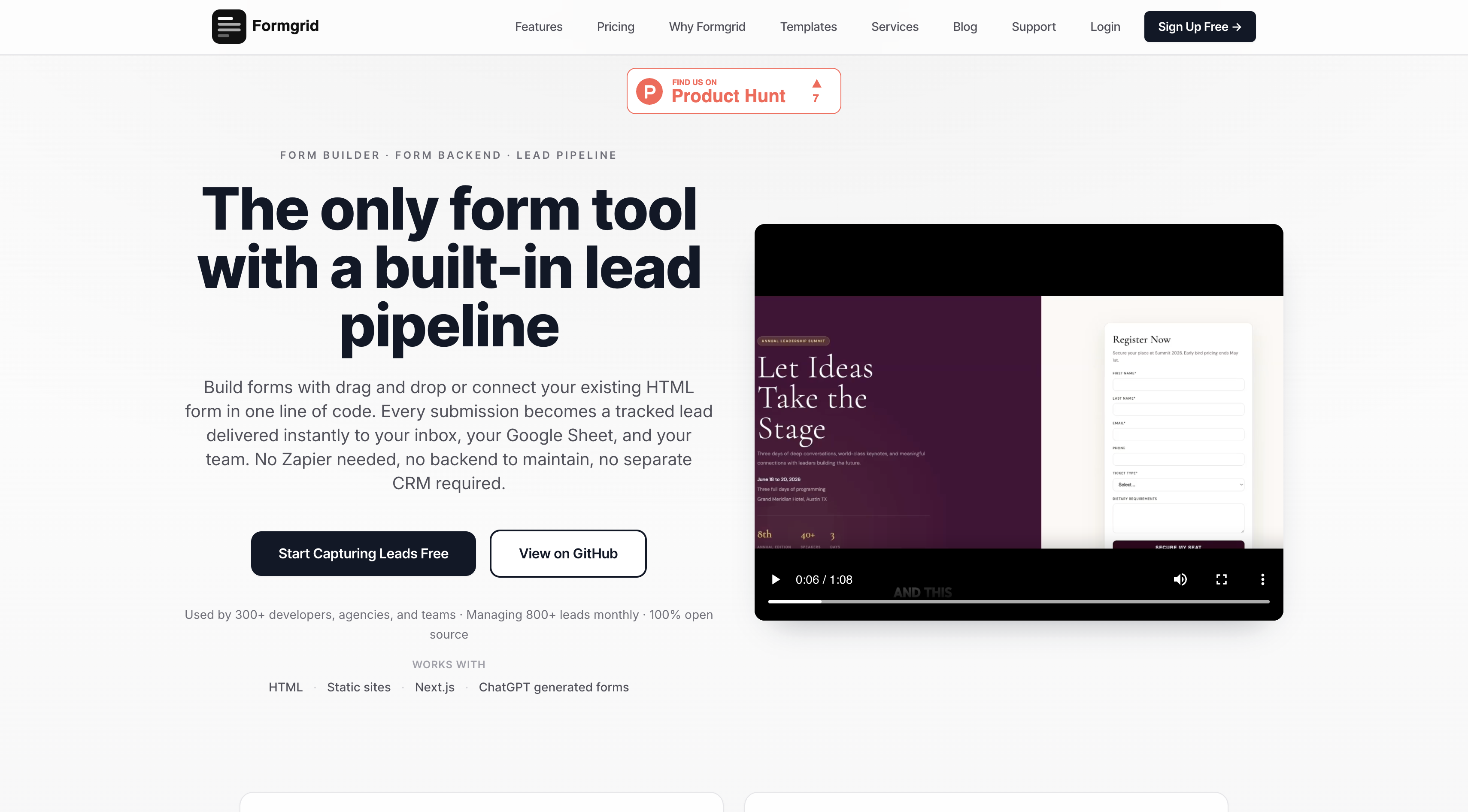
The free plan requires no credit card. You get unlimited forms and 50 submissions per month immediately.
Step 2: Create a New Form
Once logged in, you will land on your dashboard. Click New Form.
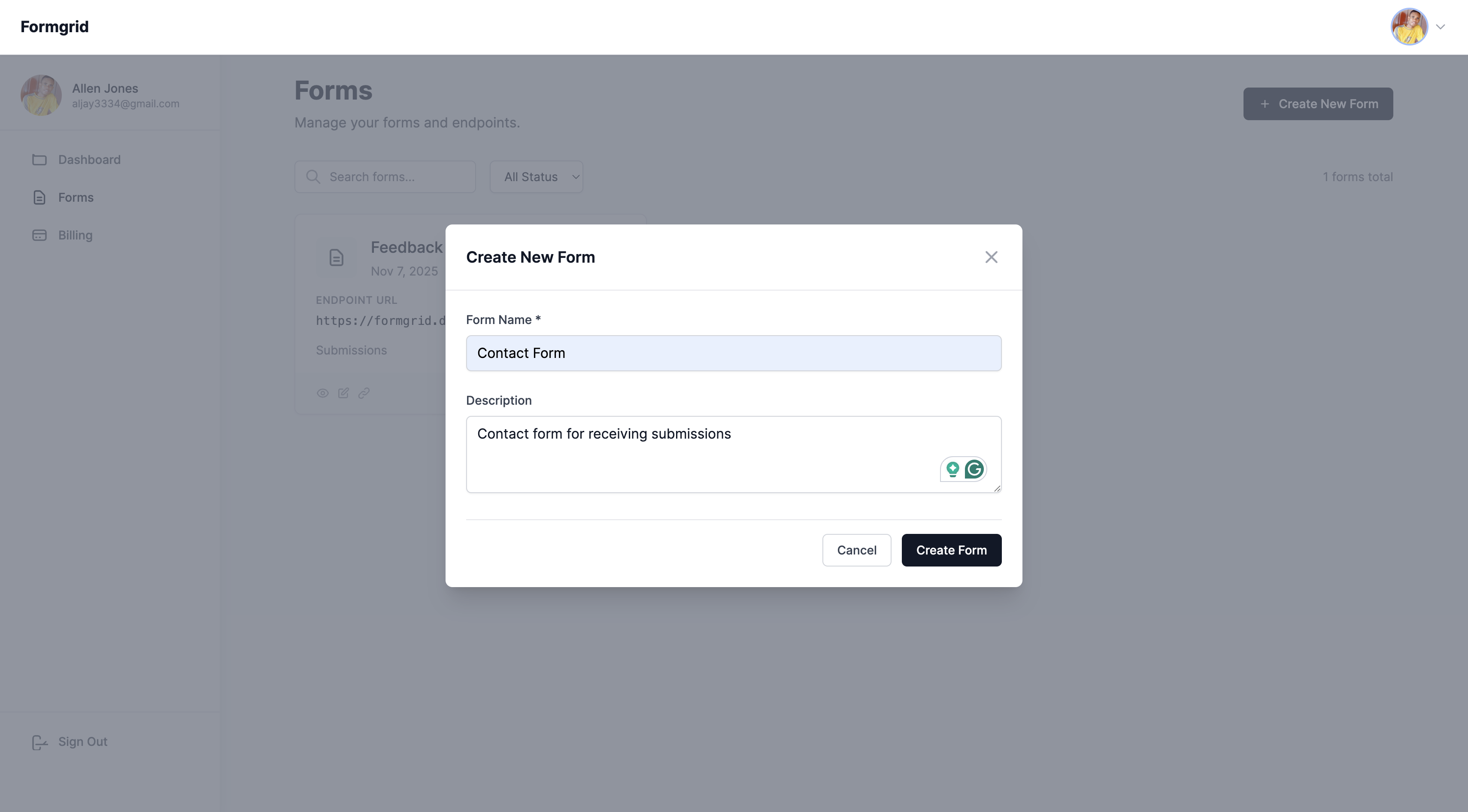
Give your form a name. Something descriptive works well: Contact Form, Portfolio Enquiry, Landing Page Leads.
Click Create Form.
Do not have an account yet? Create one here.
Step 3: Copy Your Endpoint URL
After creating your form, you will be taken to the form's overview page. Click the Overview tab and copy your unique endpoint URL.
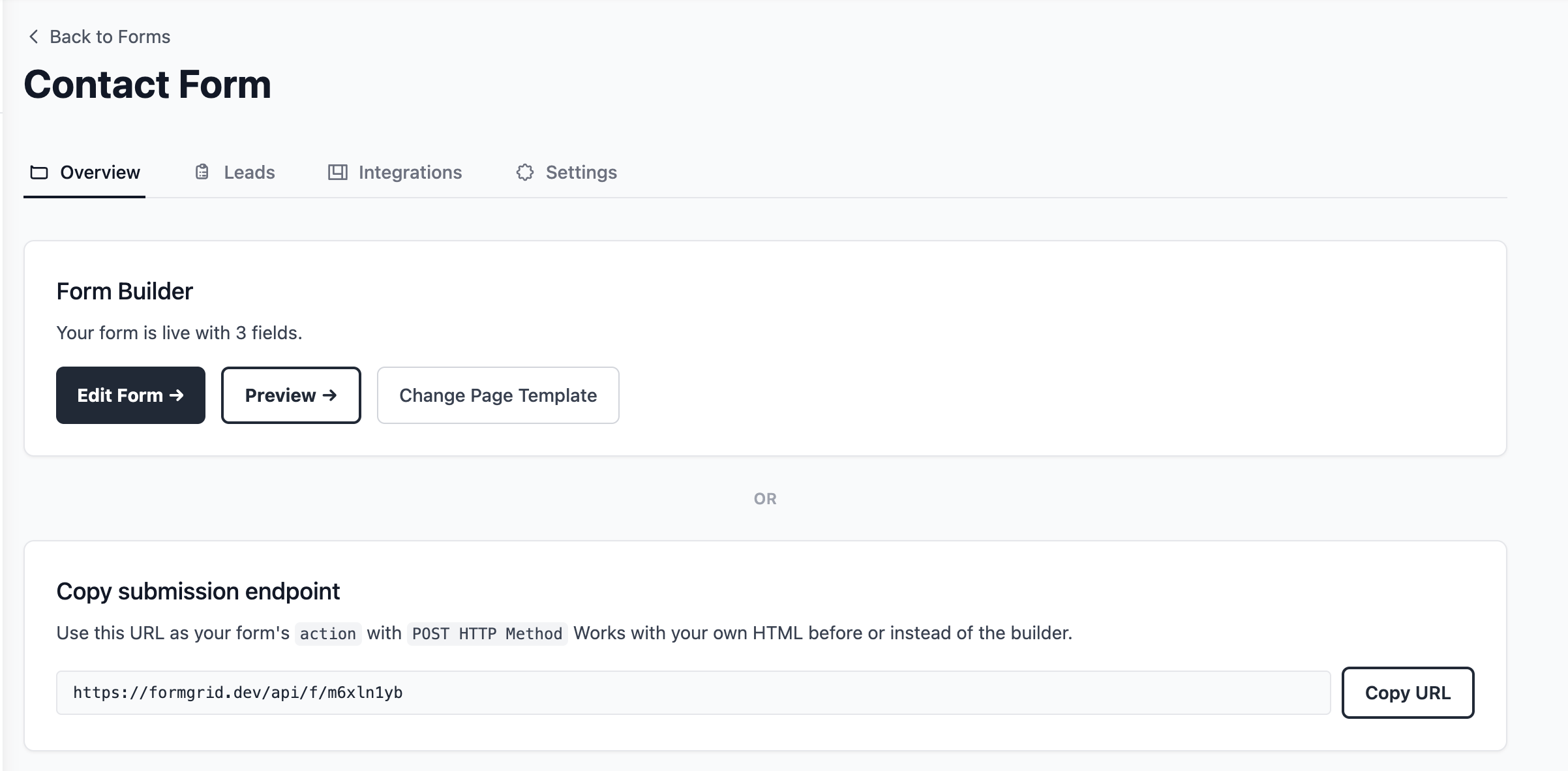
It will look something like this:
https://formgrid.dev/api/f/dcffghhnjjThis is the URL your HTML form will submit to. It's the same URL you'd use in place of your existing Formspree endpoint.
Step 4: Add the Form to Your HTML
If you already have a Formspree form, this step is genuinely all that changes. Copy your endpoint, replace the action URL, and you are done, no rewrite of your frontend required.
Here is a complete, copy-paste-ready contact form. Replace YOUR_ENDPOINT_URL with the URL you just copied:
<form action="YOUR_ENDPOINT_URL" method="POST">

  <label for="name">Your Name</label>
  <input
    type="text"
    id="name"
    name="name"
    placeholder="John Doe"
    required
  />

  <label for="email">Email Address</label>
  <input
    type="email"
    id="email"
    name="email"
    placeholder="john@example.com"
    required
  />

  <label for="message">Your Message</label>
  <textarea
    id="message"
    name="message"
    rows="5"
    placeholder="How can I help you?"
    required
  ></textarea>

  <!-- Honeypot: keeps bots out, invisible to real users -->
  <input
    type="text"
    name="_honey"
    style="display:none"
  />

  <!-- Optional: redirect after submission -->
  <input
    type="hidden"
    name="_redirect"
    value="https://yoursite.com/thank-you"
  />

  <button type="submit">Send Message</button>

</form>
That is your entire form. No server, no PHP, no backend code.
Replace Formspree now. No credit card required, and you will have this exact form live in under two minutes.
Step 5: Notifications Are Already Set Up, and Every Submission Becomes a Lead
You do not have to configure anything here. Formgrid automatically uses the email address you signed up with as your default notification email. The moment someone submits your form, the alert goes straight to your inbox.
If you would like submissions sent to a different address, for example a client's email or a team inbox, go to your form's Settings tab, find Email Notifications, and update it there.
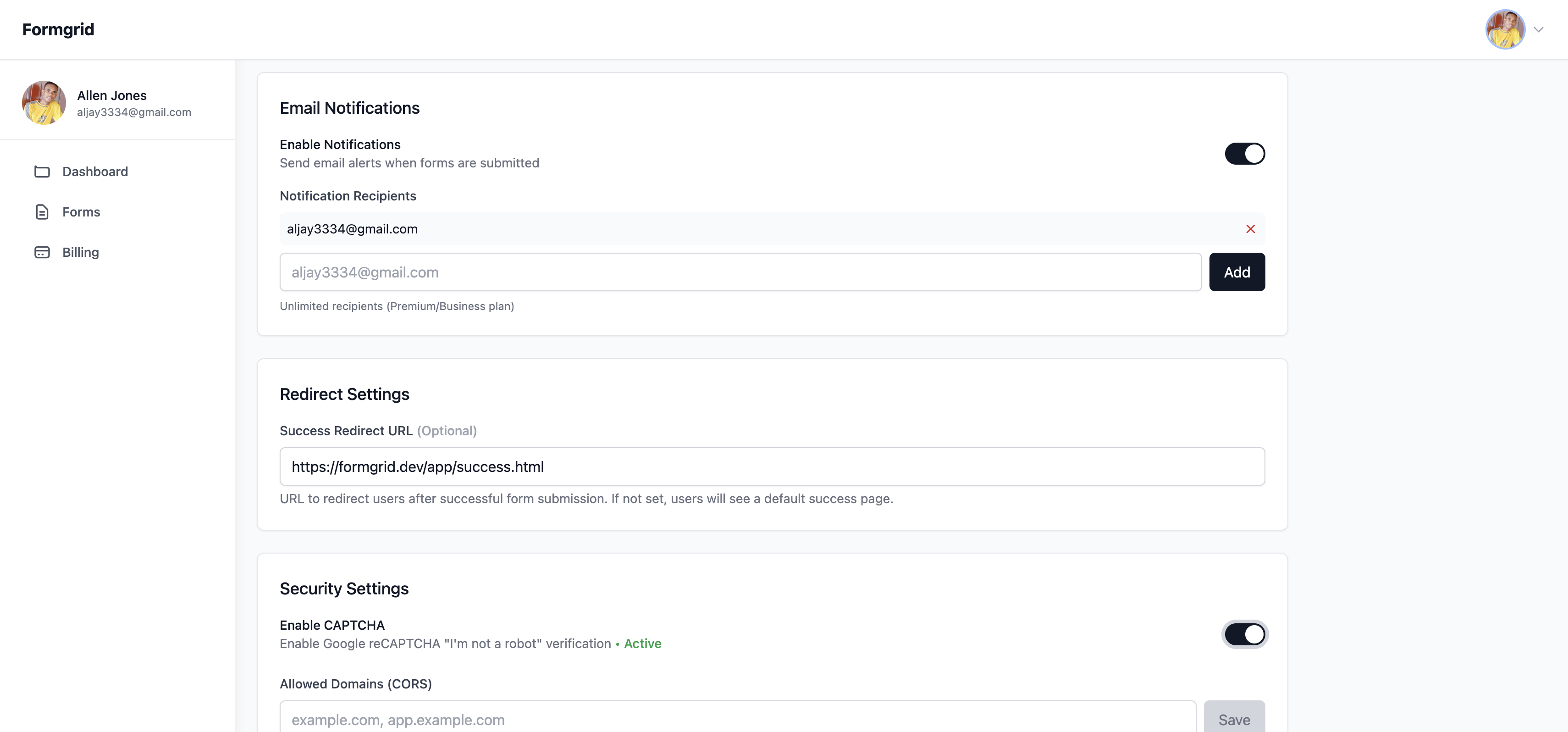
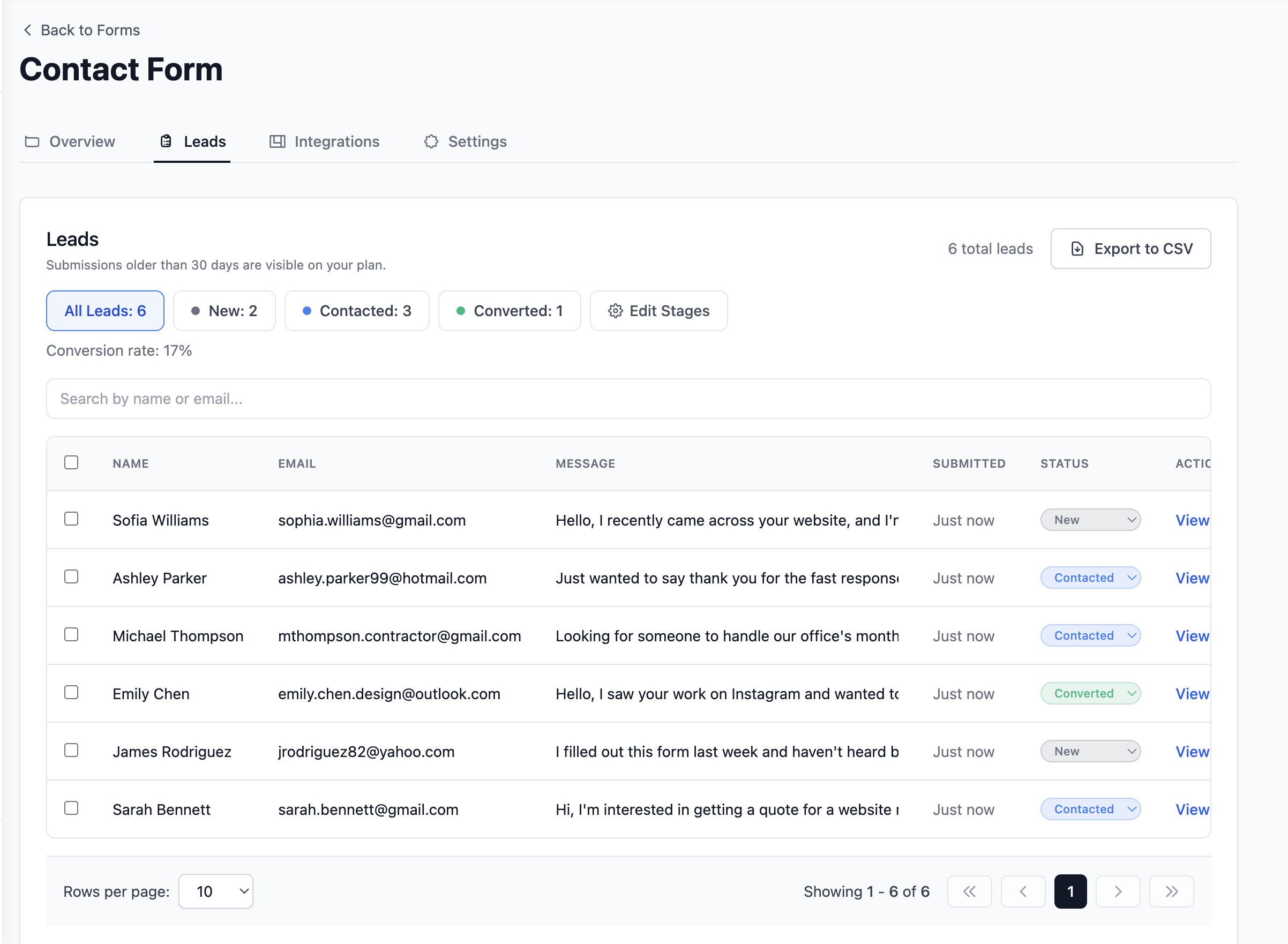
From this point on, every submission also lands in your dashboard as a lead you can move through New, Contacted, and Converted, not just a one-off email you have to remember to act on, and unlike Formspree's free plan, nothing disappears after 30 days.
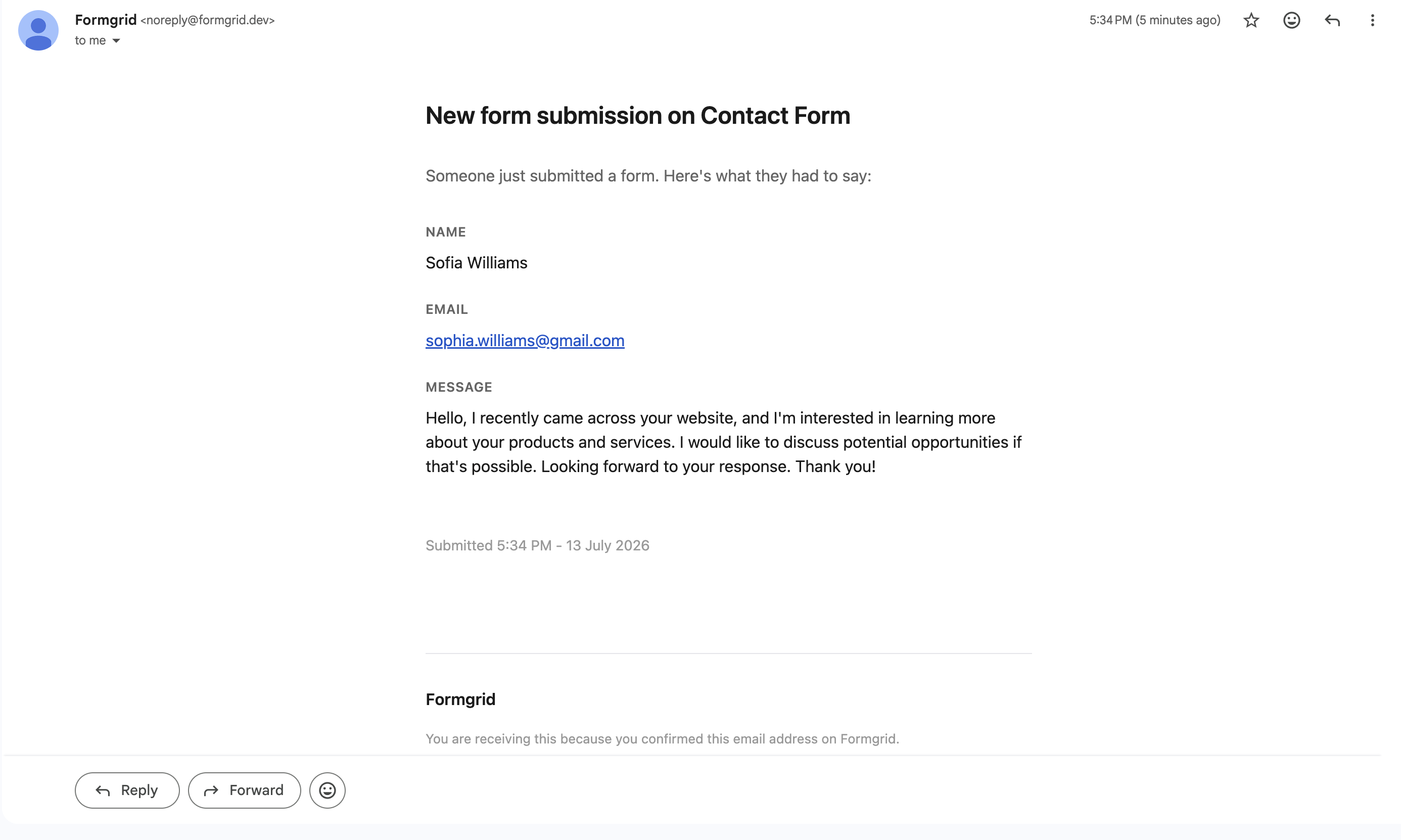
You will see the submitter's name, their email address, their message, and the timestamp, both in the email and in the dashboard. So even if a notification email slips into spam, nothing is lost.
Step 6: Test Your Form
Fill out your own form and submit it. Within seconds, you should see a confirmation email in your inbox and the submission logged in your Formgrid dashboard as a new lead.
If you do not receive the email, check your spam folder and make sure you saved the correct notification email in settings.
Optional: Using JavaScript for a Better UX
If you want to submit the form without a full page reload, here is a clean fetch-based approach:
const form = document.getElementById('contact-form');

form.addEventListener('submit', async (e) => {
  e.preventDefault();

  const formData = new FormData(form);

  try {
    const response = await fetch('YOUR_ENDPOINT_URL', {
      method: 'POST',
      body: formData,
    });

    if (response.ok) {
      form.innerHTML = '<p>Thanks! Your message was sent.</p>';
    } else {
      form.innerHTML = '<p>Something went wrong. Please try again.</p>';
    }
  } catch (error) {
    form.innerHTML = '<p>Network error. Please try again.</p>';
  }
});
Add id="contact-form" to your form element, and this script handles the rest. No page redirect, clean user experience.
Which One Should You Use?
Use Formgrid if you want a form backend that also tracks what happens after a submission arrives, you want captcha protection without writing backend code, you want Google Sheets sync without paying for a separate add-on, you need multi-step forms without a Typeform subscription, or you care about open source and self-hosting.
Use Getform if you just want a clean, simple Formspree replacement with a submission dashboard and no extras to learn.
Use Basin if price is the deciding factor and you just need basic form submission handling.
Use Netlify Forms if your site is already on Netlify, and you want zero additional setup, understanding that you stay tied to Netlify as long as you use it.
Use Staticforms if you need something completely free with no dashboard and volume is very low.
Final Thoughts
Most form backends stop at the inbox. Your submission arrives, you get an email, and then you are on your own figuring out who to follow up with, what you said to them, and whether they ever became a customer.
Formgrid is the only tool on this list that closes that gap. Not a form backend with extra features bolted on, but a form backend and a lightweight CRM in one place, for anyone who wants to actually do something with their submissions once they arrive.
Create your first tracked form, no credit card required. Or browse templates to see what you can build without writing any code.
Full disclosure: I built Formgrid. I wrote this comparison as honestly as I could. If anything looks inaccurate, let me know in the comments.

Comments
Leave a comment