
Still Paying $19/Month for Getform's Basic Plan?
Get a form builder, a lead pipeline, and self-hosting, for less than Getform's starting price. Works with your existing HTML form or a no-code builder.
Getform is a decent product. It stores submissions, sends email notifications, and supports file uploads with a clean dashboard. For a lot of developers, that used to be enough.
But if you have looked at your bill lately, or hit the limits of the free plan, you have probably started wondering what else is out there.
In this article, I will walk through the best Getform alternatives in 2026, covering price, features, self-hosting options, and which one is right for your use case.
Short Version
If you want the simplest possible form backend and nothing else, Basin is worth a look at $8 a month, the cheapest paid option here.
If you want a form backend, a form builder, and a lead pipeline in one place, use Formgrid. It costs less than Getform's starting plan and does more with what you send it.
If your site is already on Netlify, Netlify Forms needs zero extra setup and is hard to beat for that specific case.
Why Developers Look for Getform Alternatives
Here are the most common reasons people switch:
Price. Getform's paid plans start at $19 per month, more expensive than most comparable tools for similar submission limits.
No form builder. Getform is a backend only. If you need a shareable form link without writing HTML, you have to look elsewhere.
No lead management. Getform stores submissions and shows them in a dashboard. There is no way to track which ones you have followed up on, which have converted, or which need a reminder.
No self-hosting. If you care about data ownership or GDPR compliance, Getform gives you no option to run it yourself.
No open source option. You are locked in with no transparency and no customisation.
Limited free tier. The free plan is restrictive and pushes you toward a paid upgrade quickly.
If any of those hit home, keep reading.
Getform Pricing
Before comparing alternatives, here is what Getform actually charges. The free tier is limited, and paid plans start at $19 per month once you need more submissions, webhooks, or file uploads at any real volume.
Ready to see what a lower starting price gets you instead? See Formgrid's pricing.
The Best Getform Alternatives in 2026
1. Formgrid: Form Backend, Form Builder, and Lead Pipeline in One Place
Best for: developers who want a form backend, non-technical users who need a shareable form link, and small businesses who want to manage leads without a full CRM.
What makes it different
Getform is a form backend that stops at the dashboard. Formgrid does not stop there.
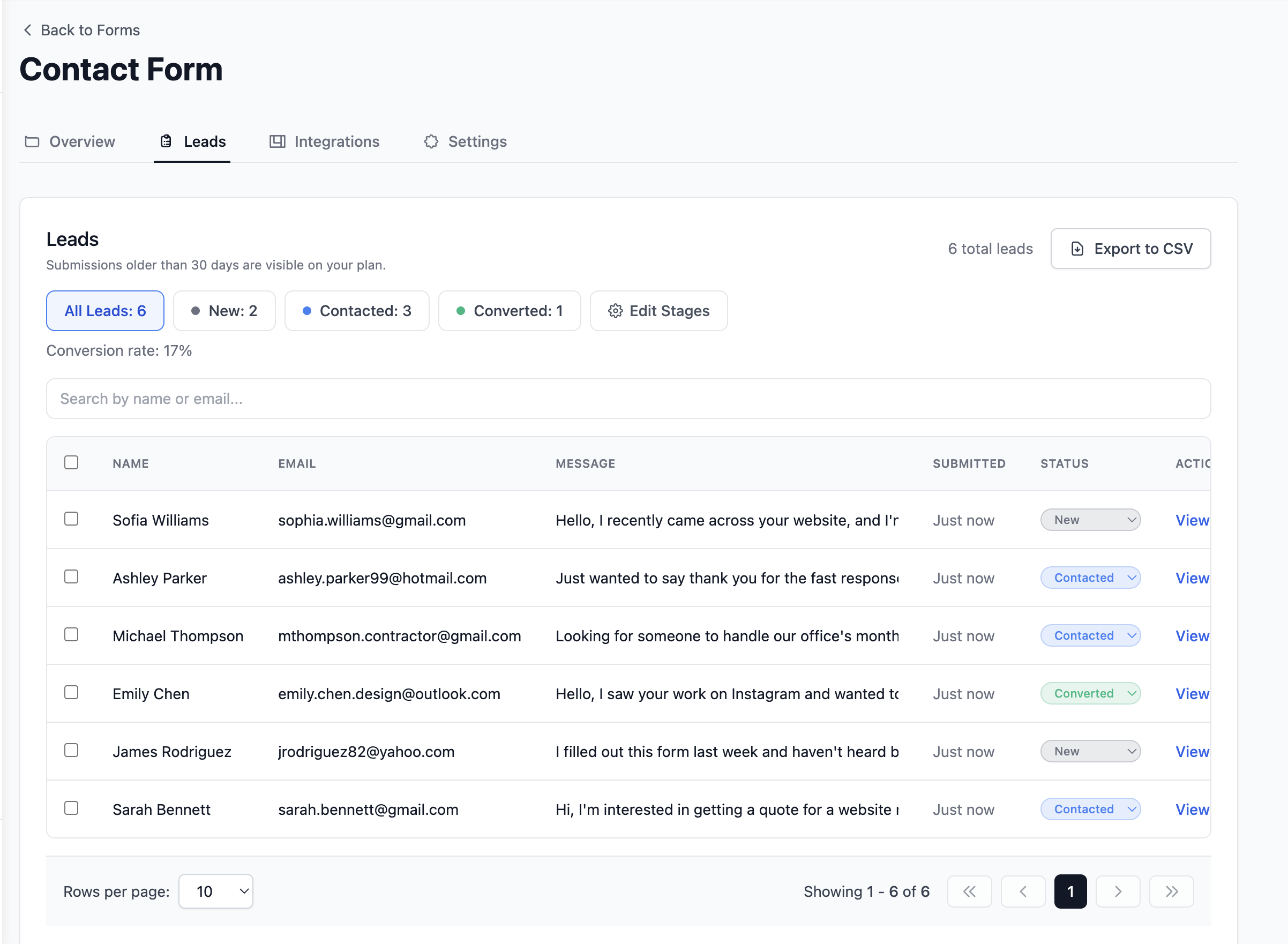
Every submission becomes a tracked lead automatically. You can mark it New, Contacted, or Converted, add a note, and set a follow-up reminder that emails you on the day you need to act.
On top of that, Formgrid includes a drag-and-drop form builder, multi-step conversational forms, free spam protection on all plans, and a starting price of $12 per month instead of Getform's $19.
How Jose uses it
Jose runs a custom T-shirt printing business and already had a working HTML contact form on his site before he looked at Getform. What he actually wanted was not a nicer dashboard to check submissions in, it was some way to know whether an enquiry had turned into an order without digging back through old messages. He pointed his existing form at a Formgrid endpoint without changing anything else on his page, and now every quote request arrives as a lead he can mark New, Contacted, or Converted, instead of a row in a table he has to cross-check against his memory.
Two ways to use it
Option A: Point your existing HTML form at a Formgrid endpoint
<!-- Your existing HTML form, unchanged -->
<form action="https://formgrid.dev/api/f/your-form-id" method="POST">
  <input type="text" name="name" placeholder="Your Name" required />
  <input type="email" name="email" placeholder="Your Email" required />
  <textarea name="message" placeholder="Your Message"></textarea>
  <!-- Honeypot spam protection -->
  <input type="text" name="_honey" style="display:none" />
  <button type="submit">Send Message</button>
</form>
Your form stays exactly as it is. Formgrid handles receiving submissions, sending email notifications, and storing every lead in your dashboard.
Option B: Use the drag and drop form builder
No HTML required. Build your form, get a shareable link, and send it via WhatsApp, email, or embed it on any website. Every submission lands as a tracked lead in your dashboard instantly.
Formgrid also includes a multi-step conversational form builder. One question at a time, clean design, works on any device. No Typeform subscription needed.

The full setup, screenshots included, is further down this post.
Switch from Getform in 5 minutes. No credit card required.
The lead management dashboard
Every form submission becomes a lead you can track through a simple pipeline: New, Contacted, Converted.
Here is what the full flow looks like from form submission to tracked lead:

On each lead, you can:
- Add a private note about the conversation
- Set a follow-up date and get an email reminder on that day
- See where the lead came from (UTM source, medium, campaign)
- Export all leads as CSV at any time
The leads tab shows your conversion rate at the top, so you always know how your form is performing.
This is the feature Getform does not have at any price point. There is a dashboard, but no lead pipeline, no follow-up reminders, and no conversion tracking. Once a submission is stored, you are on your own to remember what happened next.
See what a tracked lead looks like, try Formgrid free. No credit card required.
Google Sheets and webhooks
Every submission can automatically appear as a new row in your Google Sheet, or trigger a webhook to Zapier, Make, Slack, or Notion.
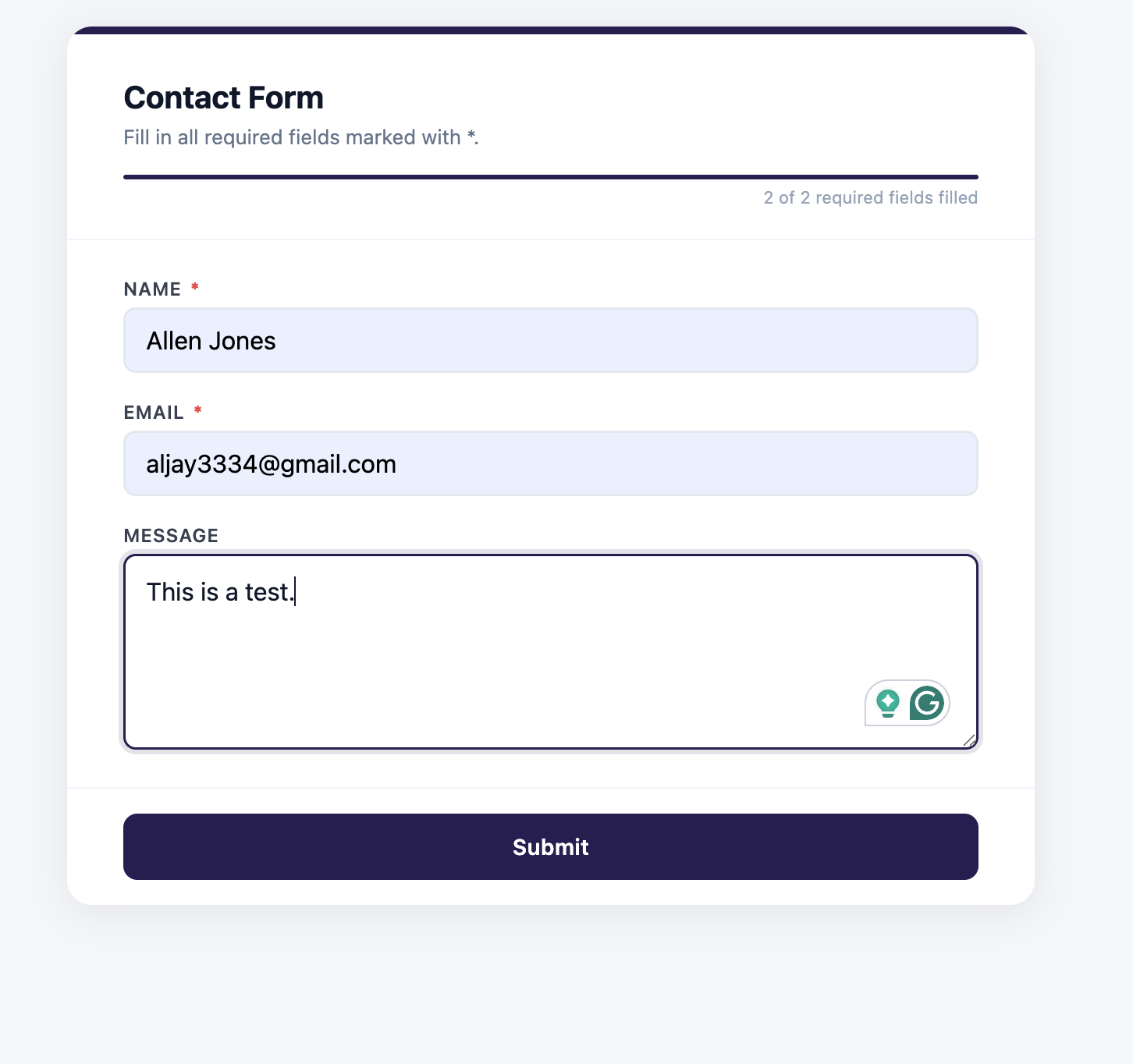
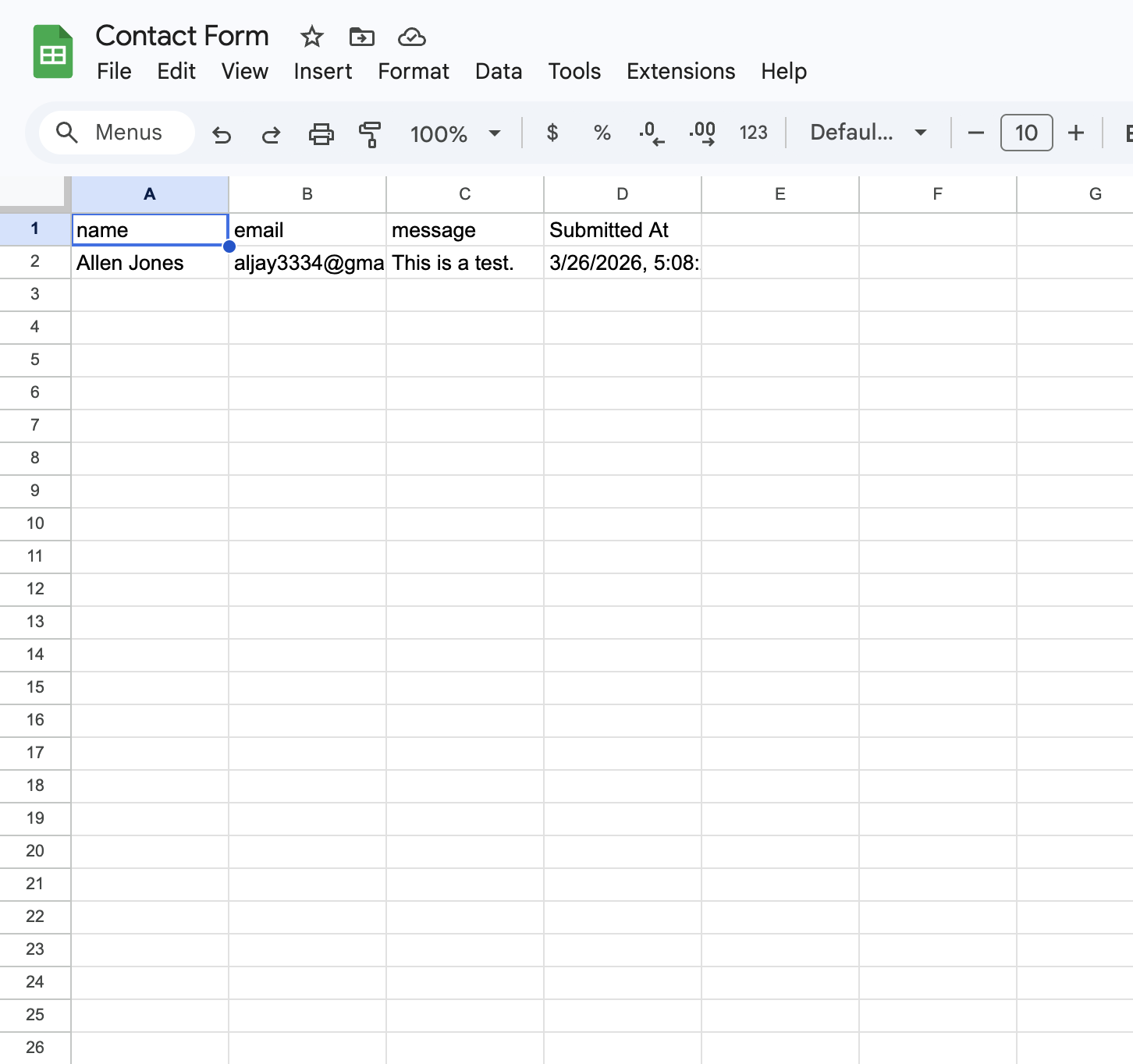
Getform includes webhooks but no direct Google Sheets sync. Formgrid gives you both.
Free spam protection on every plan
Formgrid includes built-in bot protection on all plans, including free. No backend code needed, no separate account required.
For form builder forms, Cloudflare Turnstile runs invisibly in the background. Real visitors see nothing. Bots are blocked silently before they ever reach your inbox.
For HTML endpoint forms, honeypot protection is built in automatically, and hCaptcha can be enabled from your form settings with one snippet, no server-side verification code required on your end.
Key features
- Drag and drop form builder with shareable link
- Multi-step conversational forms built in
- HTML form endpoint that works with any static site
- Built-in lead pipeline: New, Contacted, Converted
- Notes and follow-up reminders on every lead
- Conversion rate tracking
- Free spam protection on all plans
- Instant email notifications
- File uploads
- CSV export
- Google Sheets sync, no Zapier needed
- Webhooks and Zapier integration
- Self-hostable with Docker
- 100% open source under MIT license
- GDPR friendly with no tracking and no data selling
Pricing
| Plan | Price | Submissions | Google Sheets | File Uploads | Webhooks |
|---|---|---|---|---|---|
| Free | $0/month | 50/month | No | No | No |
| Premium | $12/month | 1,000/month | Yes | Yes | No |
| Business | $29/month | 15,000/month | Yes, unlimited | Yes | Yes |
The honest comparison: Getform's dashboard is clean and the product is reliable, that part is genuinely fine. But at $19 a month you get a submission store with no form builder, no lead tracking, and no self-hosting. At $12 a month, Formgrid gives you a form builder, a full lead pipeline with follow-up reminders, Google Sheets sync, and the option to self-host if you ever want to. Once you are comparing what each dollar actually buys, it is not a close call.
Turn your submissions into tracked leads. No credit card required.
2. Formspree: Most Established Form Backend
Best for: developers who want a well-documented, mature form backend with a large community and extensive framework guides.
Formspree has been around since 2012 and is one of the most referenced form backends in tutorials and documentation, covering every major framework and static site generator.
Key features
- HTML form endpoint
- Email notifications
- File uploads
- Spam protection
- Zapier integration
Pricing: free plan with 50 submissions per month, paid plans start at $15 per month.
Tradeoff: no form builder, no lead management, no self-hosting. Submission history on the free plan does not last indefinitely, so data can disappear if you do not export it in time.
3. Basin: Minimal and No-Frills
Best for: developers who want the simplest possible form backend with no distractions.
Basin is intentionally minimal. Point your form at their endpoint, receive emails, and you are done. No dashboard overload, no feature creep.
Key features
- HTML form endpoint
- Email notifications
- Spam protection
- Simple dashboard
Pricing: free tier available, paid plans start at $8 per month, the cheapest paid option on this list.
Tradeoff: very limited compared to other options. No form builder, no self-hosting, minimal integrations.
4. Netlify Forms: Great If You Are Already on Netlify
Best for: developers whose sites are deployed on Netlify.
If you are already deploying on Netlify, this is the easiest possible option. Just add the Netlify attribute to your form tag, and you are done, no external service needed.
<form name="contact" method="POST" data-netlify="true">Key features
- Zero setup if you are on Netlify
- Spam filtering
- Email notifications
- Dashboard in Netlify
Pricing: 100 submissions per month free with Netlify.
Tradeoff: only works if your site is on Netlify. No lead management, no form builder. If you host anywhere else, this is not an option.
5. Web3Forms: Most Generous Free Plan
Best for: developers who need a completely free form backend for low-volume projects.
Web3Forms offers an impressive free tier, unlimited forms and up to 250 submissions per month at no cost. No account required to get started, just an API key sent to your email.
Key features
- Completely free
- 250 submissions per month free
- No account required
- Email notifications
- Honeypot spam protection
Pricing: free.
Tradeoff: no dashboard on the free plan, no lead pipeline, no file uploads, no self-hosting. Works for basic contact forms, but nothing more.
Side by Side Comparison
| Feature | Getform | Formgrid | Formspree | Basin | Netlify Forms |
|---|---|---|---|---|---|
| Form builder | No | Yes | No | No | No |
| Multi-step forms | No | Yes | No | No | No |
| HTML endpoint | Yes | Yes | Yes | Yes | Yes |
| Shareable form link | No | Yes | No | No | No |
| Lead pipeline | No | Yes | No | No | No |
| Follow up reminders | No | Yes | No | No | No |
| Conversion tracking | No | Yes | No | No | No |
| Self-hostable | No | Yes | No | No | No |
| Open source | No | Yes | No | No | No |
| Google Sheets | No | Included | $90/mo | No | No |
| Webhooks | Yes | Yes | Paid | No | No |
| File uploads | Yes | Yes | Paid | Paid | Paid |
| Free submissions | Limited | 50/mo | 50/mo | Limited | 100/mo |
| Starting paid price | $19/mo | $12/mo | $15/mo | $8/mo, cheapest here | Bundled |
| GDPR friendly | Partial | Yes | Partial | Partial | Partial |
Step by Step: Setting Up Formgrid to Replace Getform
Let's replace Getform with Formgrid right now. This takes under five minutes.
Step 1: Create Your Formgrid Account
Head to https://formgrid.dev and sign up using Google or email.
The free plan requires no credit card. You get unlimited forms and 50 submissions per month immediately.
Step 2: Create a New Form
Once logged in, you will land on your dashboard. Click New Form.
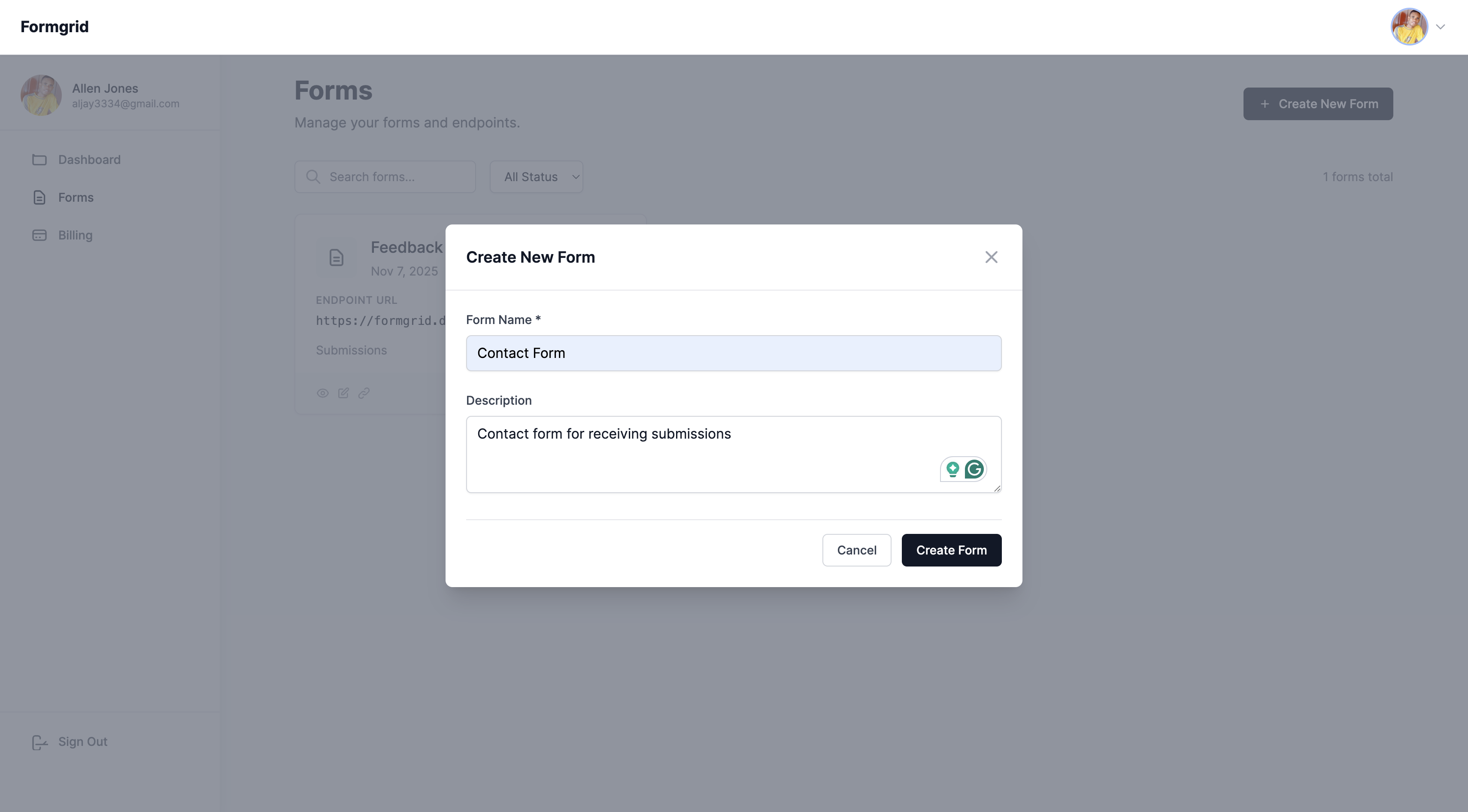
Give your form a name. Something descriptive works well: Contact Form, Quote Request, Landing Page Leads.
Click Create Form.
Do not have an account yet? Create one here.
Step 3: Copy Your Endpoint URL
After creating your form, you will be taken to the form's overview page. Click the Overview tab and copy your unique endpoint URL.
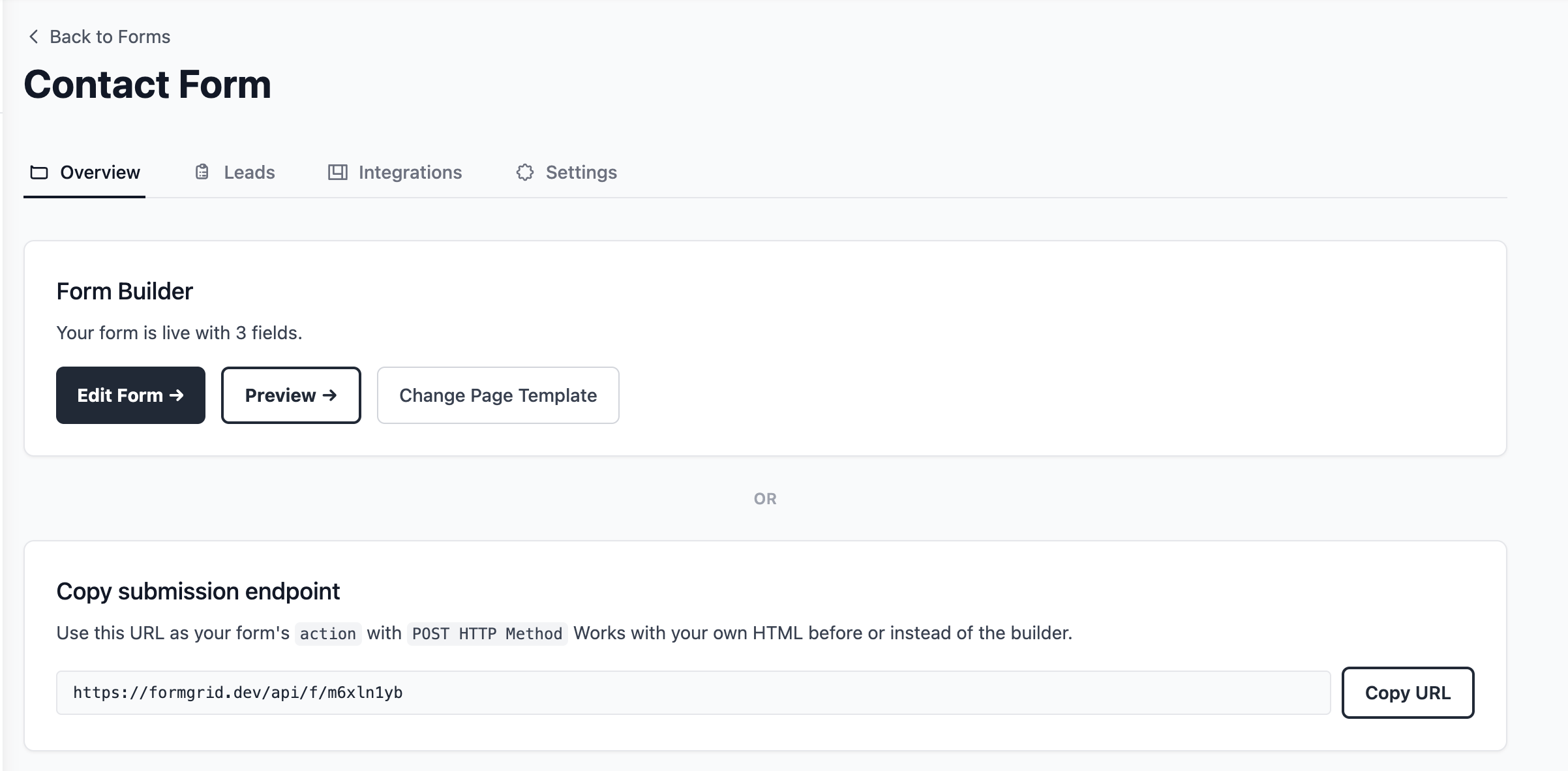
It will look something like this:
https://formgrid.dev/api/f/dcffghhnjjThis is the URL your HTML form will submit to. It is the same URL you would use in place of your existing Getform endpoint.
Step 4: Add the Form to Your HTML
If you already have a Getform form, this step is genuinely all that changes. Copy your endpoint, replace the action URL, and you are done, no rewrite of your frontend required.
Here is a complete, copy-paste-ready contact form. Replace YOUR_ENDPOINT_URL with the URL you just copied:
<form action="YOUR_ENDPOINT_URL" method="POST">

  <label for="name">Your Name</label>
  <input
    type="text"
    id="name"
    name="name"
    placeholder="John Doe"
    required
  />

  <label for="email">Email Address</label>
  <input
    type="email"
    id="email"
    name="email"
    placeholder="john@example.com"
    required
  />

  <label for="message">Your Message</label>
  <textarea
    id="message"
    name="message"
    rows="5"
    placeholder="How can I help you?"
    required
  ></textarea>

  <!-- Honeypot: keeps bots out, invisible to real users -->
  <input
    type="text"
    name="_honey"
    style="display:none"
  />

  <button type="submit">Send Message</button>

</form>
That is your entire form. No server, no PHP, no backend code.
Replace Getform now. No credit card required, and you will have this exact form live in under two minutes.
Step 5: Notifications Are Already Set Up, and Every Submission Becomes a Lead
You do not have to configure anything here. Formgrid automatically uses the email address you signed up with as your default notification email. The moment someone submits your form, the alert goes straight to your inbox.
If you would like submissions sent to a different address, for example a client's email or a team inbox, go to your form's Settings tab, find Email Notifications, and update it there.
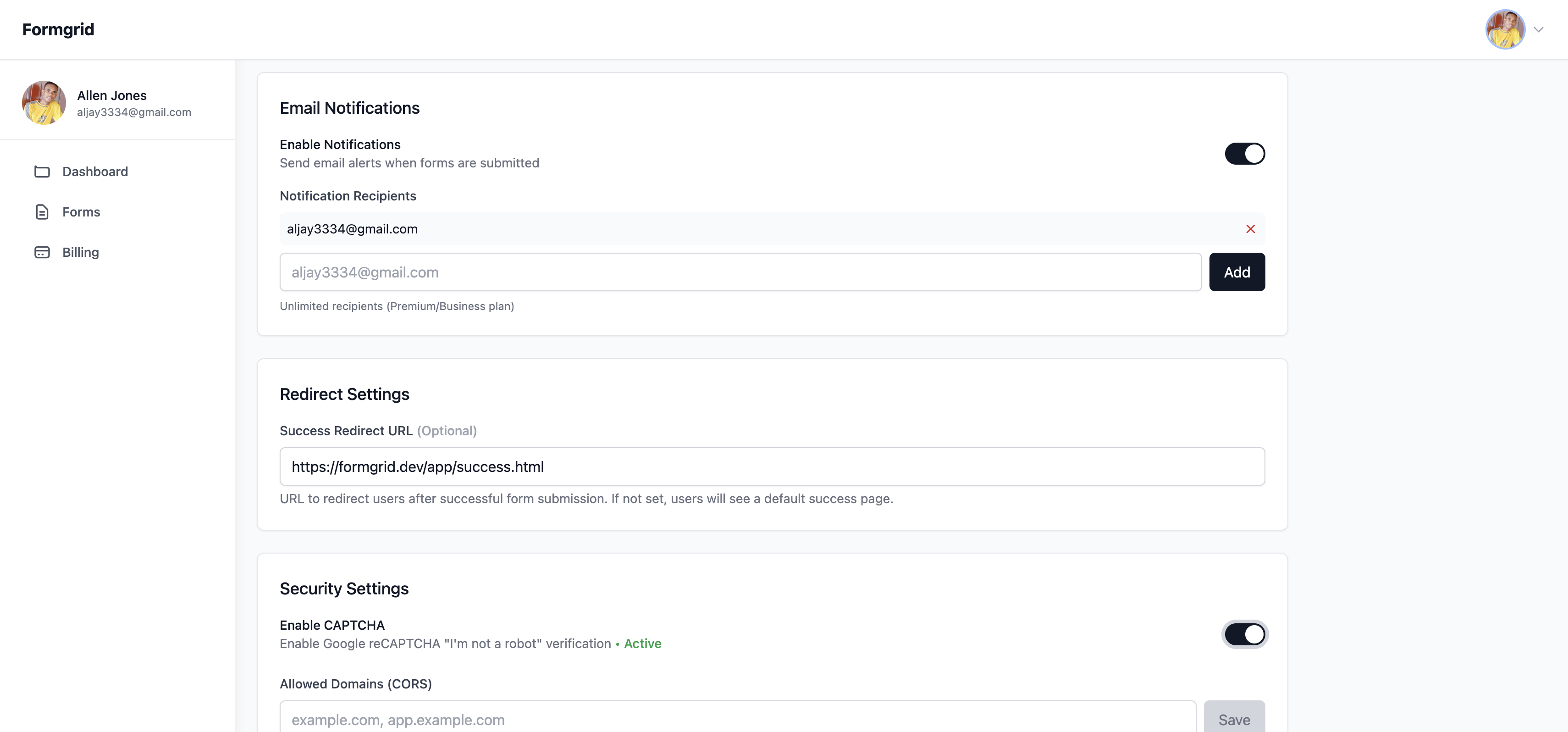
From this point on, every submission also lands in your dashboard as a lead you can move through New, Contacted, and Converted, not just a stored row you have to remember to act on.
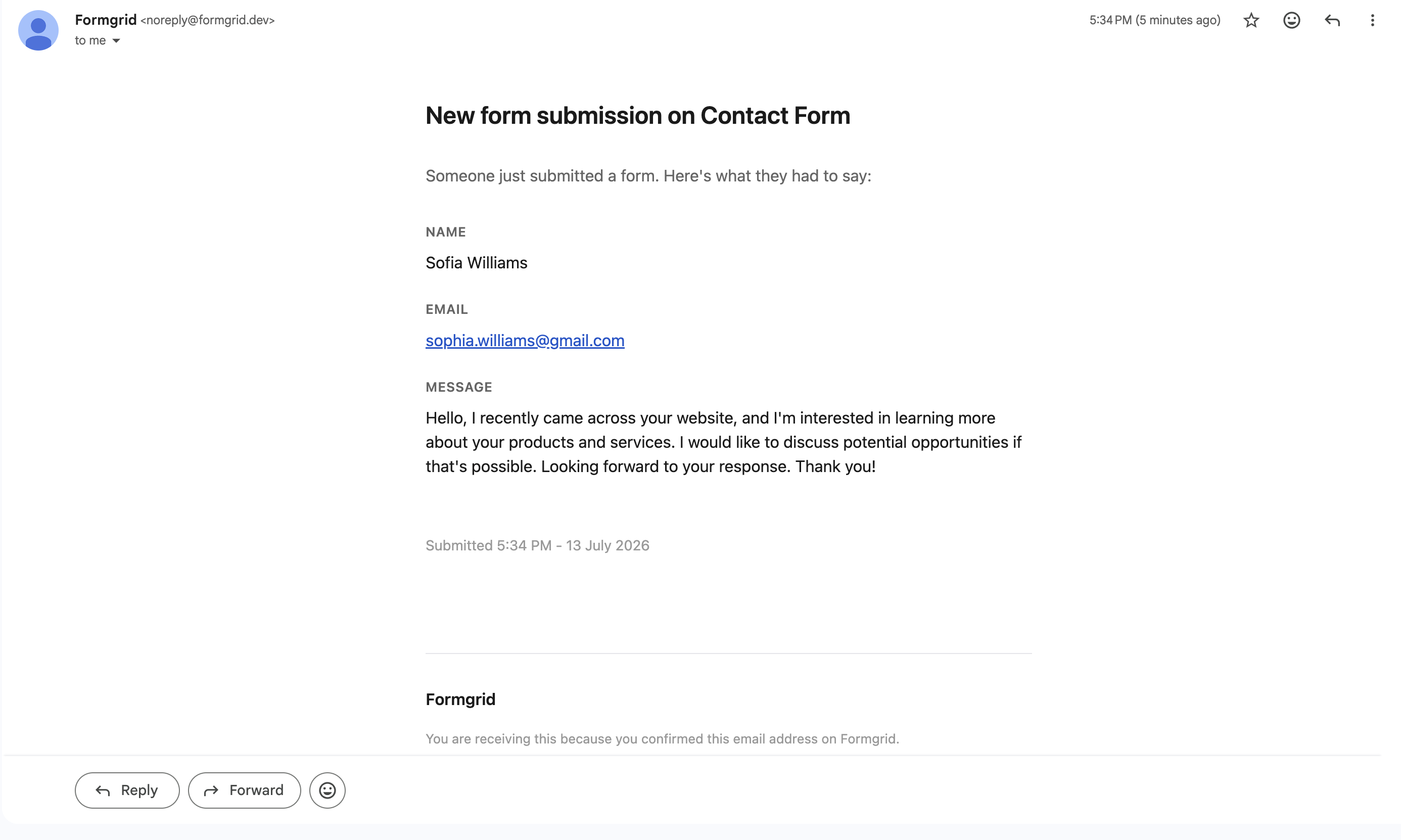
You will see the submitter's name, their email address, their message, and the timestamp, both in the email and in the dashboard. So even if a notification email slips into spam, nothing is lost.
Step 6: Test Your Form
Fill out your own form and submit it. Within seconds, you should see a confirmation email in your inbox and the submission logged in your Formgrid dashboard as a new lead.
If you do not receive the email, check your spam folder and make sure you saved the correct notification email in settings.
Optional: Using JavaScript for a Better UX
If you want to submit the form without a full page reload, here is a clean fetch-based approach:
const form = document.getElementById('contact-form');

form.addEventListener('submit', async (e) => {
  e.preventDefault();

  const formData = new FormData(form);

  try {
    const response = await fetch('YOUR_ENDPOINT_URL', {
      method: 'POST',
      body: formData,
    });

    if (response.ok) {
      form.innerHTML = '<p>Thanks! Your message was sent.</p>';
    } else {
      form.innerHTML = '<p>Something went wrong. Please try again.</p>';
    }
  } catch (error) {
    form.innerHTML = '<p>Network error. Please try again.</p>';
  }
});
Add id="contact-form" to your form element, and this script handles the rest. No page redirect, clean user experience.
Which One Should You Use?
Use Formgrid if you want a form backend and a form builder in one tool, you want to know what happened to a submission after it arrived, you care about open source and self-hosting, or you are paying too much for Getform and want to cut costs while getting more.
Use Getform if you are already set up on it, do not need a form builder or lead tracking, and the current price works for your volume.
Use Formspree if you want the most mature, well-documented form backend with the largest community, or you are following a tutorial that already uses it.
Use Basin if you want the most minimal option possible and just need basic form submission handling.
Use Netlify Forms if your site is already on Netlify, and you want zero additional setup.
Use Web3Forms if you need something completely free and volume is low.
The Honest Assessment of Getform
Getform is a solid, reliable product. The dashboard is clean, submissions arrive where you expect them, and file uploads work without fuss.
But at $19 a month once you are past the free tier, with no form builder, no lead tracking, and no self-hosting, it is no longer the obvious choice in 2026. There are better alternatives at lower prices that do more with the same submission.
Final Thoughts
If you are switching today, Formgrid is the only tool on this list that gives you a form backend for developers and a no-code form builder for non-technical users, at a lower starting price than Getform, with a lead pipeline, follow-up reminders, and full self-hosting support.
Create your first tracked form. No credit card required.
Full disclosure: I built Formgrid. I wrote this comparison as honestly as I could. If anything looks inaccurate, let me know in the comments.

Comments
Leave a comment