
A customer asks for a quote while you are finishing a job. You read the notification, decide to reply when you get back, and then answer a phone call. Two days later, the customer has heard nothing. The email was delivered. The next action was never recorded.
To stop losing website enquiries, keep a central record of each request, give it a clear status, record what happened after you replied, and set a follow-up date when more work is needed. Notifications help you notice a request. A repeatable process helps you finish it.
You can build that process with a shared list, a lightweight lead pipeline, or a dedicated CRM. The useful part is not the number of features. It is being able to answer three questions: who needs a response, what happened last, and what should happen next?
Why website enquiries get buried in email
An inbox is organized around messages and time. Your work is organized around customers and decisions. Those are different things.
A single enquiry may produce a form notification, an internal forward, a phone call and a reply from another address. Important details can end up in several places. A message marked read does not prove that anyone answered it. A reply does not prove that the customer received a quote or agreed to proceed.
Start by looking for these gaps in your current process:
- Requests go to a person who is away, rather than someone covering enquiries.
- Two people assume the other person will respond.
- A useful phone conversation leaves no written note.
- A customer is waiting for a quote, but the original email looks finished.
- Spam makes the notification inbox difficult to review.
More notification emails will not solve all of those problems. You need a record that survives the individual message.
Create one central record of enquiries
Choose one place to keep the original request and the information needed to respond. At a minimum, record the customer's contact details, what they asked for, when the request arrived, and its current status.
A spreadsheet can work when the volume is small and someone reliably maintains it. If your enquiries begin with a website form, a submission dashboard removes the need to copy every accepted request into another list by hand.
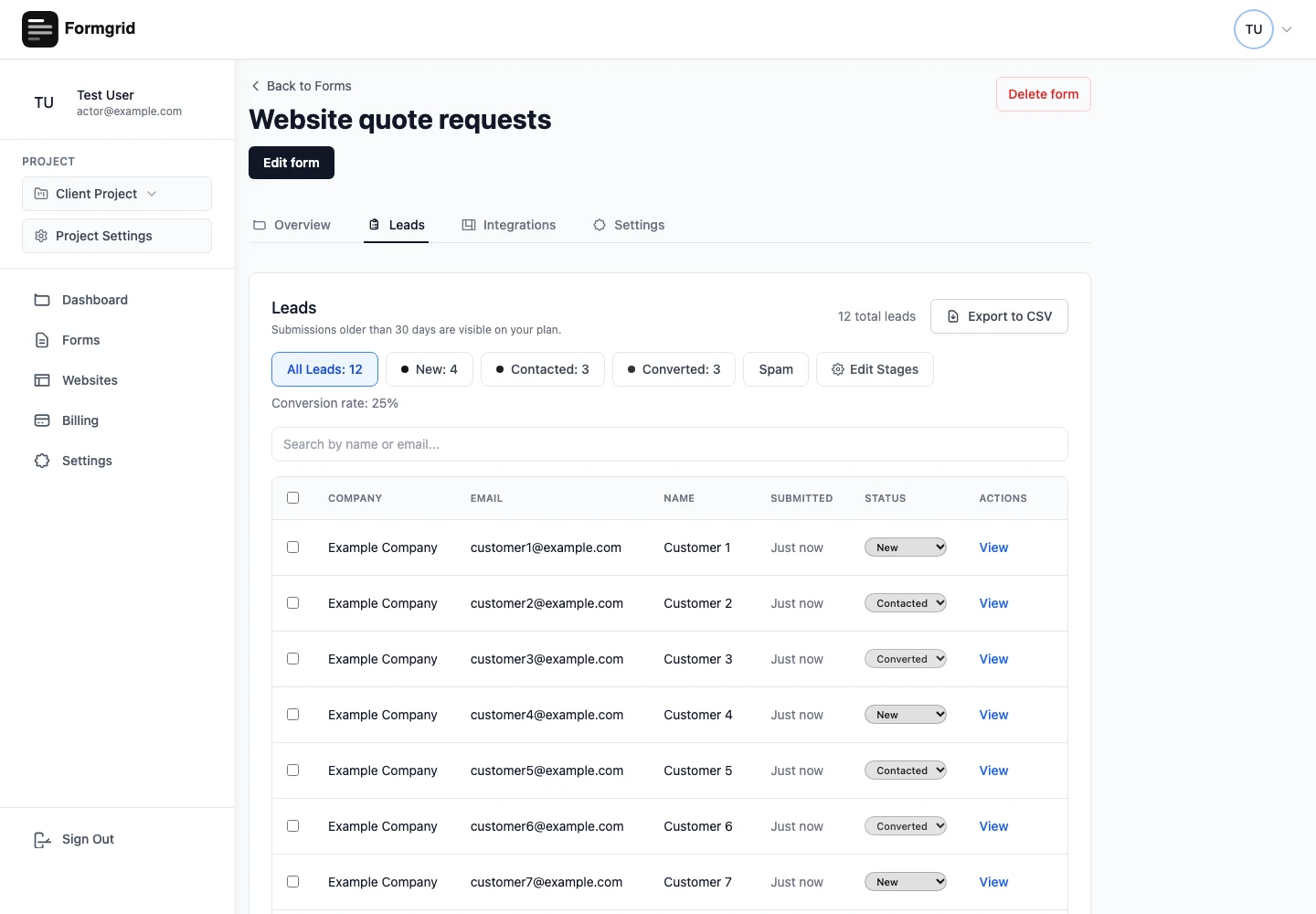
Formgrid stores accepted submissions against their form and makes them available in the Leads tab, subject to the account's plan and archive rules. Its website inquiry management workflow connects that saved request to a small lead pipeline.
Use lead statuses with clear meanings
Statuses are useful only when people understand them in the same way. Begin with a small set and describe the action that moves a request forward.
| Status | Working definition | Next question |
|---|---|---|
| New | The enquiry needs to be reviewed and answered | What does the customer need? |
| Contacted | Someone has reached out | Are we waiting on information or a decision? |
| Converted | The customer has agreed to proceed | What needs to happen during handover? |
These are Formgrid's default stages. They are not a claim that every submission is a qualified lead. Review spam and irrelevant requests separately. If your process needs different stages, check the paid plan's custom pipeline options.
Do not mark a request Converted because you sent an email. Use the stage to describe a real business outcome, such as an accepted quote or confirmed booking.
Add a note after contacting a customer
A useful note is short and specific. Write what another person, or your future self, would need before responding again.
“Called customer” says that an action happened, but not what the next person should do. “Customer needs a Saturday session; checking availability and replying Thursday” is much more useful.
For a roofing quote, you might record that an assessment is needed before pricing the work. For a restaurant event, note the guest count and the preferred date. Avoid storing unnecessary sensitive information. Keep the note focused on the enquiry and the next action.
Put a date on unfinished work
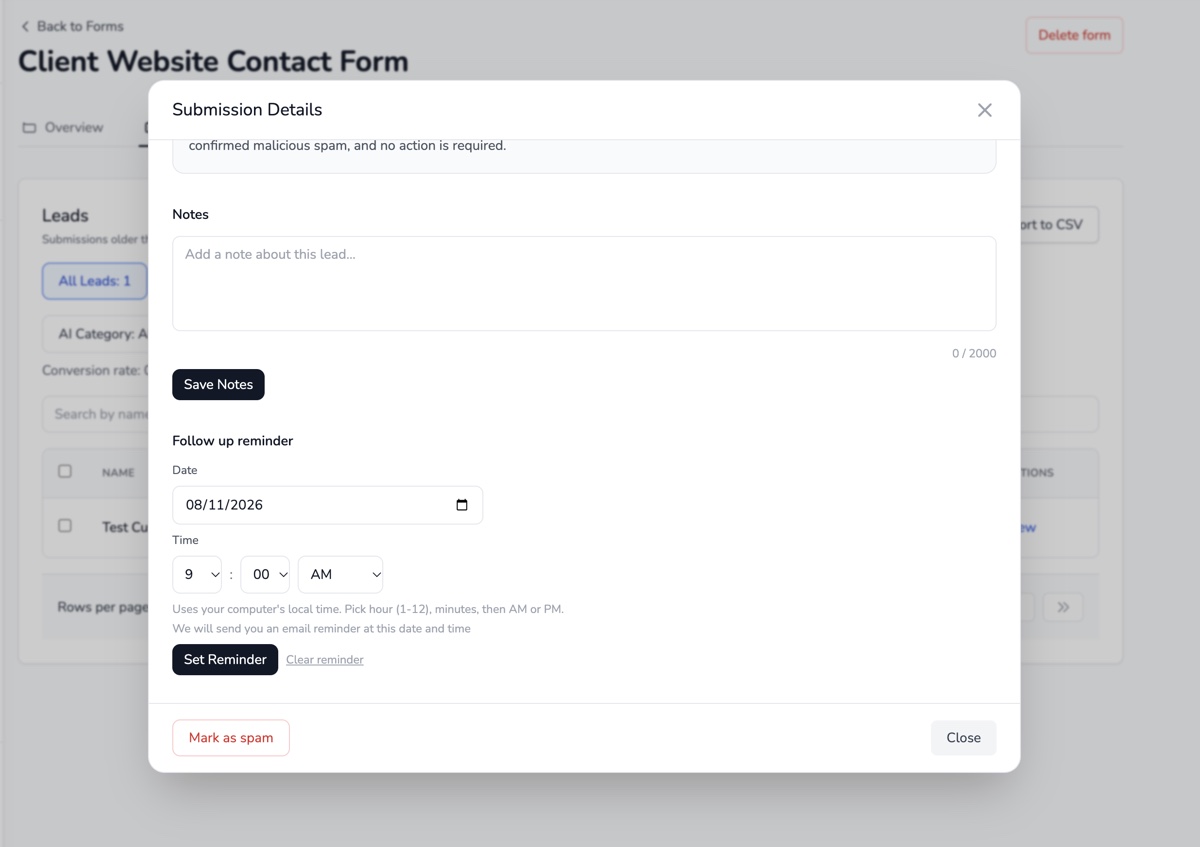
If the next step is “follow up later,” decide when later is. A date turns an intention into something you can review.
Set a follow-up after sending a quote, when waiting for measurements, or when a customer asks you to contact them after a particular day. Use the customer's context instead of following every person on the same schedule.
In Formgrid, lead details include notes and a follow-up reminder date. Email reminders depend on the configured email service and worker running successfully. Keep a regular lead review in your routine rather than treating an email reminder as a guarantee that the work is done.
Make sure the right person receives notifications
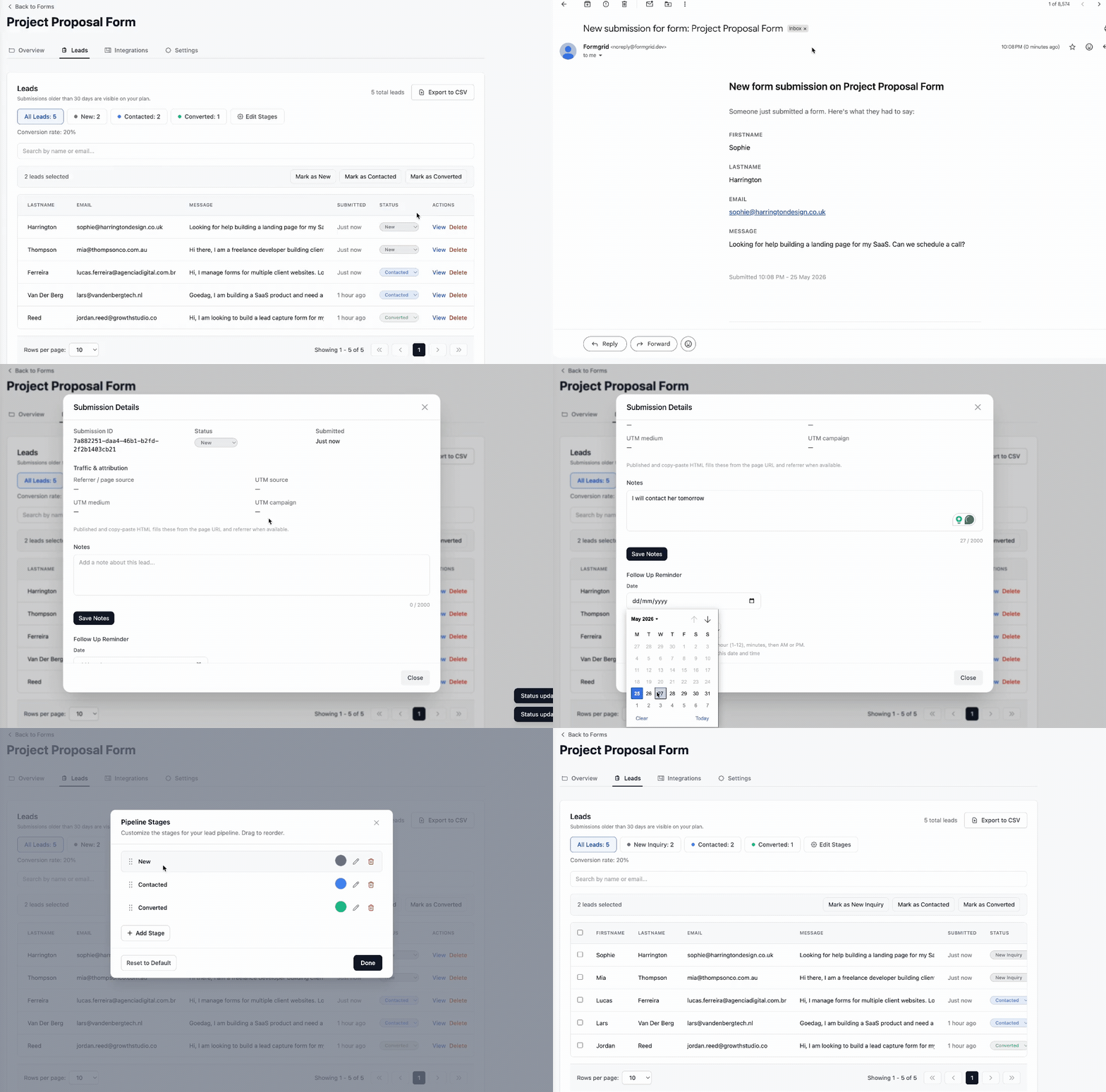
Check notification recipients before a form goes live and whenever responsibility changes. Send a real test submission and confirm both the saved record and the email's destination.
For an agency client, “the website form works” should mean more than “the developer received a test email.” The person responsible for enquiries should know where requests arrive, where records are stored, and what to do when they cannot find one.
Recipient allowances and custom notification features vary by plan. The current pricing page is a better reference than an old setup screenshot. This guide to form submission notifications explains how to make those messages easier to use.
Reduce spam without ignoring genuine enquiries
Spam controls help keep a useful queue manageable. Review the controls available for your form, including honeypot or CAPTCHA options and other plan-dependent protections. Test them on the actual website, not just the form preview.
Review the spam area periodically. A classification is a signal to inspect, not proof that every unusual message is malicious. Do not train your team to ignore all notifications because some are irrelevant.
Also check submission limits. If the account reaches its allowance, new requests may pause until capacity is available. A form's visible success or error behavior should be part of your testing and handover checklist.
An example process for a small service business
Consider an illustrative home-services business that receives quote requests from its website. This is a workflow example, not a customer case study.
- Review the request. Check the customer's details and what the job involves. Keep the record New until someone takes responsibility for the first response.
- Make contact. Ask for missing information or arrange an assessment. Update the record to Contacted and add a short note about the conversation.
- Record the next action. If you are waiting for photos or a decision on a quote, set a follow-up date. Tell the customer what you are waiting for too.
- Review the pending list. Return to the records that need attention. Do not rely only on today's email notifications.
- Close the loop. When the customer agrees to proceed, update the lead to Converted and hand over the agreed details to whoever delivers the work.
The contact form lead tracking page shows this journey from the form to its saved record.
When a lightweight pipeline is enough
A small pipeline is often useful when your main task is responding to contact forms, quote requests and booking enquiries. You need the request, a status, some notes and a next step. You do not necessarily need a complex sales operation to maintain those details.
Formgrid combines a visual form builder, hosted and embedded forms, submission endpoints and lightweight lead management. You can build a form with a lead pipeline or connect a form already on your website.
If you manage several websites, projects help organize forms by client. Business supports project invitations and permissions for supported actions. Review access deliberately; project organization should not be mistaken for a white-label client portal or an ownership-transfer feature.
When a dedicated CRM makes more sense
A form-centered pipeline is not the answer to every sales problem. Consider a dedicated CRM when you need complex account relationships, sales forecasts, territory management, multi-channel outreach or extensive sales automation.
Write down those requirements before choosing software. A system with more features can still leave enquiries unanswered if nobody owns the next step. Equally, a lightweight tool should not be stretched into a workflow it does not support.
Frequently asked questions
Should I stop using email for customer conversations?
No. Email can remain the right place for the conversation. Keep a central record of progress so the inbox is not the only place you know what happened.
Does submitting a contact form give marketing consent?
No. A relevant response to an enquiry and a promotional campaign are different purposes. Formgrid's follow-up and marketing eligibility rules are separate. Do not treat a form submission as an automatic newsletter subscription.
Can Formgrid work with my current website?
Yes. You can connect an existing HTML form to its submission endpoint, use an embed, or share a hosted form. Custom React or Next.js forms still need correct request handling and a useful success/error experience.
How often should I review pending enquiries?
Choose a regular interval that matches your enquiry volume and promised response times. The important part is having someone responsible for reviewing unfinished records, including when the usual person is unavailable.
Start with the next action
You do not need to redesign every process today. Pick one website form, check where its requests go, and decide how you will record the first response and the follow-up. Test the complete path before trusting it with a customer's enquiry.
If you want a form builder and a lightweight record of that work in the same place, start managing enquiries with Formgrid. For the available plans and limits, compare pricing.
Comments
Leave a comment